for some reasons it not showing at 3.6gb I don't know why..
Posted Sep 23, 2012 · 22:09 UTC#76
for some reasons it not showing at 3.6gb I don't know why..
Here is a screenshot of the update folder that's on my SD Card. The update folder is 99% of the data.

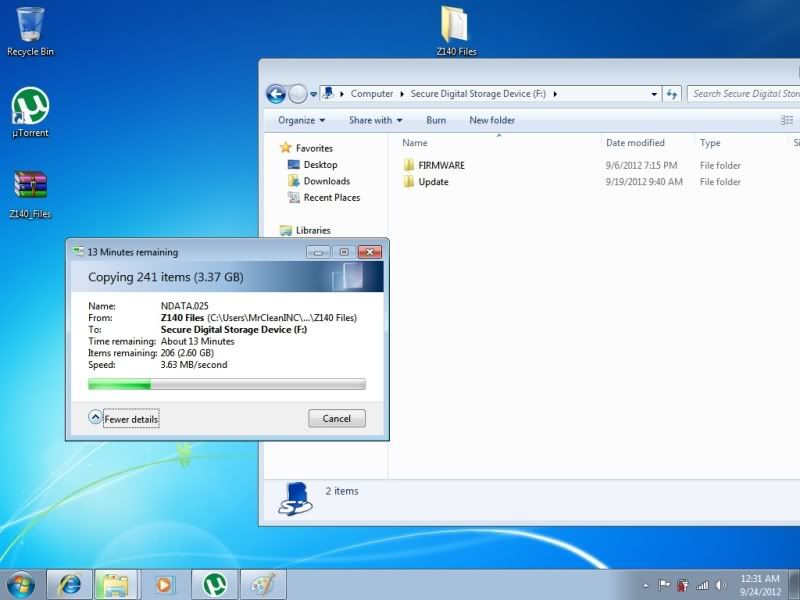
Can someone reupload the update folder tried in another computer still coming up 3.37 gb
dont worry about the size, just re-download sheka's file again if need be, extract to your computer, and then copy to your card.
Can someone reupload the update folder tried in another computer still coming up 3.37 gb
Relax. according to Win7, the folder containing the extracted files is 3.37 GB (3,623,850,837 bytes).
Then why on the update im getting incorrect sd card
OKay I tried this on the 130BT with firmware v3.001 and was unsuccessful. Here is what I did:
1) copied the Condi Hackmode 1.4 and the RenewallFLib.dll into root SD card
2) insert that SD card to unit and Testmode came on (first time ever did this..woot!)
3) Copied the RenewallFlib to USER/PROG1/APL and PROG0/APL (got from Post #12). Have to delete the old one there first.
4) Ejected the Testmode SD and put in the SD with new 1.4 Shekara update files (which already unzipped using WinRAR in Windows, and copied the CardInfo to root which also got from post #12.
5) put in this SD card...(in step #4)
...and...
Nothing..
Turn car key off, then on again...system do it's thing and everything came on as "normal"..which means no update prompt or anything...as if nothing is in SD slot, no update no nothing...
What am I doing wrong??????????????? Thanks for the help.
try using the original cardinfo file instead
Relax. according to Win7, the folder containing the extracted files is 3.37 GB (3,623,850,837 bytes).
Then why is everybody else saying its suppose to 3.6gb
okay copied the original cardinfo to root SD but still no cigar...
I think I have the exact same problem that coolin72 had yesterday. Going to give up for tonight... 
Im completly lost and have my radio stuck
ok so i have all 3 files on the root of a 32gb sd card. Power up my z130bt insert card, power off z130bt then power back on and i should be prompted to start update?
Coolin72, did you ever get yours to work? I have the exact same problem.
Im completly lost and have my radio stuck
Damn this scary. Your radio is not working at all now?
It wants the sd card to finish the update
It wants the sd card to finish the update
My extract in win7 says 3.37 gig (3,6xx,xxx bytes)
May be you should get another sd card and give it a try ?
Mine didn't even start. I stick the sd card in and nothing happens. May be that is a blessing in disguise.
Joe - did you try deleting StartKnd.log to kick the unit out of upgrade mode? If not, go back and read the thread. If so, please list a comprehensive, detailed set of steps that you have achieved similar to what randomwalk provided.
What do you have on your SD card right now? Can you provide a screenshot or listing?
im doing exactly what everbody has been telling me
- i did the testmode and deleted the files and replace them
- extract from zip file to desktop
- then put in sd card with the patches applied
- put it my radio at 98% it tells me that error
i believe it has to do with the cardinfo file
joe DO NOT apply any patches to or modify any of the files on the sd card. (Dont change anything on SD\UPDATE folder). If you are replacing files there, maybe it's why it is failing?
You only overwrite the RenewalIFLib.dll on the flash of the unit (\USER\PRG0\APL or \USER\PRG1\APL). This is because that lib is used by the current version of the software to decide to update or not. The software in the update folder is getting installed, and that version of RenewalIFLib.dll will only be used next time you do a major (i.e., 2013) update. Minor updates (from same major version, i.e., 4.01 -> 4.0x) dont require this.
as far as cardinfo.cif goes. If your unit recognizes an update when you put the card in, then you have the right cardinfo.cif on the sd card. If nothing happens, then you need to try a different cardinfo.cif.
Yes - don't modify ANYTHING from the downloaded source z140 files, you ONLY replace the RenewallFlib.dll on the UNIT. *NOT* the source files.
If windows 7 is showing a smaller amount of files than OSX I apologize for that confusion.
If the update accepts the password you put in, and it starts the update - you have successfully completed the patching step of the process. If it stops at 98% that means only one of three things:
- Your SD card is bad
- You are missing at least one file from the source
- You have modified at least one of the source files
Those are the only reasons the update will fail once it's started, it's asking for an SD card because it's expecting a file that isn't present for some reason, or a file has been modified.
joe DO NOT apply any patches to or modify any of the files on the sd card. (Dont change anything on SD\UPDATE folder). If you are replacing files there, maybe it's why it is failing?
You only overwrite the RenewalIFLib.dll on the flash of the unit (\USER\PRG0\APL or \USER\PRG1\APL). This is because that lib is used by the current version of the software to decide to update or not. The software in the update folder is getting installed, and that version of RenewalIFLib.dll will only be used next time you do a major (i.e., 2013) update. Minor updates (from same major version, i.e., 4.01 -> 4.0x) dont require this.
as far as cardinfo.cif goes. If your unit recognizes an update when you put the card in, then you have the right cardinfo.cif on the sd card. If nothing happens, then you need to try a different cardinfo.cif.
Yes - don't modify ANYTHING from the downloaded source z140 files, you ONLY replace the RenewallFlib.dll on the UNIT. *NOT* the source files.
If windows 7 is showing a smaller amount of files than OSX I apologize for that confusion.
If the update accepts the password you put in, and it starts the update - you have successfully completed the patching step of the process. If it stops at 98% that means only one of three things:
- Your SD card is bad
- You are missing at least one file from the source
- You have modified at least one of the source files
Those are the only reasons the update will fail once it's started, it's asking for an SD card because it's expecting a file that isn't present for some reason, or a file has been modified.
thank you for your help pionara it was a sucess i replaced the RenewalIFLib.dll to the original and it worked like a charm i want to thank you and everybody for you help i appreciate it and mattaleao dont worry about the confusion now we atleast kno all the possible issues that can happen so we can help anybody out thanks all again
Joe
Awesome that everything worked. You got me scared when you said you got stuck there.
Do you have the orig 130BT and upgrade to 140? What cardinfo file did you use? If you don't mine can you upload it here? Thanks.
I tried the orig cardinfo from shekana ..nothing happens. So I tried the cardinfo from post #12. Nothing. What now???
Btw there are only 2 cardinfo files right? One is from the orig 140 zip file and the other is from post #12?
Btw there are only 2 cardinfo files right? One is from the orig 140 zip file and the other is from post #12?
No idea, but I wonder if the only difference between the two CNSD-310FM upgrades (one for Z110/120 and another for Z130) is the cardinfo files??? I guess we'll have to wait until the files can be compared.
Now, I'm wondering when someone will put together a simpler hack that works like the previous ShortFuse hacks (you copy the two hacked files into a Pioneer patch release like 1.0001 or 2.0001, and/or 3.0001). Then installing the patch release updates RenewalIFLib.dll without having to go into testmode. So it would be less intimidating for nubies.
Come to think of it, the old ShortFuse hack files would probably work as-is on an un-modified Z110 and then CNSD-310FM should work just fine (with the correct Cardinfo.cif)