Search Archive

AVIC-MRZ99 Custom Firmware / Testmode

By crankz · Oct 09, 2014in Hacks/Mods💬 972 posts👁️ 566,761 views
Page 1 of 39
Posted Oct 09, 2014 · 19:40 UTC#1

Hi,


sorry for posting in the wrong Subforum, but I didn't find a M-Series Subforum.

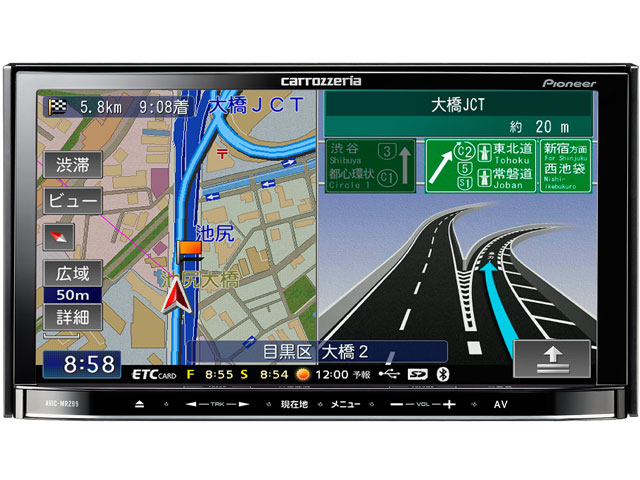
I bought a Pioneer Carrozzeria AVIC-MRZ99 on eBay.


K0000155196.jpg


It's a japanese Unit from an imported Car.

The Problem is, you can't change the language to english... you can't change it generally :/ 


Does anyone know if I can install another firmware to this device? 

Maybe this device was sold in EU or USA with another Name.


Hard to find some infos about it, all in japanese language :/


I tried several Testmode.key Files from this forum, but none of them worked for me.

Just get the Error Message: 


CAUTION!

TEST MODE FAILED STARTING!

[Turn off ACC]


Any Solutions to get it work?


Thanks & sorry for my bad english

Posted Jan 01, 2015 · 01:19 UTC#2

Hello everyone,


I'm also looking for a compatible testmode.key for this unit.


No one have any clue about it? 


Thanks.

Posted May 16, 2015 · 05:59 UTC#3

never

Posted Dec 30, 2015 · 19:26 UTC#4

for testmode press and hold navi button and then right left right left right left.

Posted Nov 02, 2016 · 23:45 UTC#5

I've translated the Japanese language strings for the MRZ99 to English. 

I figured out the format of the LNG file, dumped the Japanese, translated all the strings using google translate, then rebuilt the file.

Some of the English is not perfect but it makes the system much more usable. 


I've tested it with APP firmware version 3.070200 (installed with platform version 3.000600), other versions may not work.

If the old language file is 93627 bytes long then this will almost certainly work.


To install this, unzip the attachment mrz99english.zip and put the PF090JPJPN.LNG file on an sd card. (130905 bytes, md5sum is cb3f9cb76330704cc171e2b0acb9f6ad)

Get into testmode by holding the NAVI button (left button with Japanese writing on it) and pressing right..left..right..left..right..left and then release NAVI.


Go to the last entry on the first page (File Maintenance in Japanese) and press MENU (right button with Japanese writing on it) 

This opens the file manager which is in English and fairly obvious.


Make a backup of /USER as described elsewhere on avic411.com


Look in /USER to see if there is a file named  PRG.FLG

if there is, then the system uses /USER/PRG1, otherwise it uses /USER/PRG0


You can check the file versions by looking at  /USER/PRGx/PF090APL.HTM (where x is 0 or 1 depending on PRG.FLG)


go to  /USER/PRGx/APL/LANGDATA/


delete  PF090JPJPN.LNG

go to /SD, copy the new PF090JPJPN.LNG and paste it into LANGDATA where the old one was.


Switch off the power and when it restarts, it should be in English....


This worked for me but obviously is not 100% safe, be very careful in the file manager.


Update: There's now an installer that also changes the background and most of the important images with japanese text.


Find it here:


https://github.com/dzo/mrz99/releases

mrz99English_v2.zip
Edited Feb 16, 2017 by dzo
Posted Nov 12, 2016 · 16:54 UTC#6

I've translated the Japanese language strings for the MRZ99 to English. 

I figured out the format of the LNG file, dumped the Japanese, translated all the strings using google translate, then rebuilt the file.

Some of the English is not perfect but it makes the system much more usable. 


I've tested it with APP firmware version 3.070200 (installed with platform version 3.000600), other versions may not work.

If the old language file is 93627 bytes long then this will almost certainly work.


To install this, unzip the attachment attachicon.gifmrz99english.zip and put the PF090JPJPN.LNG file on an sd card. (130905 bytes, md5sum is cb3f9cb76330704cc171e2b0acb9f6ad)

Get into testmode by holding the NAVI button (left button with Japanese writing on it) and pressing right..left..right..left..right..left and then release NAVI.


Go to the last entry on the first page (File Maintenance in Japanese) and press MENU (right button with Japanese writing on it) 

This opens the file manager which is in English and fairly obvious.


Make a backup of /USER as described elsewhere on avic411.com


Look in /USER to see if there is a file named  PRG.FLG

if there is, then the system uses /USER/PRG1, otherwise it uses /USER/PRG0


You can check the file versions by looking at  /USER/PRGx/PF090APL.HTM (where x is 0 or 1 depending on PRG.FLG)


go to  /USER/PRGx/APL/LANGDATA/


delete  PF090JPJPN.LNG

go to /SD, copy the new PF090JPJPN.LNG and paste it into LANGDATA where the old one was.


Switch off the power and when it restarts, it should be in English....


This worked for me but obviously is not 100% safe, be very careful in the file manager.


Update: I've edited the translation to make a few of the strings fit the buttons better.. attachicon.gifmrz99English_v2.zip (130721 bytes, md5sum  7a4c582ce37f1fbca6caf0317e121ec5)

Thx bro, how do you translate these language file? use what software to open the .lng file?

Posted Nov 13, 2016 · 02:31 UTC#7

Thx bro, how do you translate these language file? use what software to open the .lng file?


I wrote a couple of simple C programs to decode and encode the .lng file. I can put them on github if you like.  


Also here's a testmode key for the mrz99


testmode_mrz99.zip


OK, I've put the code on github here:


https://github.com/dzo/mrz99

Edited Nov 13, 2016 by dzo
Posted Nov 17, 2016 · 10:32 UTC#8

Thank you

Edited Nov 18, 2016 by dantest232
Posted Nov 18, 2016 · 11:55 UTC#10

OK, Here's a video...


https://youtu.be/h4VJ5p26pgY

bless you dzo.


Your lead helped me change an AVIC MRZ09 to English.


Very impressive

Edited Nov 18, 2016 by dantest232
Posted Nov 19, 2016 · 09:38 UTC#11

Here's an english language file for the mrz09, I haven't tested it so let me know if it works.


The mrz09 is from 2011 and has a few extra strings.


mrz09.zip

Edited Nov 21, 2016 by dzo
Posted Nov 20, 2016 · 09:36 UTC#12

Thanks DZO.
I will test it and revert to you.

Posted Nov 20, 2016 · 13:45 UTC#13

Here's an english language file for the mrz09, I haven't tested it so let me know if it works.


The mrz09 is from 2011 and has a few extra strings.


attachicon.gifmrz09.zip

Works perfectly well.

Posted Nov 21, 2016 · 07:54 UTC#14

dear dzo,


Ive done every step up to copying your translated file. however, when i go to APL--> LANGDATA--> and attempt to paste the new file to where the old one was, the paste option never functions (as in, its not selectable). 


do you know anything i can do to fix this please? 

Posted Nov 21, 2016 · 07:56 UTC#15

I've translated the Japanese language strings for the MRZ99 to English. 

I figured out the format of the LNG file, dumped the Japanese, translated all the strings using google translate, then rebuilt the file.

Some of the English is not perfect but it makes the system much more usable. 


I've tested it with APP firmware version 3.070200 (installed with platform version 3.000600), other versions may not work.

If the old language file is 93627 bytes long then this will almost certainly work.


To install this, unzip the attachment attachicon.gifmrz99english.zip and put the PF090JPJPN.LNG file on an sd card. (130905 bytes, md5sum is cb3f9cb76330704cc171e2b0acb9f6ad)

Get into testmode by holding the NAVI button (left button with Japanese writing on it) and pressing right..left..right..left..right..left and then release NAVI.


Go to the last entry on the first page (File Maintenance in Japanese) and press MENU (right button with Japanese writing on it) 

This opens the file manager which is in English and fairly obvious.


Make a backup of /USER as described elsewhere on avic411.com


Look in /USER to see if there is a file named  PRG.FLG

if there is, then the system uses /USER/PRG1, otherwise it uses /USER/PRG0


You can check the file versions by looking at  /USER/PRGx/PF090APL.HTM (where x is 0 or 1 depending on PRG.FLG)


go to  /USER/PRGx/APL/LANGDATA/


delete  PF090JPJPN.LNG

go to /SD, copy the new PF090JPJPN.LNG and paste it into LANGDATA where the old one was.


Switch off the power and when it restarts, it should be in English....


This worked for me but obviously is not 100% safe, be very careful in the file manager.


Update: I've edited the translation to make a few of the strings fit the buttons better.. attachicon.gifmrz99English_v2.zip (130721 bytes, md5sum  7a4c582ce37f1fbca6caf0317e121ec5)


dear dzo,


Ive done every step up to copying your translated file. however, when i go to APL--> LANGDATA--> and attempt to paste the new file to where the old one was, the paste option never functions (as in, its not selectable). 


do you know anything i can do to fix this please? 

Posted Nov 21, 2016 · 09:26 UTC#16

dear dzo,


Ive done every step up to copying your translated file. however, when i go to APL--> LANGDATA--> and attempt to paste the new file to where the old one was, the paste option never functions (as in, its not selectable). 


do you know anything i can do to fix this please? 


The file manager isn't very intuitive, you need to navigate to the source file, highlight select and press menu so the file has a + beside it, then highlight copy and then press menu again, now navigate to the destination directory and move to any entry and then paste should be selectable. After you have pasted, be very careful because it highlights the next available operation which just happens to be "delete"!!


There's a youtube video showing how to use the file manager somewhere.


If you are still having problems, I can make a testmode script to do the copying.

Posted Nov 27, 2016 · 13:57 UTC#17

i need help in translating mrz07 from jap to english ,any guidance will be appreciated.


thanks :)

Posted Nov 27, 2016 · 14:00 UTC#18

I've translated the Japanese language strings for the MRZ99 to English. 

I figured out the format of the LNG file, dumped the Japanese, translated all the strings using google translate, then rebuilt the file.

Some of the English is not perfect but it makes the system much more usable. 


I've tested it with APP firmware version 3.070200 (installed with platform version 3.000600), other versions may not work.

If the old language file is 93627 bytes long then this will almost certainly work.


To install this, unzip the attachment attachicon.gifmrz99english.zip and put the PF090JPJPN.LNG file on an sd card. (130905 bytes, md5sum is cb3f9cb76330704cc171e2b0acb9f6ad)

Get into testmode by holding the NAVI button (left button with Japanese writing on it) and pressing right..left..right..left..right..left and then release NAVI.


Go to the last entry on the first page (File Maintenance in Japanese) and press MENU (right button with Japanese writing on it) 

This opens the file manager which is in English and fairly obvious.


Make a backup of /USER as described elsewhere on avic411.com


Look in /USER to see if there is a file named  PRG.FLG

if there is, then the system uses /USER/PRG1, otherwise it uses /USER/PRG0


You can check the file versions by looking at  /USER/PRGx/PF090APL.HTM (where x is 0 or 1 depending on PRG.FLG)


go to  /USER/PRGx/APL/LANGDATA/


delete  PF090JPJPN.LNG

go to /SD, copy the new PF090JPJPN.LNG and paste it into LANGDATA where the old one was.


Switch off the power and when it restarts, it should be in English....


This worked for me but obviously is not 100% safe, be very careful in the file manager.


Update: I've edited the translation to make a few of the strings fit the buttons better.. attachicon.gifmrz99English_v2.zip (130721 bytes, md5sum  7a4c582ce37f1fbca6caf0317e121ec5)


Please help me to change the language for mrz07 to english...

Posted Nov 27, 2016 · 21:10 UTC#19

The mrz07 is very similar to the mrz09 so try the file in the mrz09 zip I posted earlier. Make sure you do a backup first so you can restore the old file if it doesn't work.

Posted Dec 08, 2016 · 01:05 UTC#20

hi, will the english file work on the avic-mrz05?

Posted Dec 08, 2016 · 01:30 UTC#21

hi, will the english file work on the avic-mrz05?

It should do, you will probably need the file for mrz09 (in post #11). As long as you make a backup of the old file first  (it's called PF110JPJPN.LNG on the mrz09), replacing it is quite safe (because testmode runs before anything else). If you are worried, send me the existing file (or post it here) and I'll check if it's the same as mrz09.

Posted Dec 19, 2016 · 05:22 UTC#22

How to change date and time settings? Does anybody know?

Posted Dec 19, 2016 · 10:36 UTC#23

How to change date and time settings? Does anybody know?

This isn't easy, the date and time are obtained from the GPS and there's no obvious way to change the timezone.

It may be possible to set the time if you unplug the gps antenna but I haven't tried this.

One way to hack the timezone would be to change the dll that reads the time to add an offset.

Posted Dec 20, 2016 · 14:21 UTC#24

Sorry for the bad english,
on time pressed and held for more than two seconds bottom button at startup. I have mrz77 that works with file 99. Big thank you. as of this file when trying to adjust the date and time. media restarts

Posted Dec 20, 2016 · 14:31 UTC#25

Is there a chance mrz to work with software for F110BT

Page 1 of 39