Search Archive

AVIC-MRZ99 Custom Firmware / Testmode

By crankz · Oct 09, 2014in Hacks/Mods💬 972 posts👁️ 566,761 views
Page 39 of 39
Posted Apr 25, 2023 · 07:19 UTC#951
6 hours ago, crash_rider said:

Я приостановил эту деятельность, так как это бесполезно! 
Нет желающих поменять язык на своих устройствах.
Пусть и дальше путешествуют с японским языком!

Я приостановил эту деятельность так как это бесперспективно!  

Нет желания переделывать язык на своих аппаратах.
Пусть и дальше ездят с японским населением!

10000 тысяч за перевод ,тут вроде все бесплатно всем делятся у кого что получилось а ты хочешь разбогатеть ,цену хотя бы реальную просил.

Posted Apr 25, 2023 · 22:18 UTC#952

софт, для перевода, я выложил! 

Удачи! :)

Edited Jul 07, 2023 by crash_rider
Posted Apr 26, 2023 · 15:51 UTC#953
17 hours ago, crash_rider said:

Почитайте, что сделал я, и что тут сделали бесплатно!

Бесплатно заменить японские фразы на английском! И....Все! 

И уверен , что я сделал! 

Одни шрифты только месяц делали! ШРИФТЫ! только! 

Картинки еще месяц! 

Перевод месяца! Поиск точек POI на русском, клавиатура на русском!

Ну и во время всего этого , нужно было писать софт! который все это делает! 

НУ как вам такая работа? 

Вышло 4 месяца по 18ч работы в день! я должен бесплатно это отдать? 

Мне в магазине не дают бесплатно! и Вы, тоже думаю бесплатно - не работает! 

И сколько Вы, за 4 месяца зарабатываете? не 10 000р думаю! 

Еще радио сделал, и карту с двумя дорогами Владивостока!

Но делать дальше не буду! Все, работы хватает другой... 

Катайтесь с кривым переводом на английский и картой Японии! :))))))

Тем более софт, для перевода, я выложил! 

Вы можете взять его и так же перевести и раздавать бесплатно! 

ОЙ! Гляди, как я разбогател! Завидуешь? :- П

Удачи! :)

Да не завидую я тебе ,понимаю что ты не один час сидел над переводом и другой работой, ну за 10 у тебя в очередь не выстроятся, дорого легче тогда купить на андроиде и не заморачиваться .

Posted Apr 26, 2023 · 22:24 UTC#954

.

Edited May 11, 2023 by crash_rider
Posted Jun 03, 2023 · 11:21 UTC#955

Hi, need to change language on AVIC-MRZ03. Have hone through few pages but unable to find downloadable language files. Appreciate if anyone can assiat. Thanks

Posted Jul 06, 2023 · 22:12 UTC#956

Hi > check testmode.key for MRZ 009 


TESTMODE.zip

Edited Jul 07, 2023 by crash_rider
Posted Jul 06, 2023 · 22:16 UTC#957

2 mian

There are no ready-made files, you can assemble it yourself!

The necessary programs are laid out here, use the search!

Posted Jul 12, 2023 · 10:35 UTC#958

inTESTMODE.zipFolder 3 work! MRZ009 MRZ066!

Posted Aug 26, 2023 · 18:09 UTC#959
On 11/11/2019 at 6:15 AM, Shtirlitz said:

Hi,

OK, here is the step-by-step manual:

Step 1: Take out the FW, see here

Step 2: Get the file named "PS140PLT.PRG". For RZ09 it is in folder NAVIVUP\AVICRZ09\PLATFORM\

Cut out 0x200 bytes from the start of the file: its header. I used the SFK-tool:


sfk195x64.exe partcopy PS140PLT.PRG -allfrom 0x200 output.nb0 -yes

When you need to extract file output.nb0 by the dumpromx.exe tool (easy to find it on this forum):


mkdir DUMP
dumpromx.exe -d DUMP -v -5 output.nb0 >output.txt

As a result, you'll get a lot of FW files, and initDB.dat of course :)

Step 3: Patch initDB.dat file.

Use my sources, take translate.c and translation.txt, and see the code:


const long OFFSET = 0x18C8D0L;   // RZ09 1.04 0x18C8D0L; RZ77 2.07 = 0x1EA87CL
const long BLOCK_LEN = 0xAF00BL; // RZ09 1.04  0xAF00BL; RZ77 2.07 =  0xB5CDFL

These constants define the start and length-1 of the data block inside of the initDB.dat, correct it according to your header.

Address stores in the little-endian bytes sequence:
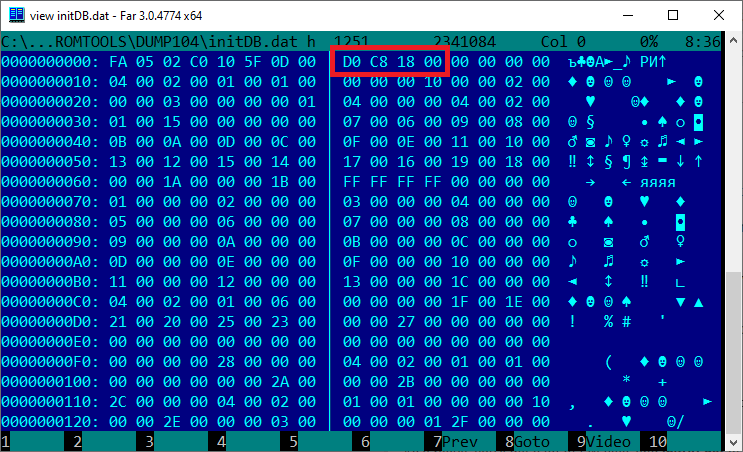
scr001.png?raw=true

Go to the start of this data block offset:
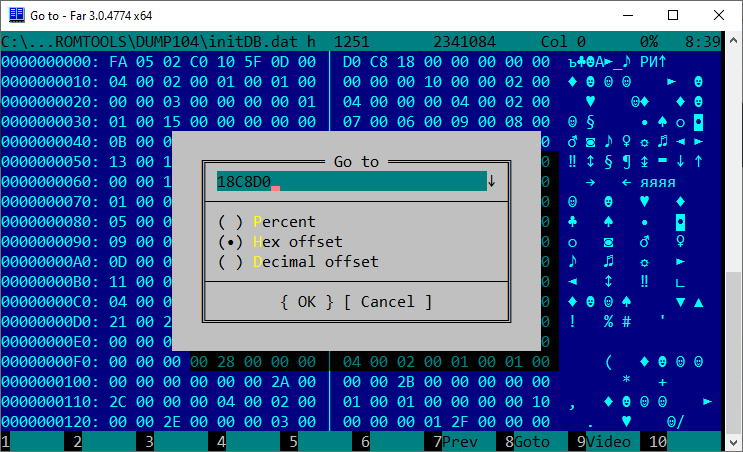
scr002.png?raw=true

scr003.png?raw=true

You can see the start of the Japanese strings data, its in UCS-2 LE codepage.

The end of the data block at the end of the initDB.dat file:
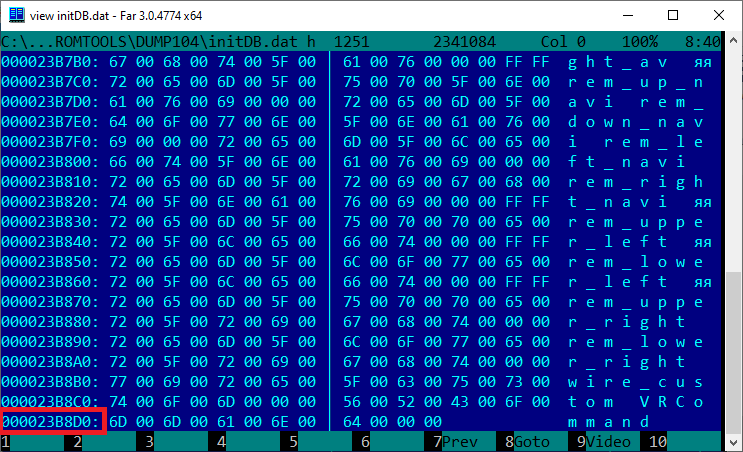
scr004.png?raw=true

The address of the last data byte is 0x23B8DB. Use the calc for calculating the length-1 and insert it to translate.c source, and compile it.

While running, the translate.exe search for initDB.dat and translation.txt in the current folder.

After finishing the output file initDB_out.dat will be created.

Step 4: Assemble the updated FW.

Get makever.c and compile it. You can change the version if you need it, the current FW version in the PS140PLT.VER file.
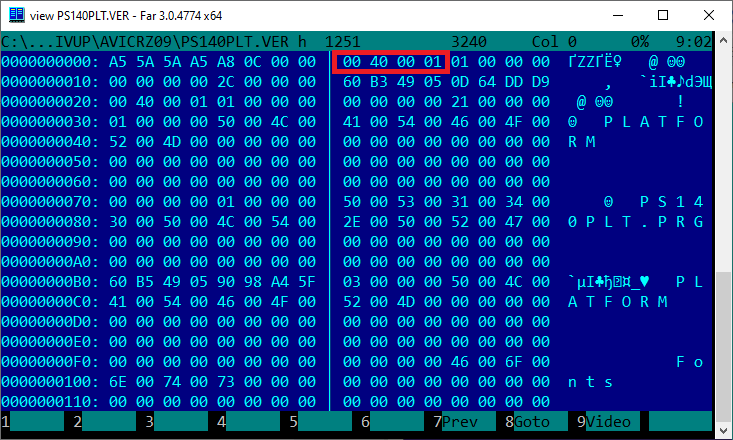
scr005.png?raw=true

Replace initDB.dat in the FW by commands:


copy /Y initDB_out.dat initDB.dat
dumpromx.exe -a initDB.dat fw_104_src.nb0

You need to get the correct output, like this:


img 00000000 : hdr=8d908c88 base=88471000  commandlineoffset=88471000
ERROR: could not find pointer for ofs 00000000
Successful file initDB.dat inserting
initDB.dat.nb saved successfully

If it OK, run the makever.exe by commands:


del /Q fw_104.nb0
ren initDB.dat.nb fw_104.nb0
makever.exe
mkdir NAVIVUP\AVICRZ09\PLATFORM
copy /Y PS140PLT.PRG NAVIVUP\AVICRZ09\PLATFORM\PS140PLT.PRG
copy /Y PS140PLT.VER NAVIVUP\AVICRZ09\PS140PLT.VER

It creates the folders (NAVIVUP) and files for the AVIC's FW update.

Step 5: Just place folder NAVIVUP on the SD and try to update your AVIC in a test mode.

Use "Program forced write" menu and "Platform write" command, SD as a source.

On Internal SD stayed the original Japanese FW if you want back to it.

And be careful, do not power off the AVIC during updating, it can be bricked (or boot looped)!!!

Good luck)
Hello,

I have an AVIC RZ-06 and have been searching everywhere for translation from japanese to english before i found this forum. I tried to follow this tutorial and i'm stuck at Step 3. Have extracted the iniDB.dat file, but i can't edit it in Notepad++ (even tried Far manager) or anything else because it doesn't open properly. Can someone please help me with this?

Edited Aug 26, 2023 by mrnslmx
Posted Sep 20, 2023 · 06:51 UTC#960

is there a maps for mrz-009?

maps of europe

Posted Oct 09, 2023 · 04:17 UTC#961

I have a Pioneer Carrozzeria AVIC-MRZ02 car deck. The car was bought from Japan. The language isnt the issue. The deck developed a problem whereby it would boot, the Pioneer branding image would appear then it immediately went to an error page saying Program Failed to Start. I downloaded PRG0 and PRG1 files hoping that replacing the two folders would fix it. However, after pasting those two folders, a new error message appears saying There is no program. How do I fix? Does anyone have all the system/program files that I can just replace all and make it work like new again? 

Posted Nov 05, 2023 · 10:54 UTC#962

 Здравствуйте, подскажите магнитола mrz-07, ошибка 7 , не загружается, что делать и где взять прошивку

Posted Jan 09, 2024 · 19:18 UTC#964
On 10/19/2020 at 6:48 PM, tMrz said:

Hey guys, I bought a Honda Fit and it came with Avic RZ33. I want to switch the clock. It seems, the clock is set for Japan time zone and I wanna change it to European zones. Is there anyway to do it? My radio is in Japanese language so, any pictures are welcome here :) 

Thanks in advance.

Has anyone figured out how to set the time to US/Canada rather than Japan on the AVIC MRZ series?

Posted Jan 30, 2024 · 00:02 UTC#965

2 SunTzu

this is not possible for the average user. You can patch the library for the right time.

Posted Apr 10, 2024 · 23:06 UTC#966
On 6/21/2021 at 1:28 AM, Solvalou said:

First off I want to go and say @dzo is an absolute legend! My MRZ-09 is (mostly) in English, so thank you so very much!

After reading through this lengthy thread, I guess I'm lucky that I have a working unit but there's still a couple of things that are annoying me and translating the original Japanese manuals for my model are proving not to be too helpful.


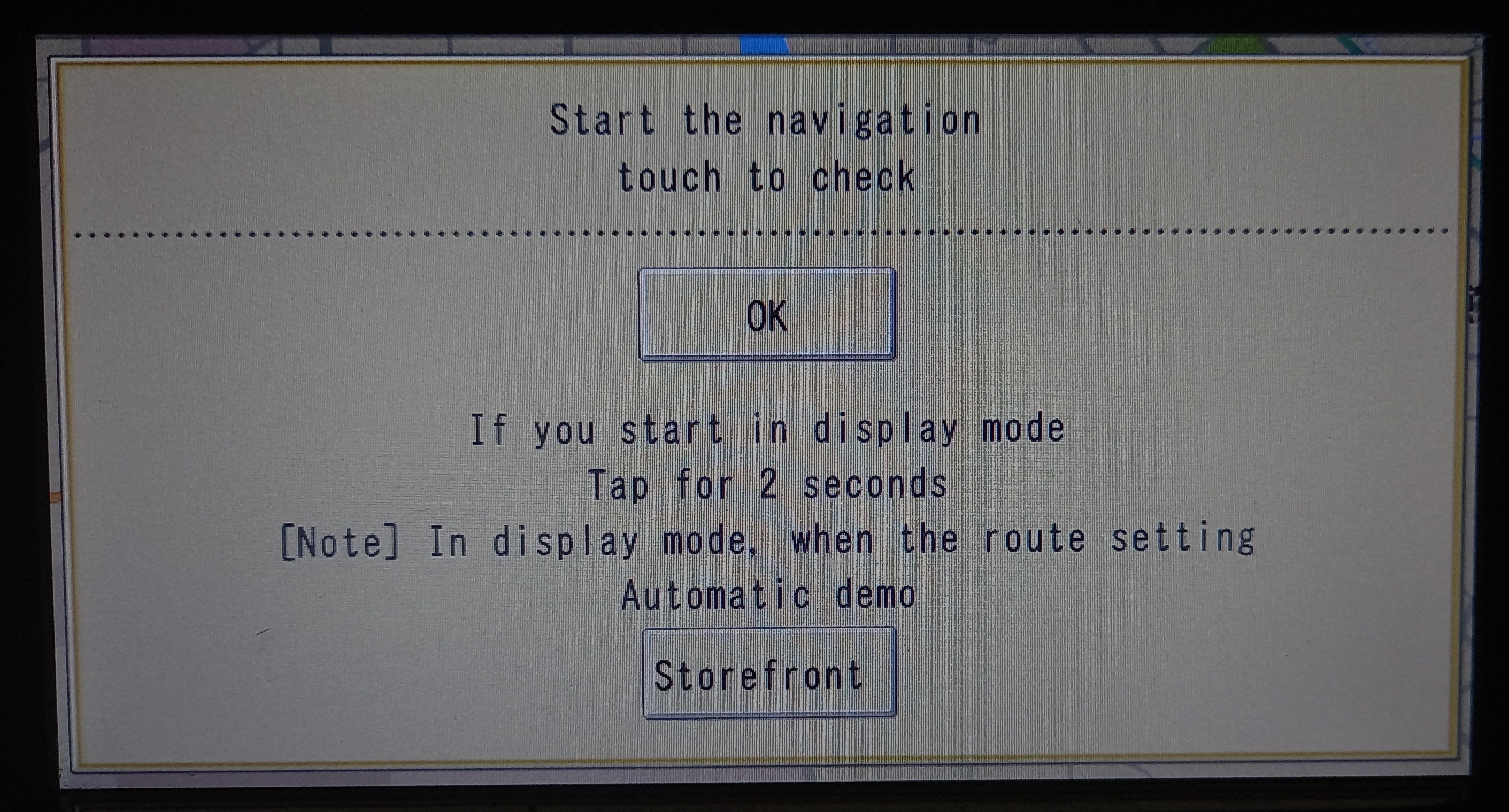
Firstly since resetting all the settings I've started getting this splash screen when powering on (and yes I can just "OK" it but it's annoying to keep having to do this every time).

Second issue of mine is the lack of being able to set the time, something many others have had issues with by the looks of it. It seems to be linked with the GPS from reading past posts. I see there's a video on a workaround for a different Carrozzeria unit, but is there anything for the MRZ-09? 

Thirdly is there away to change the splash screen on the MRZ-09? If so could anyone point me to the right discussion, tutorial or explain how it's done? I'm happy to make my own images, I'm well up enough on Photoshop to do it, I'd just need to know the image size and format. I'd like to make splash screens for others here too, upon request.

Forth and final thing that I'm fairly sure isn't possible reading the thread, but has anyone had any success in changing the maps what so ever on any JDM Carrozzeria device? If not, has anyone found a way to make it so the MRZ-09 defaults to the AV mode, or some way of disabling the Sat Nav altogether?

Please see my attached pictures. Any support would be greatly appreciated!

20210620_221725_1.jpg

20210620_221808.jpg

Just wondering how have you got your usb hooked up. I bought an ipod input cable ipod/usb and there's a male and female usb halfway down one cord and it doesn't pick up my phone or anything else plugged in. And the ipod only works when the usb male and female are connected. Seems odd

Posted Apr 10, 2024 · 23:25 UTC#967
On 12/30/2016 at 4:59 AM, dzo said:

Here's a zip file that should automatically update mrz99, mrz77, mrz09 and mrz07 (and perhaps others).


https://github.com/dzo/mrz99/blob/master/updatemrz99.zip?raw=true


Extract the zip to a usb drive and switch on the AVIC with it plugged in to install.


If you want to use a SD card, edit the script and replace USB\ with SD\ in the copy commands


It also replaces the images so there is almost no Japanese text left. 


My mrz99 has a photo of my family as the background but I'm sure you don't want that in your car so I've replaced it with this:


https://github.com/dzo/mrz99/blob/master/updated/b1853.bmp


Make sure you do a backup before running the script just in case.


Do you have any other background images available please? 

Posted Apr 14, 2024 · 07:51 UTC#968

Hi, i have MRZ90 on my car but i cannot copy the files from or to my user folder or sd card. anyway to fix it?

Edited Apr 14, 2024 by Prabhjot Singh
Posted Jun 05, 2024 · 20:02 UTC#969

Всем привет! При копировании NAVIVUP Каким-то образом была удалена папка USER от avic-rz800, если у кого-нибудь есть исходник данной папки (rz09), будьте добры выложите архив! Заранее спасибо!

Edited Jun 05, 2024 by Keman70 — Reason: уточнение
Posted Dec 14, 2024 · 05:30 UTC#970
On 24.07.2019 at 05:14, yoppi2010 said:

Спасибо вам за поддержку.
Не все идеально, но некоторые загрузочные изображения можно изменить.
Я написал способ применения загрузочного изображения с помощью Mr. dzo.

[Как изменить изображение при запуске Raku Navi]
1. В тестовом режиме на панели навигации выберите «Начать запись данных (強制書換プログラム)» в разделе «Запись данных при запуске (起動データ書き込み)» и проверьте символы *** в ***.OPN (пример: NA090.OPN)
2. Отредактируйте изображение, которое вы хотите отобразить, с помощью GIMP и т. д.Сделайте зеркальное отражение и переверните изображение. Сохраните его в формате bmp размером 800x480.
3. Отобразите bmp-изображение, сохраненное ранее с помощью двоичного редактора, скопируйте строку символов с [00 00 00 00 00 00] (00008A) до конца и
00000000 a5 5a 5a a5 00 b8 0b 00 bc ea cd 15 00 00 00 01 | .ZZ.............|
00000010 01 00 00 00 00 00 00 00 4e 41 30 39 30 4f 50 4e |........NA090OPN|
00000020 ff ff ff ff ff ff ff ff ff ff ff ff ff ff ff ff ff |................|

000001F0 ff ff ff ff ff ff ff ff ff ff ff ff ff ff ff ff ff ff ff ff |................|
После этого вставьте двоичные данные из 00000008A, скопированные ранее, и сохраните их с номером .dat, указанным в 1. (Пример: NA090OPN.DAT)
※ В этот момент убедитесь, что размер файла составляет 768 512 байт.
4. Скачайте [makever.c] с https://github.com/dzo/mrz99. Откройте makever.c в текстовом редакторе (NA090) и замените три указанных числа на те, которые вы подтвердили в 1.
5. Скомпилируйте [gcc makever.c -o makever] с помощью компилятора C (Msys2 или Ubuntu для Windows), установленного вместе с gcc, и создайте makever.exe.
6. Поместите созданный файл .dat в ту же папку, что и makever.exe, и выполните [./makever NA090OPN.DAT NA090BOT.VER] из компилятора C.
7. Создайте папку с названием [AVIC ****] в корневой папке SD.
Поместите её в папку, в которой вы создали .VER (например, NA090OPN.VER), полученный в шаге 6.
(* Указывает название модели Navi. Если вы не знаете, то написано, что вы смотрите на файл .HTM Navi. Пример: AVICMRZ90, AVICMRZ0047 и т. д.)
8. Создайте папку с названием OPN *** в папке, созданной в 7. (Пример: OPN090) Поместите в неё DAT, созданный в 3 (пример: NA090OPN. DAT)
SD
-AVICMRZ090
-NA090OPN.VER
-OPN090
-NA090OPN.DAT
9. Вставьте SD-карту в навигатор и откройте тестовый режим
10. Откройте [Принудительную запись программы (プログラム強制書換)] → [Запись данных при открытии изображения (起動データ書き込み)] в тестовом режиме и убедитесь, что версия отображается на SD-карте, и выполните


Однако я буду отображать пользовательское изображение в течение 5 секунд после запуска таким образом. Остальные 5 секунд будет отображаться изображение до изменения. После этого пользовательское изображение будет отображаться только одну секунду.
Я доволен этим, потому что мне нравится [пользовательские изображения 5 секунд + оригинальные изображения 5 секунд].
Большое вам спасибо.

https://mega.nz/#!wz4wQACR!dy3ddJLRu-uvmKYuAD7pXopShD2U6n8wR7aOTDkNjZ0

DSC04677.JPG

DSC04678.JPG

Не могу создать ver фаил.не моглиб вы сделать к токомуже магнитофону с одним изображением ,,pioneer,,

Posted Dec 24, 2024 · 06:59 UTC#971

Hello I have a pioneer C9P6 which uses the same menu as the MZR series but ive tried using this solution with this model the language still defaults to japanese, i was wondering if there is a way to translate the C9P6 model to english
Thank you

Posted Jan 02, 2025 · 16:27 UTC#972

Does anyone now how to remove this any time i start car. Its so annoying

IMG_1241.jpeg

Edited Jan 02, 2025 by Ismirb00 — Reason: Photo add
Page 39 of 39