Search Archive

AVIC-MRZ99 Custom Firmware / Testmode

By crankz · Oct 09, 2014in Hacks/Mods💬 972 posts👁️ 566,761 views
Page 32 of 39
Posted Nov 02, 2019 · 16:48 UTC#776

Hi friends, I'm new to this forum and happy to join the discussion.

I have a Avic mrz06 which I'm trying to change the language to english. I'm living in the caribbean so a map for my region would be super great.

I've done lots of reading and are able to get into the test mode of the unit ok.

thank in advance.

After a week of trying I finally got my avic mrz06  menus to English. I was missing one obvious step.

Thank you all for the awesome work you guys put into this project.

Edited Nov 08, 2019 by daltjohns
Posted Nov 05, 2019 · 06:44 UTC#777

I have AVIC-MRZ77 from an imported car from Japan. When I first turned it on it was showing all the options like DVD/USB/SD etc. But after few runs now I can see only FM/AM/TV/BT options.. It is not showing DVD/USB/SD options. I checked all the system settings by google translating but unfortunately I could not find setting related to this. Also in TestMode it also does not show SD or USB contents. So I also cannot change language by copying files.  Any one knows how to solve this issue when SD and USB are not working? 

Posted Nov 05, 2019 · 12:01 UTC#779
4 hours ago, Mwassaru said:

But how come the settings for sound are still in Japanese?

IMG_20191015_085221.jpg

Hi @Mwassaru,

This set of setting (DSP & sound settings) I have translated already, but some interfaces (Navi for example) is still in Japanese.

The screenshots are not up to date on GitHub, see translation.txt commits for last updates.

Alex

Posted Nov 07, 2019 · 00:50 UTC#780
On 2/10/2018 at 4:07 PM, Gnom_77 said:

Hey.

 I bought a car and there the radio in Japanese Pioneer carrozzeria AVIC-RZ05 read your correspondence with people, tried to repeat but failed I can not copy files there is no such function and did not find USER and PF090JPJPN.LNG

Found similar:

9. File Maintenance / NAND / NX293 / PRG0, PRG1 / APL / Resource / LANGDATA /

Help please translate into English

1. File Maintenance.jpg

2. NAND.jpg

3. NX293.jpg

4. PRG0, PRG1.jpg

5.  APL.jpg

6.  Resource.jpg

7. LANGDATA.jpg

8.jpg

Hey, I have the same model - RZ-05 with the same file structure. I cannot see a USER folder as all the examples are suggesting. When using the SD card and starting up I get CAUTION! TEST MODE FAILED STARTING!  [Turn off ACC].

Not sure if I am doing something wrong any suggestions.

Thanks

Posted Nov 07, 2019 · 01:42 UTC#781
On 11/5/2019 at 1:44 AM, kjaved8 said:

I have AVIC-MRZ77 from an imported car from Japan. When I first turned it on it was showing all the options like DVD/USB/SD etc. But after few runs now I can see only FM/AM/TV/BT options.. It is not showing DVD/USB/SD options. I checked all the system settings by google translating but unfortunately I could not find setting related to this. Also in TestMode it also does not show SD or USB contents. So I also cannot change language by copying files.  Any one knows how to solve this issue when SD and USB are not working? 

you need to insert a sd card or a thumb drive before it shows up. I have a avic mrz06 

Posted Nov 07, 2019 · 06:02 UTC#782
5 hours ago, Spaznuski said:

Hey, I have the same model - RZ-05 with the same file structure. I cannot see a USER folder as all the examples are suggesting. When using the SD card and starting up I get CAUTION! TEST MODE FAILED STARTING!  [Turn off ACC].

Not sure if I am doing something wrong any suggestions.

Thanks

Hi!

For RZ05 translation you need to take out the FW, and use my GitHub project to prepare modified FW: https://github.com/Shtirlitz/RZ09

Good luck)

Posted Nov 08, 2019 · 00:09 UTC#783
18 hours ago, Shtirlitz said:

Hi!

For RZ05 translation you need to take out the FW, and use my GitHub project to prepare modified FW: https://github.com/Shtirlitz/RZ09

Good luck)

Thank you for the reply, I managed to "take out the FW" not seeing a initDB.dat file though. I will go through the RZ05 again to see if I missed anything. But the reply has given me some hope so now I go searching for the initDB.dat to run your script on.

Regards

Posted Nov 10, 2019 · 22:37 UTC#784
On 07.11.2019 at 19:02, Shtirlitz said:

Здравствуй!

Добрый день земляк! С языками не силен... по этому буду благодарен за науку на русском.

имею avic-hrz099 чистокровный японец. хотел бы так же облагородить меню на английском языке.

могу попросить ссылки на порядок действий и ПО по обновлению языка?

заранее благодарен!

Posted Nov 11, 2019 · 06:15 UTC#785
On 08.11.2019 at 3:09 AM, Spaznuski said:

Thank you for the reply, I managed to "take out the FW" not seeing a initDB.dat file though. I will go through the RZ05 again to see if I missed anything. But the reply has given me some hope so now I go searching for the initDB.dat to run your script on.

Regards

Hi,

OK, here is the step-by-step manual:

Step 1: Take out the FW, see here

Step 2: Get the file named "PS140PLT.PRG". For RZ09 it is in folder NAVIVUP\AVICRZ09\PLATFORM\

Cut out 0x200 bytes from the start of the file: its header. I used the SFK-tool:

sfk195x64.exe partcopy PS140PLT.PRG -allfrom 0x200 output.nb0 -yes

When you need to extract file output.nb0 by the dumpromx.exe tool (easy to find it on this forum):

mkdir DUMP
dumpromx.exe -d DUMP -v -5 output.nb0 >output.txt

As a result, you'll get a lot of FW files, and initDB.dat of course :)

Step 3: Patch initDB.dat file.

Use my sources, take translate.c and translation.txt, and see the code:

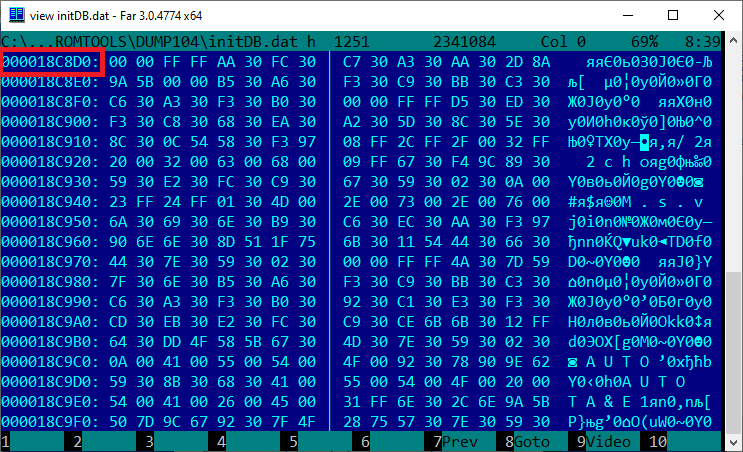
const long OFFSET = 0x18C8D0L;   // RZ09 1.04 0x18C8D0L; RZ77 2.07 = 0x1EA87CL
const long BLOCK_LEN = 0xAF00BL; // RZ09 1.04  0xAF00BL; RZ77 2.07 =  0xB5CDFL

These constants define the start and length-1 of the data block inside of the initDB.dat, correct it according to your header.

Address stores in the little-endian bytes sequence:
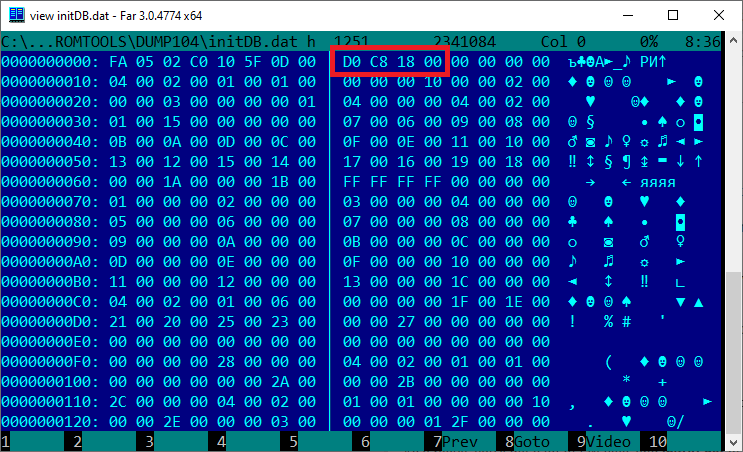
scr001.png?raw=true

Go to the start of this data block offset:
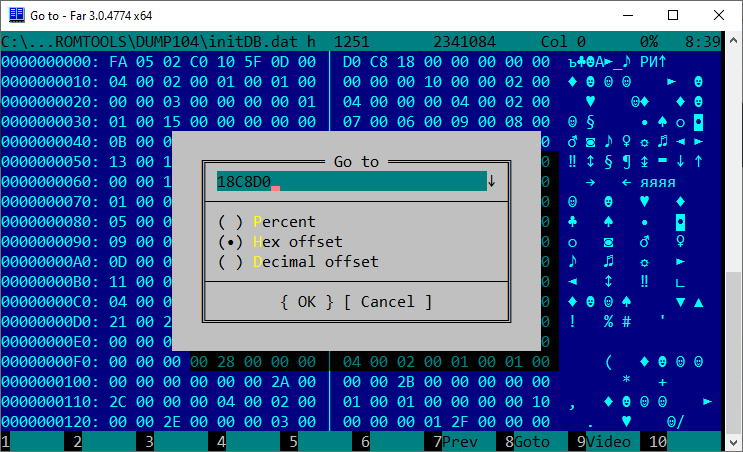
scr002.png?raw=true

scr003.png?raw=true

You can see the start of the Japanese strings data, its in UCS-2 LE codepage.

The end of the data block at the end of the initDB.dat file:
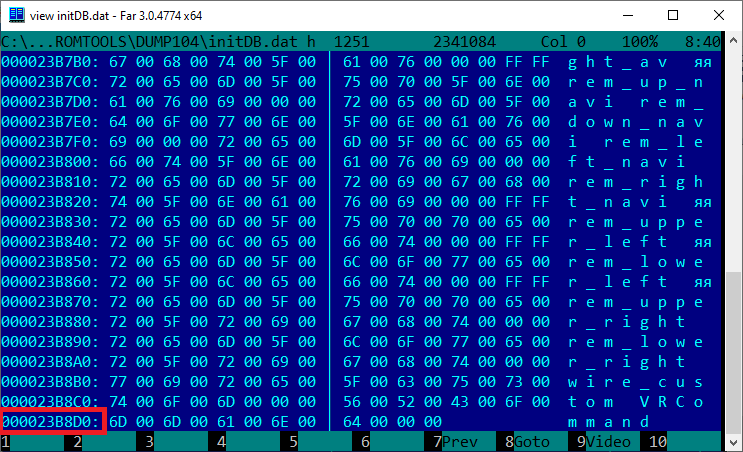
scr004.png?raw=true

The address of the last data byte is 0x23B8DB. Use the calc for calculating the length-1 and insert it to translate.c source, and compile it.

While running, the translate.exe search for initDB.dat and translation.txt in the current folder.

After finishing the output file initDB_out.dat will be created.

Step 4: Assemble the updated FW.

Get makever.c and compile it. You can change the version if you need it, the current FW version in the PS140PLT.VER file.
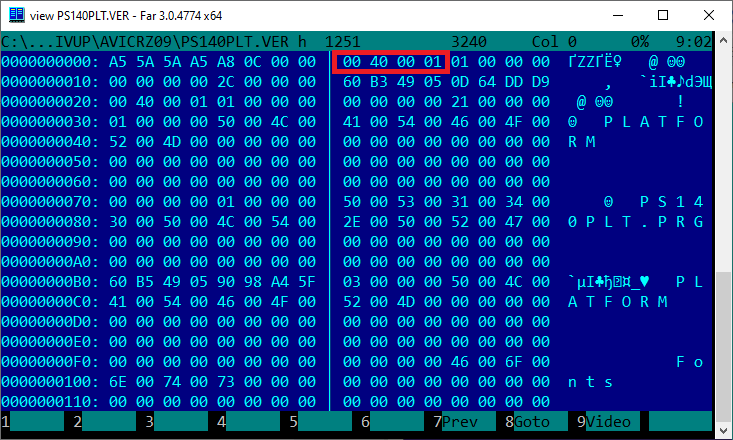
scr005.png?raw=true

Replace initDB.dat in the FW by commands:

copy /Y initDB_out.dat initDB.dat
dumpromx.exe -a initDB.dat fw_104_src.nb0

You need to get the correct output, like this:

img 00000000 : hdr=8d908c88 base=88471000  commandlineoffset=88471000
ERROR: could not find pointer for ofs 00000000
Successful file initDB.dat inserting
initDB.dat.nb saved successfully

If it OK, run the makever.exe by commands:

del /Q fw_104.nb0
ren initDB.dat.nb fw_104.nb0
makever.exe
mkdir NAVIVUP\AVICRZ09\PLATFORM
copy /Y PS140PLT.PRG NAVIVUP\AVICRZ09\PLATFORM\PS140PLT.PRG
copy /Y PS140PLT.VER NAVIVUP\AVICRZ09\PS140PLT.VER

It creates the folders (NAVIVUP) and files for the AVIC's FW update.

Step 5: Just place folder NAVIVUP on the SD and try to update your AVIC in a test mode.

Use "Program forced write" menu and "Platform write" command, SD as a source.

On Internal SD stayed the original Japanese FW if you want back to it.

And be careful, do not power off the AVIC during updating, it can be bricked (or boot looped)!!!

Good luck)
Posted Nov 13, 2019 · 06:41 UTC#786

Good day to everyone.?

I bought an avic-hrz0088.

Please, if you have any information on how to translate this model into English or Russian.

First of all, thank you.

Posted Nov 21, 2019 · 02:16 UTC#787

Hi Guys i have purchased a volvo xc90 with a AVIC-HRV22... I cannot even find a way of getting into the test mode, im not even sure this has usb.. has anyone any idea if its possible to update the language files?

Posted Nov 24, 2019 · 15:03 UTC#788
On 21.11.2019 at 9:16 AM, mattmoo138 said:

Hi Guys i have purchased a volvo xc90 with a AVIC-HRV22... I cannot even find a way of getting into the test mode, im not even sure this has usb.. has anyone any idea if its possible to update the language files?

Судя по описалову в интернете, у тебя блок ДВД + монитор. Я, конечно, не спец, но предположу, что твоя система далеко не на Windows Mobile или чем-то похожем.
Как мне кажется, у нее нет ничего похожего на testmode.


Posted Nov 24, 2019 · 15:08 UTC#789
3 hours ago, Alex75rus said:

How did you solve the problem?

Try turning on Bluetooth first and then try changing the password.
I have RZ-77, and while bluetooth is off, all settings are inactive.

Попробуй сначала включить Bluetooth и уже потом пробуй сменить пароль.
У меня RZ-77, и пока выключен bluetooth, все настройки неактивны.

Posted Nov 25, 2019 · 10:38 UTC#790
22 hours ago, Alex75rus said:

How did you solve the problem?

At first, select the Japanese mobile operator: docomo, au, SoftBank.

Сначала  надо выбрать японского оператора : docomo, au, SoftBank.  Тогда  блюпуп должен очнуться.

Posted Dec 11, 2019 · 21:46 UTC#791

hi, i got mrz07, i deleted pf.090jpjpn.lng from prg0 and prg1, and replace with new. restart and again japanese. i replace as well pf110jpjpn.lng in both places. restart still japanese language. what i can do more? just system let me change the backgroung image , replaced the file , restart and work.

Edited Dec 11, 2019 by olini2008
Posted Dec 17, 2019 · 11:53 UTC#792

Добрый день , удалил с папки USER  avic-mrz 0047 все файлы, копии нет буду признателен если кто даст ссылку на файлы. Спасибо.

Edited Dec 17, 2019 by Plishkinn
Posted Dec 28, 2019 · 10:10 UTC#793
On 09.07.2019 at 12:16, dzo said:

Просто используйте GIMP.


Posted Jan 04, 2020 · 16:57 UTC#794
On 4/10/2019 at 2:47 PM, EnoKt said:

Hi @dzo,

Your contribution is appreciated always. I jump boosted a battery to start my car  The AVIC MRZ09 shows the characters in Japanese shown below, translated  ''there is no program'' with number 7 at the bottom right of screen. The USER/DIŔ shows no content  Any help to revive this unit? I have original USER content backup and the English one from your previous posts. . I tried copying and  pasting the backups to the USER folder but nothing happens or shows up.  The Unit copies and pastes to any other media like FLASH DISC OR SD but does not paste in USER folder.. Any help  to revive it.? 

20190418_145120.jpg

Greetings, I have my avic mrz09 displaying the above screen of not loading programs and number 6 at the bottom any help on how to fix it. Regards

Posted Jan 26, 2020 · 13:22 UTC#795

Hey I'm new here. I have an rz33 and wanted to know how to get the map to show my country... Trinidad and Tobago. Also, I see no settings for Bluetooth and can the entire language be changed to english? It is the commercial model. 

Edited Jan 26, 2020 by Warhead
Posted Feb 07, 2020 · 10:41 UTC#796
On 11/3/2016 at 5:45 AM, dzo said:

I've translated the Japanese language strings for the MRZ99 to English. 

I figured out the format of the LNG file, dumped the Japanese, translated all the strings using google translate, then rebuilt the file.

Some of the English is not perfect but it makes the system much more usable. 


I've tested it with APP firmware version 3.070200 (installed with platform version 3.000600), other versions may not work.

If the old language file is 93627 bytes long then this will almost certainly work.


To install this, unzip the attachment mrz99english.zip and put the PF090JPJPN.LNG file on an sd card. (130905 bytes, md5sum is cb3f9cb76330704cc171e2b0acb9f6ad)

Get into testmode by holding the NAVI button (left button with Japanese writing on it) and pressing right..left..right..left..right..left and then release NAVI.


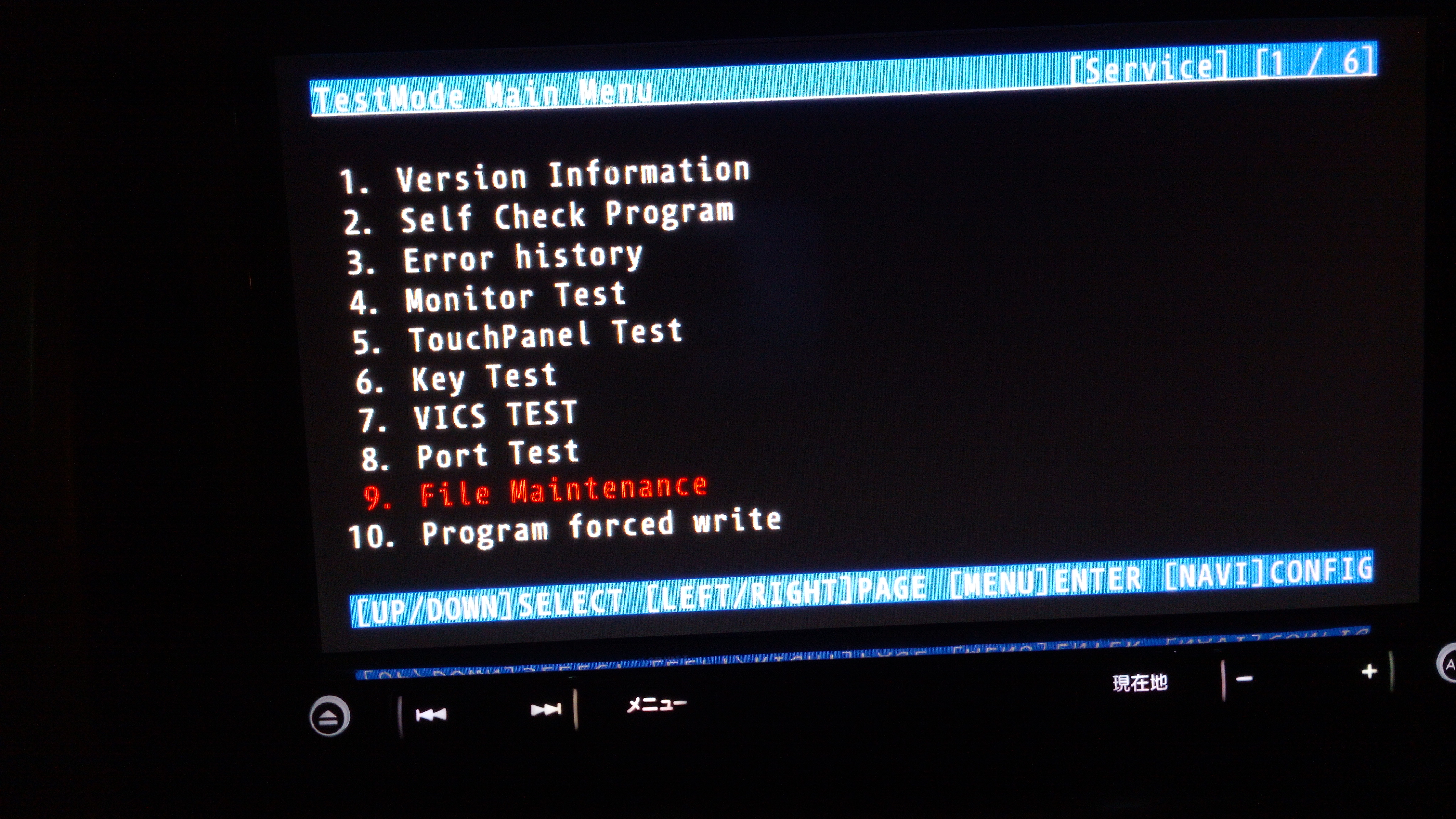
Go to the last entry on the first page (File Maintenance in Japanese) and press MENU (right button with Japanese writing on it) 

This opens the file manager which is in English and fairly obvious.


Make a backup of /USER as described elsewhere on avic411.com


Look in /USER to see if there is a file named  PRG.FLG

if there is, then the system uses /USER/PRG1, otherwise it uses /USER/PRG0


You can check the file versions by looking at  /USER/PRGx/PF090APL.HTM (where x is 0 or 1 depending on PRG.FLG)


go to  /USER/PRGx/APL/LANGDATA/


delete  PF090JPJPN.LNG

go to /SD, copy the new PF090JPJPN.LNG and paste it into LANGDATA where the old one was.


Switch off the power and when it restarts, it should be in English....


This worked for me but obviously is not 100% safe, be very careful in the file manager.


Update: There's now an installer that also changes the background and most of the important images with japanese text.


Find it here:


https://github.com/dzo/mrz99/releases

mrz99English_v2.zip

Thank you sod much bro, finally I was able to change the japanese from English. can you please teach me how to change the gps zone? Its set for japan and Won't work in my country. I also Don't know how to download maps. 

I live in Bangladesh, Asia.

Thanks in advance :)     

Posted Feb 15, 2020 · 15:44 UTC#797

Dear dzo,

I have the exact nav system, i mean shape is exact I don't know the model, it is in Japanese as well but is from Mitsubishi. Will this work for Mitsubishi car navigation system as well? 

Please help!

Posted Feb 17, 2020 · 14:01 UTC#798
On 4/10/2019 at 2:47 PM, EnoKt said:

Hi @dzo,

Your contribution is appreciated always. I jump boosted a battery to start my car  The AVIC MRZ09 shows the characters in Japanese shown below, translated  ''there is no program'' with number 7 at the bottom right of screen. The USER/DIŔ shows no content  Any help to revive this unit? I have original USER content backup and the English one from your previous posts. . I tried copying and  pasting the backups to the USER folder but nothing happens or shows up.  The Unit copies and pastes to any other media like FLASH DISC OR SD but does not paste in USER folder.. Any help  to revive it.? 

20190418_145120.jpg

Please dzo try to assist in this issue which i asked and attached the image of the screen of MRZ09 on page 47.

Thanking you in advance for your time.

Posted Mar 05, 2020 · 10:45 UTC#799
On 9/6/2019 at 2:43 PM, Shtirlitz said:

Hi All!

FW backup instruction for AVIC-RZ09 (and similar devices - AVIC-RL09, AVIC-RW09, AVIC-RZ09, AVIC-RZ07, AVIC-RZ06, AVIC-RL05, AVIC-RZ05, AVIC-RW03, AVIC-RZ03):

1. Get SD card, FAT32-formatted. Probably the USB disk will work too, but I didn't check back up on USB.

2. Make the empty folder named "NAVIVUP" on SD card.

3. Power on the AVIC and place the SD card into AVIC device slot.

4. Go to in the Testmode (press and hold "NAVI" button, press each once right-left-right-left-right-left, release "NAVI" button - device restarted in test mode).

5. On the first screen - select menu "10. Program forced write", go to the next screen of this submenu (2 of 3) and select "3. Take out program".

6. Select destination "SD" or "USB" and press "MENU" for start downloading.

7. Wait for about minute while FW downloaded to SD/USD disk - with full-screen messages "!!NOW COPYING!!", while "HIT ANY KEY" message didn't appear.

Profit) You can see the full-FW files on your SD/USB disk in the NAVIVUP folder.

P.S.: Sorry guys but I cannot upload the screen-shots here, I see just "There was a problem uploading the file." message displayed.

Alex

This is backup instruction, Now how do yu upload English Language?

Posted Mar 06, 2020 · 06:25 UTC#800
19 hours ago, Mwassaru said:

This is backup instruction, Now how do yu upload English Language?

Hi @Mwassaru

Just use sources: https://github.com/Shtirlitz/RZ09

Cut 0x200 header of PRG-file - you'll get the .NB0 firmware.

Extract initDB.dat from .NB0 file, use my tools to make the translation.

Replace translated initDB.dat in the .NB0 and use makever.c to create updated FW files.

Here is step-by-step manual (2 posts): http://4pda.ru/forum/index.php?showtopic=847671&st=20#entry90149444

It's in Russian but I think it's easy to translate to English.

Good luck!

Alex

Page 32 of 39