the link i give you is with all files copy all files inside my flash disk you missed apl3 etc....
the link is bigger keep all files of my flash disk
the link i give you is with all files copy all files inside my flash disk you missed apl3 etc....
the link is bigger keep all files of my flash disk
Should I open the APL and APL2 on the right side and then copy each file over to my flash drive.
This is what APL looks like when I open it. Thanks again and sorry we won the rugby 

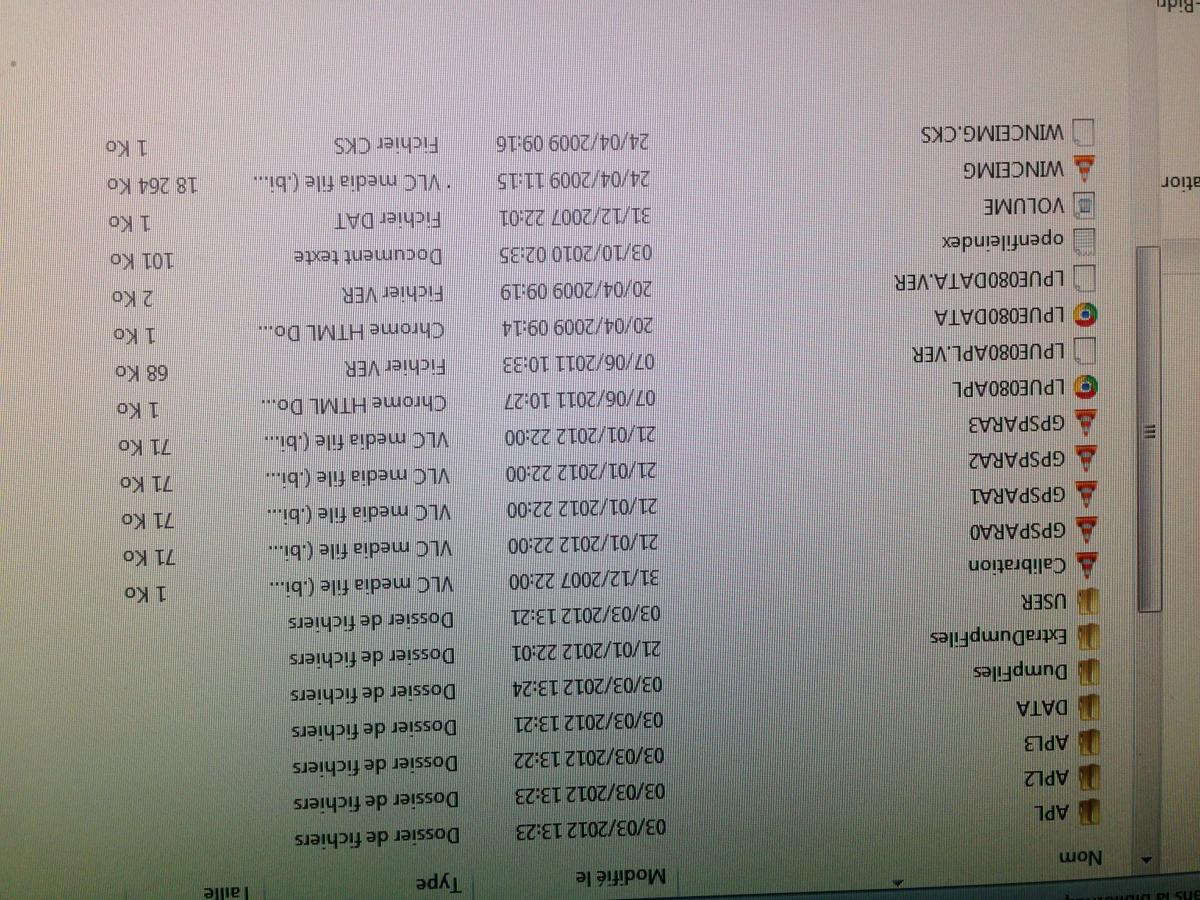 Hi no let the folder whole and copy inside your flash disk
this is what you must have inside your avic use 7zip to extract my flash disk
poiplaza the website has not worked me this if it works perfect
http://android-zone.ws/topic/9611-igo-primo-full-europe-speedcam-23082014-torrent/
Ok that seems to work, I had to do it on a PC as my Imac was blocking some files. I just have to update the maps and I should be sorted. Thanks again guizmo.

yes very nice i forget to tell no use imac he don't keep all files 
you can delete chromeimage it's only if you wan't to change color of menu nice trip
Ok I got my Irish maps in but my settings are still in french do I change this on my flash disc or on the avic.

hi guizmo sry. but my english is very bad.will it works on my
F920BT ?Hi fergalb ok are you copy the files who i said to you the english lang folder inside folder lang of avic (take a sd card put the folder english lang inside with testmode and the folder voices ) i give you the link for files
Hi adelhaid no it's not the same for your avic this program can't work for you
Hi everyone,
Is this program gonna work on a F30BT?
Thanks.
Hi no only f700 bt ,710 bt,900 bt,910 bt,500 bt
Too bad!
Thanks for the answer!
Dear Guizmo,
Thanks for your good and clear SUPPORT.
I put today in one hour the update on my Pioneer F500BT and it works very good and fast.
All the answers and questions helped me well !!!
Now i can in May/june on Holiday by car to Spain through France ( Route du Soleil) with the new 2014 Maps !
Thanks and kind regards from the Netherlands !
Rob
I would be lost without him he has the patience of a saint I'm still not there yet my Lang and voices are not working for me but I did these on my imac, my daughter will be back from college at the weekend so I'll have another go with her laptop.


Hi take this file decompress you have a folder lang put him inside your avic
https://drive.google.com/file/d/0B4MAukIOceEXRXRuaXJCTFhvT2c/view?usp=sharing
this files is voices decompress and copy the folder inside your avic
https://drive.google.com/file/d/0B4MAukIOceEXeG1fM095VGZDOGc/view?usp=sharing
hi robsel good news have a nice trip
Is it possible to run maps from SD card instead of flash disc?
yes it's possible to run a complete program from sd card you can run primo ,you have no reason to read map outside flash disk take only map do you want ,with ezrider patched. you have on site the primo of ryar he work fine .
I want to use original igo prog on my pioneer but I need alot of maps on vacation. I can't fit them all on my flash disc.
Is there some way to put the maps on my SD? Edit the sys file?
Hi h4d3z take this link one is testmode and another is nav mod copy testmode and nav mod on sd card and copy new map and poi and building to refresh inside the flash disk in your sd card to work use only primo to work insert the sd card on your avic and turn on your device .avic boot on windows screen press on storage card and after on flash disk and on apl2 and on primo and he start if you don't want to use retire only sd card after using and you be on your normally avic .use a sd card of 8 g
Please the password for zip file thanks
the password is www.avic411.com sorry i forgot to write him it's chuck 88 program a member
i have problem navi wont start after i cope the file BUILDER MAP AND POI then restart it stay longer systemstart waiting!!
i have F9110BT
Hi h4d3z take this link one is testmode and another is nav mod copy testmode and nav mod on sd card and copy new map and poi and building to refresh inside the flash disk in your sd card to work use only primo to work insert the sd card on your avic and turn on your device .avic boot on windows screen press on storage card and after on flash disk and on apl2 and on primo and he start if you don't want to use retire only sd card after using and you be on your normally avic .use a sd card of 8 g
So its not possible to use original navi with maps on sd card ? I have to use this version, but i cant listen to radio/cd etc ?
Grts