To all of you guys:
To get a password send a Private Message to:
Flomsen
or
Ivoo
or
CELL
and stop spamming this topic.
To all of you guys:
To get a password send a Private Message to:
Flomsen
or
Ivoo
or
CELL
and stop spamming this topic.
Hi,
Where I can find the cracked "RenewalIFLib.dll" ???
I modified the original and do not have a backup.
It is for a F930BT
Thanks!!!
I have a BIG Problem 
I have been trying to upgrade my AVIC F30BT following your steps. When I go to password doesn't work with PASSWORDPASSWORD (with crack .dll)
Thanks in advance
I've tried it, but always write: "No SD available. Insert SD to continue" and won't start
What can I do?
thx
I've the same error.
What did you resolve that ?
Thanks in advance 
Try full format sd card or try a different sd card and afcorse full format.
I tried editing RenewalIFlib file but I have completely different numbers(I know how to use hex editor) than monsterF9 even though I have the same unit(f9220bt).
Does anyone know why and what should I do?
EDIT:
Ok, solution was much easier than I thought. I was looking for wrong file. I had to change this one from prg1,not from prg0.
So another confirmation that monsterF9 method works on f9220bt. THANK YOU!
EDIT2:
and btw polish voice commands works without any additional files/installation.
Try full format sd card or try a different sd card and afcorse full format.
I don't understand mate
What do u mean ?
Is possible to make hard reset in mi AVIC con the testmode ????
I have a BIG Problem
I have been trying to upgrade my AVIC F30BT following your steps. When I go to password doesn't work with PASSWORDPASSWORD (with crack .dll)
I tried to change the file VERINFO.DAT "http://avic411.com/index.php?/topic/37407-2013-eu-update-f30-f930-f9310-f40-f940-f840-f8430/?p=271168" of the 2013 version to this version and when I run my PIONEER I have a black screen with the info "Please, insert the correct SD".If I remove the SD on the device this mensage still in the screen and the radio doesn't work.Anyone knows how to resolve that???
Thanks in advance
I've tried it, but always write: "No SD available. Insert SD to continue" and won't start
What can I do?
thx
I have the same Problem
I try it with this Manual but do some wrong
Confirmed update from 5.0 to 6.0 on F9220Apply these changes to your RenewallFlib.dll on your Unit:Offset 000019F0: 0350A0E3 replace with 0050A0E3Offset 00001A10: 0350A0E3 replace with 0050A0E3Offset 00001AD8: 0350A0E3 replace with 0050A0E3Offset 00001C1C: 0250A0E3 replace with 0050A0E3Offset 00001C24: 0150A0E3 replace with 0050A0E3Offset 00001A3C: 0350A0E3 replace with 0050A0E3Users with units older than F30BT will have to use cardinfo from this post:
Hi all,
I can confirm this works on the F9210BT.
As per above, the process I followed was:
1. Run 'supertestmode' from a freshly formatted (FAT32) SD card.
2. Copy RenewallFlib.dll from USER\PRG0\APL to SD root.
3. Remove SD card from AVIC and edit RenewallFlib.dll as per monsterF9's guidance on a PC.
4. Insert SD card with edited RenewallFlib.dll back into AVIC.
5. Delete RenewallFLib.dll from USER\PRG0\APL on AVIC.
6. Paste edited RenewallFlib.dll from SD card into USER\PRG0\APL.
7. Remove SD card format it and copy Update, FIRMWARE and (modded) CARDINFO.cif onto it.
8. Insert SD card into AVIC and turn on ignition. Follow onscree instructions where you'll be prompted to enter a password. Enter PASSWORDPASSWORD
9. Sit back and wait for 25 minutes whilst the unit updates.
If anyone needs a hand with this, please ping me. I'm by no means an expert but after some reading, understand what's needed and how to achieve it.
Thanks to Flomsem for the SD contents and monsterF9 for putting in the work to crack the content. If you both PM me with your PayPal details, I'll send a donation to show my appreciation for your efforts.
Cheers,
Paul
Big Thanks for it!!
Please need some Help
and sorry for my english
you are trying to update?
Bud he keeps asking put right sd in?
Then your update sd is not good.
try a "full format" of the SD card, not a quick one.
Put update back op SD en try again.
You can olso try a other SD card and do the same as above.
I got that problem with installing 2013 maps. Did it with other sd en full format and i could install.
Hi,
Where I can find the cracked "RenewalIFLib.dll" ???
I modified the original and do not have a backup.
It is for a F930BT
Thanks!!!
The RenewallFLib.dll is specific to your unit. There's no guarantee the same file from the same model unit will work in your unit. You could try the one included in the 2015 files and see if that works.
You may have found out the hard way why you always back up a file before you edit it. Not very helpful I know but that's the reality of it unfortunately.
Paul
you are trying to update?
Bud he keeps asking put right sd in?
Then your update sd is not good.
try a "full format" of the SD card, not a quick one.
Put update back op SD en try again.
You can olso try a other SD card and do the same as above.
I got that problem with installing 2013 maps. Did it with other sd en full format and i could install.
^This^.
Re-format the card and follow the instructions implicitly. If you skip steps it won't work. It's a process that works if followed. If it still doesn't work and your unit is included in this thread as being successful, you need a different SD card.
Paul
HI ANY FILE DOWNLOAD LINKS THAT WORK ?#
I have try the 2013 update but it dosnt work
I found this in the AVIC test mode
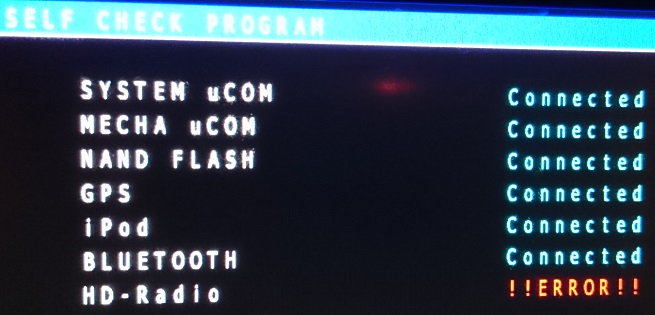
I have try the 2013 update but it dosnt work
I found this in the AVIC test mode
Maybe it's possible to install the firmware again from Pioneer?
I hope that it recovers your system
http://www.pioneer.eu/eur/support/software/AVIC-F9210BT/page.html#download_211
http://www.pioneer.eu/files/support/AVIC-F20BT_F920BT/AVICF20BT_APL2.00300.zip
Got it working on F930BT! Was updated from 5.0 (2013, also done from this forum).
Followed the instructions posted before. Works just fine! Thanks a lot!
Two things to be said:
1. Using hex-editor you should use search function to find the exact text specified in post #65 and replace all entries accordingly.
2. CARDINFO file from the zip-file worked, no modded file used.
may i have the password for the zip
thanks
Maybe it's possible to install the firmware again from Pioneer?
I hope that it recovers your system
http://www.pioneer.eu/eur/support/software/AVIC-F9210BT/page.html#download_211
http://www.pioneer.eu/files/support/AVIC-F20BT_F920BT/AVICF20BT_APL2.00300.zip
I ve try it yesterday but it always the same
I will try it with fresh SD Card with the 2013 & the 2015 Update I have the 2012 Update to maybe...
Thank you for the support
I tried editing RenewalIFlib file but I have conpletely different numbers(I know how to use hex editor) than monsterF9 even though I have the same unit(f9220bt).
Does anyone know why and what should I do?
EDIT:
Ok, solution was much easier than I thought. I was looking for wrong file. I had to change this one from prg1,not from prg0.
So another confirmation that monsterF9 method works on f9220bt.
What Pionner do u've?
I've a F30bt and doesn't work like monsterF9 says. I don't know if try to move the RenewalIFlib.dll file from prg0 to prg1.
Do u think that it works ? it works to u ?
Thanks in advance mate 
Hi,
on my f930bt the supertestmode paste function is no active.
It copies file but it's impossible paste on SD.
Is there anyone that can help me?
Thanks
What Pionner do u've?
I've a F30bt and doesn't work like monsterF9 says. I don't know if try to move the RenewalIFlib.dll file from prg0 to prg1.
Do u think that it works ? it works to u ?
Thanks in advance mate
Like I've wrote, I have f9220bt.
I only edited file from prg1 without copying it to prg0(or doing anything with prg0). I've noticed that these file are completely different, so I wouldn't recommend to copy from prg0 to prg1 and the other way(although I'm not really an expert).
What doesn't work more precisely?
Maybe it's possible to install the firmware again from Pioneer?
I hope that it recovers your system
http://www.pioneer.eu/eur/support/software/AVIC-F9210BT/page.html#download_211
http://www.pioneer.eu/files/support/AVIC-F20BT_F920BT/AVICF20BT_APL2.00300.zip
Isn't HD radio not something else? zome cind of extern unit. i got the same bud everything work fine.
Hi,
on my f930bt the supertestmode paste function is no active.
It copies file but it's impossible paste on SD.
Is there anyone that can help me?
Thanks
There's a video on Youtube walking through this function.
Essentially the GUI for supertestmode is very unintuitive. What you need to do is Select the file (so it has the + next to it), then Copy the selected file, then move the action back to Enter and navigate back up each level of the root until you get to where you want to paste the file. Paste should be enabled now.
Paul
Can somebody send me the password?
Thx.
There's a video on Youtube walking through this function.
Essentially the GUI for supertestmode is very unintuitive. What you need to do is Select the file (so it has the + next to it), then Copy the selected file, then move the action back to Enter and navigate back up each level of the root until you get to where you want to paste the file. Paste should be enabled now.
Paul
I've done!
Thank you!