Search Archive
📌 Pinned

2017 v7 US/Can Update available for Z110/120/130/140,X920/930/940

By RonS · Jul 23, 2017in Hacks/Mods💬 220 posts👁️ 72,748 views
Page 7 of 9
Posted Jun 04, 2018 · 00:19 UTC#151

Hey all,

I've got a z110bt and I've been able to update in the past without any issues. For some reason, I cannot get this 2017 update to work. I can run the shortfuse script but can't get the maps to install. 

I get the "Wrong SD card. Install correct SD card" error before even getting the chance to put in a password. I've tried several things:

- Full format(not quick format) 2 different 8GB cards (used in previous updates) for FAT 32 with default config and 32k. I tried 16k and it wouldn't let it finish. 

- I've tried both the cardinfo.cif from the original zip as well as the specified z110 file that was also linked to this thread.

Can anyone lend some insight into this issue?

Thank you in advance!

Edited Jun 04, 2018 by Jefe2323 — Reason: Edit: I've re-formatted at 16k and now get the "An error occurred, update failed". It will also show the message "insert SD card"
Posted Jun 05, 2018 · 02:25 UTC#152
On 6/3/2018 at 6:19 PM, Jefe2323 said:

Hey all,

I've got a z110bt and I've been able to update in the past without any issues. For some reason, I cannot get this 2017 update to work. I can run the shortfuse script but can't get the maps to install. 

I get the "Wrong SD card. Install correct SD card" error before even getting the chance to put in a password. I've tried several things:

- Full format(not quick format) 2 different 8GB cards (used in previous updates) for FAT 32 with default config and 32k. I tried 16k and it wouldn't let it finish. 

- I've tried both the cardinfo.cif from the original zip as well as the specified z110 file that was also linked to this thread.

Can anyone lend some insight into this issue?

Thank you in advance!
I can also enter TESTMODE and was able to copy over old files from USER. I'm just not able to update to new maps no matter what I've tried. 

Posted Jun 17, 2018 · 03:23 UTC#153

Hello, I have Pioneer_T1000-25818.zip but can't find the proper password. And it isn't "PASSWORDPASSWORD" . Could I please have the right one? Thank you.

I do have ShortFuseScript.zip and would be good to go.

Found what I was looking for, thank you. I was missing the other password. Updating as I type with 18 minutes to go.

Thank you RonS

Edited Jun 17, 2018 by Shane H
Posted Jun 17, 2018 · 12:55 UTC#154
9 hours ago, Shane H said:

Hello, I have Pioneer_T1000-25818.zip but can't find the proper password. And it isn't "PASSWORDPASSWORD" . Could I please have the right one? Thank you.

I do have ShortFuseScript.zip and would be good to go.


Posted Jun 20, 2018 · 00:38 UTC#155

RonS, I used the "Easy" method, everything went smooth. But now Ipod wont work. The menu changed, I switch the CARDINFO with Z110Z120X920CARDINFO I have the 120BT. What did I do wrong? I'm going outside right now. It worked fine, cable is good. Any suggestions would be appreciated. Thanx

Posted Jun 20, 2018 · 01:39 UTC#156
58 minutes ago, Shane H said:

RonS, I used the "Easy" method, everything went smooth. But now Ipod wont work. The menu changed, I switch the CARDINFO with Z110Z120X920CARDINFO I have the 120BT. What did I do wrong? I'm going outside right now. It worked fine, cable is good. Any suggestions would be appreciated. Thanx

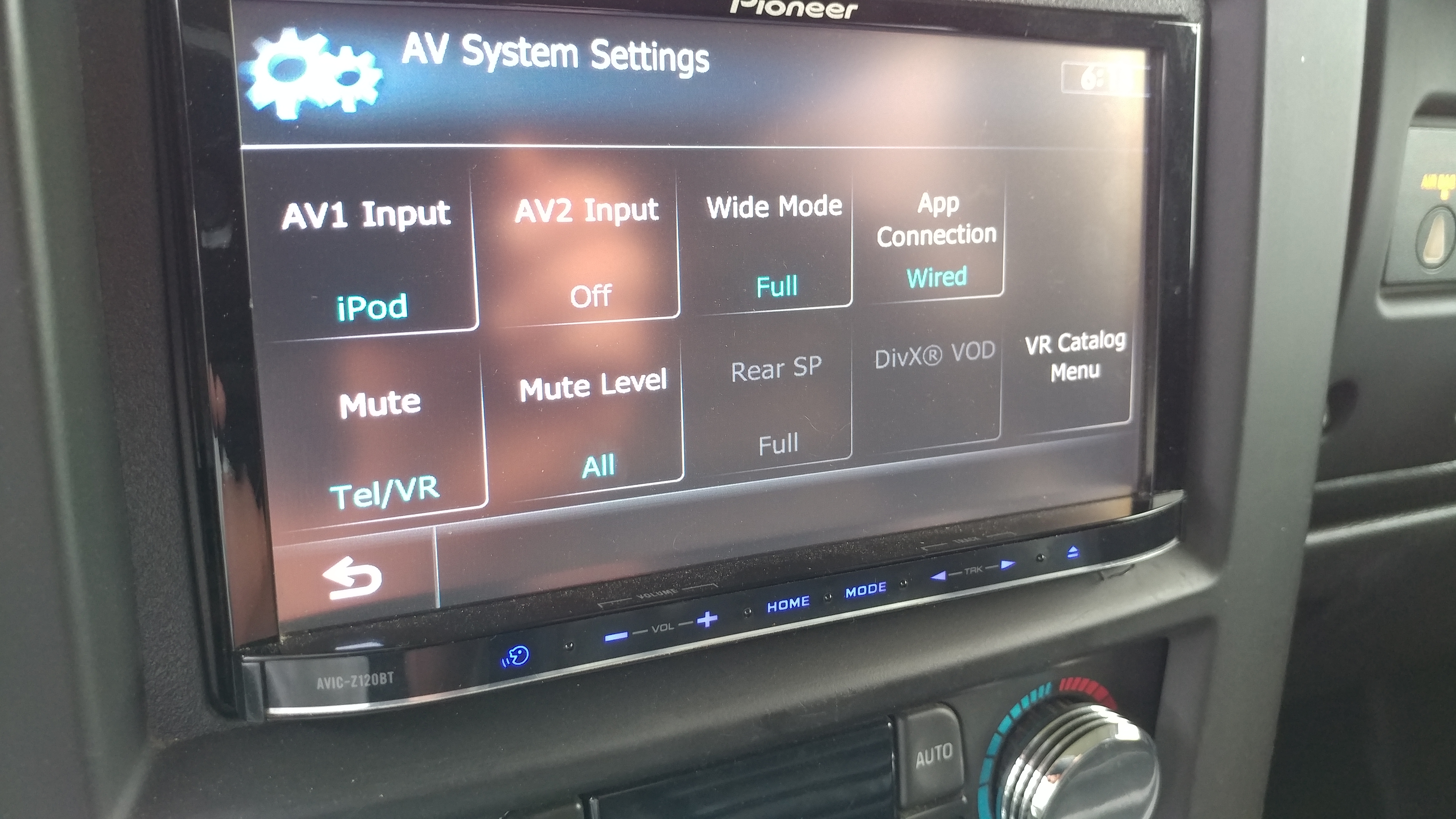
What do you mean? how is your iPod connected? Did you try AV System Settings/App Connection?

Posted Jun 20, 2018 · 22:25 UTC#157

I was in a hurry. Ipod nano connected with the usb/av cable. In the first pic only the settings and eq buttons work.

0620181817a.jpg

0620181818.jpg

Posted Jun 21, 2018 · 14:08 UTC#158
15 hours ago, Shane H said:

I was in a hurry. Ipod nano connected with the usb/av cable. In the first pic only the settings and eq buttons work.


I never used App Mode - didn't even know it worked with a nano. I can only suggest doing a hard reset by disconnecting the car battery for a couple minutes. This often cures odd behavior after a firmware update.

Posted Jul 01, 2018 · 14:01 UTC#159

I never used app mode either. The selection is either wired or Bluetooth no off. I am going to disconnect the battery now since I can't find the radio fuse on the Hummer.

Just pulled the radio fuse, it was powerless, reinstalled fuse and no change. The ipod function goes into app mode.

I'm not 100% sure but if I remember right App mode was always greyed out before I did the update.

Edited Jul 01, 2018 by Shane H
Posted Jul 07, 2018 · 20:12 UTC#160

Would someone mind pointing me to the update to 4.6 or 5.1 so I can get lightning support? I have z120bt if that is pertinent.

Posted Jul 08, 2018 · 13:49 UTC#161
On 8/8/2017 at 10:35 AM, RonS said:

Thought I'd post the Installation/operation manuals and info on the two 2017 updates (v7.0 firmware). I recommend that everyone review them before installing. Also note the specific instructions for upgrading BT from older( < 3.10) versions to v3.32. And as before, it doesn't seem possible to add iPhone Lightning connector support(patches 4.6 or 5.1) after the fact. It must be installed before installing firmware 6.0 and higher. IDK if there is a workaround.


Only Compatible With: 

  • AVIC-Z110BT, AVIC-Z120BT, AVIC-X920BT         CRD5009A.pdf
  • AVIC-Z130BT, AVIC-X930BT, AVIC-X9310BT, AVIC-Z140BH, AVIC-X940BT          CRD5006A.pdf

As with other updates, either product can be made to install on any of the above units when used with the proper CARDINFO file.  See post #26 for the update files and see Shortfuse Hack for how to hack you unit prior to installing those files.

The manuals wont open up,says page not found.

Posted Jul 08, 2018 · 13:53 UTC#162

The maps wont do anything when I put the card in my z110bt

Posted Jul 08, 2018 · 17:32 UTC#163
3 hours ago, BigCurt327 said:

The maps wont do anything when I put the card in my z110bt

Did you replace the Cardinfo.cif file on the SD? The one in the ZIP is for Z130 or Z140

Posted Jul 10, 2018 · 23:58 UTC#165
On 7/8/2018 at 1:32 PM, RonS said:

Did you replace the Cardinfo.cif file on the SD? The one in the ZIP is for Z130 or Z140

I've been trying I cant seem to figure out how to do it I guess.. I downloaded winrar (I seen someone suggest using it). But I cant get the one for 130 /140 to delete/move. Apparently I'm not the best with computers. Smdh

Posted Jul 11, 2018 · 20:24 UTC#166
20 hours ago, BigCurt327 said:

I've been trying I cant seem to figure out how to do it I guess.. I downloaded winrar (I seen someone suggest using it). But I cant get the one for 130 /140 to delete/move. Apparently I'm not the best with computers. Smdh

Can anybody help me? Please

Posted Jul 17, 2018 · 13:57 UTC#167
On 09/07/2018 at 3:37 AM, RonS said:

Looks like they removed them from Navigation.com web-site. Their link does the same thing. Here's the files:


Pioneer_2017_maps-Z110-CRD5009A.pdf

Pioneer_2017_maps-Z130-CRD5006A.pdf

Hello RonS,

I have been reading your posts and I was wondering if you can help me out. I have a pioneer avic-f930bt currently on firmware version 3.0 and possibly 2011/2012 Australia maps. I am hoping to update it to the latest firmware and maps. Would you by chance have Australia maps available that I could install with firmware v7.0 on my unit? It would be great if you could help me or point me in the right direction. Just FYI... This is my first pioneer unit and I am a total novice in this.


Look forward to hearing from you on my request soon.

Cheers!

Gangs

Posted Jul 18, 2018 · 01:17 UTC#168
11 hours ago, gangs said:

Hello RonS,

I have been reading your posts and I was wondering if you can help me out. I have a pioneer avic-f930bt currently on firmware version 3.0 and possibly 2011/2012 Australia maps. I am hoping to update it to the latest firmware and maps. Would you by chance have Australia maps available that I could install with firmware v7.0 on my unit? It would be great if you could help me or point me in the right direction. Just FYI... This is my first pioneer unit and I am a total novice in this.


Look forward to hearing from you on my request soon.

Cheers!

Gangs

Nope. No idea about Aus maps or where to get them. You might have to find your local Pioneer web site and buy them. Maybe someone else has a better idea.

Posted Jul 18, 2018 · 05:38 UTC#169
4 hours ago, RonS said:

Nope. No idea about Aus maps or where to get them. You might have to find your local Pioneer web site and buy them. Maybe someone else has a better idea.

Thanks for the reply mate. I already contacted the local Pioneer outfit and they informed me that the last map update for the F930BT was in 2015. Nothing available after that. Looks like my hunt goes on.

In the meanwhile, perhaps you can help me with another thing. How can I update my F930BT to firmware V7.0 without updating the maps? If I have the latest firmware, maybe I can then look at hacking some maps and installing that on my unit. 

Cheers!!!

Posted Jul 18, 2018 · 12:45 UTC#170
6 hours ago, gangs said:

How can I update my F930BT to firmware V7.0 without updating the maps? If I have the latest firmware, maybe I can then look at hacking some maps and installing that on my unit. 

Cheers!!!

I have no idea. I don't think it would even work (new firmware with old maps). They are built together.  Also I don't think there would be any noticeable benefit. Keep in mind that 2015 maps aren't exactly obsolete.

Maybe someone with F series hardware has been able to install a 3rd party app (such as igo). I don't get involved with that.

Posted Jul 19, 2018 · 13:45 UTC#171

Just wanted to say a big "Thank You!" to RonS and nezfotnemom - Upgrade of my x940bt went flawlessly.  You guys Rock!  Zen, just sent you $ via Paypal.  Cheers!

-Squeege96

Posted Jul 22, 2018 · 02:42 UTC#172
On 18/07/2018 at 10:45 PM, RonS said:

I have no idea. I don't think it would even work (new firmware with old maps). They are built together.  Also I don't think there would be any noticeable benefit. Keep in mind that 2015 maps aren't exactly obsolete.

Maybe someone with F series hardware has been able to install a 3rd party app (such as igo). I don't get involved with that.

Thanks RonS... let's see how my update to the 2015 version goes and then take things ahead from there. Cheers!!

Posted Nov 01, 2018 · 22:06 UTC#173
On ‎6‎/‎21‎/‎2018 at 10:08 AM, RonS said:

I never used App Mode - didn't even know it worked with a nano. I can only suggest doing a hard reset by disconnecting the car battery for a couple minutes. This often cures odd behavior after a firmware update.

Well Ron I finally got around to disconnecting the battery today like you said to do months ago. . . guess what. . . .ipod function is back and works great again. The only reason I had time to do that was to replace my starter. Ha, Thanx for the excellent advice.

Posted Dec 13, 2018 · 01:14 UTC#174
On 9/16/2018 at 3:29 PM, RonS said:

Yes. you can undo it if you kept the SD that you used intact. But it is not necessary and would have no effect. You can not redo the update.  What troubleshooting are you referring to?

@RonS - ever done one of these with a bad SD reader? Like through the usb port? I have an x920 that I am trying to update the maps on for a friend.. Wont read any SD cards.. I have tried all dif brands.. Boots from USB find but I do not know how to force this update through usb? Any ideas?

Posted Dec 13, 2018 · 23:15 UTC#175
21 hours ago, nezfotnemom said:

@RonS - ever done one of these with a bad SD reader? Like through the usb port? I have an x920 that I am trying to update the maps on for a friend.. Wont read any SD cards.. I have tried all dif brands.. Boots from USB find but I do not know how to force this update through usb? Any ideas?

Sorry, never tried it. If it boots from USB (do you mean into testmode?) seems like you could try copying the upgrade files into the root of and empty memory stick. 

There's also the possibility of using Force Program Write in Testmode. I think you can specify the source device as USB.

Page 7 of 9