On 15-5-2020 at 6:43 PM, maunav90 said:
Me the same, i didn't put the original back... I tried @spoon1
aand now it ask to put again password, like it doesn't accept
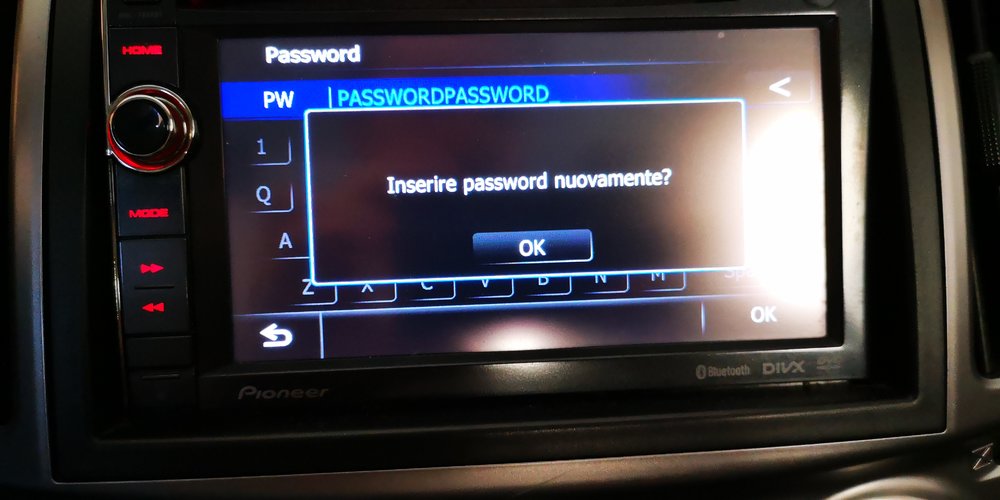
Quick response: I updated my father's AVIC-F930BT this evening, and everything was successfull (I'll share a more detailed document accompanied by screenshots later on). So please be informed that - in my case at least - it accepted the 'PASSWORDPASSWORD' combination without complaining, and completed the upgrade in about 20-30 minutes time. Perhaps it is worth mentioning that I got a different message about the password. In Dutch of course, and it stated 'Geef het wachtwoord van Pioneer in om door te gaan met de update. Druk op annuleren om update te stoppen'. I was offered 3 options 'Yes', 'No' and 'Cancel', and chose 'Yes'. That seems very different than what @maunav90 got in Italian ('Inserire password nuovamente?') , which seems to suggest a question to CHANGE the password, not to merely enter it.. Final note: I came from a 2011 (hence very old) firmware. Could that be the difference here between what I got and what @maunav90 got ?
Basic steps that I followed (based upon the guide from @spoon1 and input from @RonS as well on how to proceed):
- Prepare SD-cards (#1 with ShortFuse hack files, 2 Gb minimum/FAT32-formatted and #2 with 2019 map update (see files shared by @godzilla, 8 Gb minimum/FAT32-formatted)
- Install SD1 and install the ShortFuse hack
- Install SD2 and install the 2019 map data (note: firmware device updates were automatically installed after the 2019 map data was loaded successfully)
- Prepared/Reused SD1 for the TTS (Voice) files and chose/installed the navigation voice language (in my case Dutch) from the menu
IMPORTANT NOTES:
- Since the AVIC-F930BT is a "MY2011" device, there was no need to modify or manipulate the CARDINFO file. In other words: I simply included/recursively copied the one from the 2019 Map Update ZIP file that @godzilla shared with us already. Obviously, the ShortFuse hack will do the magic trickery already, and there's no need to modify the CARDINFO file either.
Edited May 19, 2020 by mroset — Reason: Some enhancements on the general steps used to install the 2019 update


 ). I suggest that


