Search Archive

Guide to .bmp files inside the Flash Disk

By CatchMeIfYouCan631 · Aug 25, 2008in Hacks/Mods💬 128 posts👁️ 36,497 views
Page 4 of 6
Posted Sep 22, 2008 · 05:34 UTC#76
side note, you can use a certain color (its a pinkish) to get transparent icons going on, that way you can change the background and have it all look really good....


Yes that color can be found on the ipod wheel .bmp inside the image.res file in the APL directory, but not all .bmps use that, some use solid black. I will deffinitly experiment with that though. Good looks. and damn you and your STi, such a sexy car lol

Posted Sep 29, 2008 · 22:21 UTC#77

Can someone help me with an error im sure im making here.. basically i have opened Image.Res with 7Zip and then opened the Top Menu .bmp files for the Wiggly Nav Arrow and Yellow Music note on the 'Home' or Menu screen.


When i then save as a .bmp using Photoshop CS2 after a couple of tiny mods the files come out twice the size and i notice they lose some dpi (drops from 96, down to 72).


Now this maybe coincedence and not even linked to my problem, however when i upload the new Image.Res with these changes to my unit using winCE and boot it back up the icons are then just gone and im lefted with my un-modified 2 blue people in the middle but nothing either side.


Im assuming Photoshop isnt saving the .bmp as i need it or something, however i cant get my head round it because except the size and dpi i cant see any other differences.


(i have modified the dpi back up to 96 and its just the same, i cant seem to reduce the file size though so this may be the problem - each one jumps from 120kb'ish up to 225kb if this makes any difference?)

Posted Oct 01, 2008 · 18:04 UTC#78

Can anyone help me out with the above?

Posted Oct 01, 2008 · 18:07 UTC#79

did you recompress it back to its original state and then rename it image.res? I forgot to do that once and I had no iPod UI because the unit couldnt find the Image.res

Posted Oct 01, 2008 · 18:31 UTC#80

ye, i had made that error initially too.


It's like Photoshop is doing something to the BMP, because even without editing it and just opening it and re-saving through Photoshop it seems to double its size?!


Edited to say: I just restored the originals and then opened the Nav Arrow in Paint and saved it, and the Music Note from the AV Source selection in Photoshop and saved that too... both without editing anything. Uploaded the new .res with these in to the device and now the Music Note doesnt show but the Nav Arrow does.


Basically Photoshop CS2 is doing something to double the file size, and make it un-usable to the system, but i dont know what?! did anyone else use PS CS2?

Posted Oct 01, 2008 · 19:17 UTC#81

*Problem Solved*


I saved the files as .PNG in Photoshop, and then opened them in Paint and saved them as .BMP from there. Now they work?!


How weird.


Anyways, here is my work so far for my STi :D

post-23040-12872755656227_thumb.jpg

Posted Oct 02, 2008 · 05:56 UTC#82

Wow Glade to see how many people are into this, and nice work to all of you.


Check out tee thread. Taks about running the Avic Software on your computer make it faster then running to the car every time to see if what you got works or looks good.


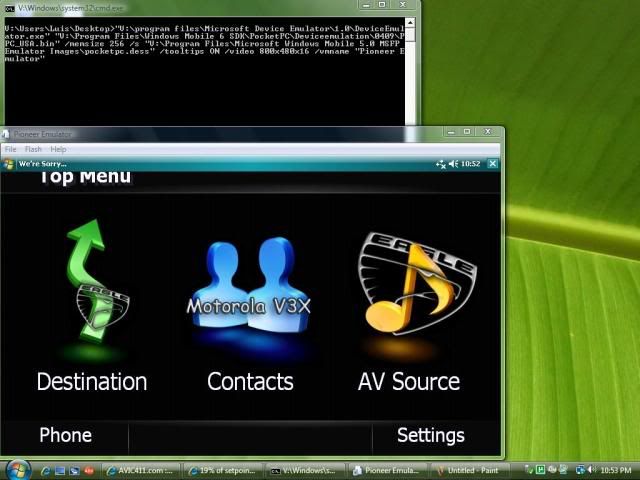
Heres a pic of it working on my vista PC:

O_snap-1.jpg

Posted Oct 02, 2008 · 20:30 UTC#83

Hackz,


Can you post a tutorial show how you managed to run avic software in windows?


Tks


GUGA

Posted Oct 02, 2008 · 20:39 UTC#84

No Problem


Thanks to, Lunar-Eclipse


Step by step:

1. Download and install these:

Mobile Emulator ----->http://www.microsoft.com/downloads/info.aspx?na=46&p=2&SrcDisplayLang=en&SrcCategoryId=&SrcFamilyId=c62d54a5-183a-4a1e-a7e2-cc500ed1f19a&u=http%3a%2f%2fdownload.microsoft.com%2fdownload%2fc%2fb%2fb%2fcbb8bc58-07b9-46bb-86ba-d12bb0d9b1d9%2fV1Emulator.zip&oRef=http%3a%2f%2fwww.christec.co.nz%2fblog%2farchives%2fcategory%2fdebugging

Windows Mobile 5 Image

----->http://www.microsoft.com/downloads/info.aspx?na=46&p=1&SrcDisplayLang=en&SrcCategoryId=&SrcFamilyId=c62d54a5-183a-4a1e-a7e2-cc500ed1f19a&u=http%3a%2f%2fdownload.microsoft.com%2fdownload%2fc%2fb%2fb%2fcbb8bc58-07b9-46bb-86ba-d12bb0d9b1d9%2fefp.msi&oRef=http%3a%2f%2fwww.christec.co.nz%2fblog%2farchives%2fcategory%2fdebugging

Windows Mobile 6.1 Image

----->http://www.microsoft.com/downloads/info.aspx?na=46&p=1&SrcDisplayLang=en&SrcCategoryId=&SrcFamilyId=3d6f581e-c093-4b15-ab0c-a2ce5bffdb47&u=http%3a%2f%2fdownload.microsoft.com%2fdownload%2fd%2fc%2f7%2fdc73c8e7-f9c3-49de-821f-5588eeefcac4%2fWindows+Mobile+6.1+Professional+Images+(USA).msi&oRef=http%3a%2f%2fwww.microsoft.com%2fdownloads%2fresults.aspx%3fpocId%3d%26freetext%3dwm6+emulator%26DisplayLang%3den


2. Create a new text document and call it "Launch Pioneer VM in 800x480.bat". Make sure you have show file extensions enabled in Windows.


3. Paste the information below into the batch file and save it.

Code:

"C:\program files\Microsoft Device Emulator\1.0\DeviceEmulator.exe" "C:\Program Files\Windows Mobile 6 SDK\PocketPC\DeviceEmulation\0409\PPC_USA.bin" /memsize 256 /s "C:\Program Files\Microsoft Windows Mobile 5.0 MSFP Emulator Images\pocketpc.dess" /tooltips ON /video 800x480x16 /vmname "Pioneer Emulator"


4. Run the file "Launch Pioneer VM in 800x480.bat"


5. It will take the VM a minute to boot. While it's booting...

6. Click File

7. Click Configure

8. In the "Shared Folder" box, browse to where you have your copy of "My Flash Disk" stored and select it.

9. Click OK

10. Click OK

11. By now, Windows Mobile should be fully booted.

12. Click the Start button in the top left corner

13. Click Programs

14. Click "File Explorer"

15. In the top left corner click the drop down arrow (in my case, it says my documents beside the arrow).

16. Select "Storage Card"

17. Double Click APL folder

18. Double Click Main Menu or Navi or Tel.

Posted Oct 03, 2008 · 21:17 UTC#85

Do you think if I made the individual contacts images smaller that we could fit more contacts on a page (screen)?


Well might as well try I guess but if anyones either way please let me know...

Posted Oct 04, 2008 · 17:14 UTC#86

I seriously doubt it's as easy as that...you'll probably just off center the pictures.

Posted Oct 04, 2008 · 17:15 UTC#87

Its not that easy, the system runs its images in set sizes to a grid... unless you can find the parameters to modify that grid then you will always have the same amount of contacts on a line

Posted Oct 04, 2008 · 19:48 UTC#88

Well here's my first attempt...I wanted to work the original icons in somehow and I like the how it ended up...


NewIconsScreened.jpg


...Bad camera I know...Here is a view of them....first one is normal, second one is when they are pushed...


NewIconsNormal.jpg


NewIconsPushed.jpg


Oh, and I have a question for anybody, I'm running the emulator to test them like so many others, and I seen many posting screen captures of their work in it...so here's my question, why can't I Print Screen when the emulator is open, but if I minimize it or close it I can again?

Posted Oct 04, 2008 · 20:32 UTC#89

The emulator must have a lock on it. If you goto www.discountedwheelwarehouse.com, their wheel visualizer won't allow you to print screen either.

Posted Oct 04, 2008 · 20:37 UTC#90

worked for me

post-18749-1287275573693_thumb.jpg

Posted Oct 04, 2008 · 23:51 UTC#91

was that with the wheel visualizer program open? That pis is only part of the banner

Posted Oct 05, 2008 · 06:55 UTC#92

Man i gotta try to make one with the Scion Logo and xB logo.....Just gotta fig out were to start................... :?:?:?

Posted Oct 05, 2008 · 08:07 UTC#93

Id start by getting a Scion Logo , and a XB logo for starters, and go from there.


Then u can get brave and add that to ur avic

Posted Oct 05, 2008 · 19:25 UTC#94

nice work kdoll =)


I like how you tied those all together...


I actually decided to get it closer to an OEM look for my RX-8.


f90bt11.jpg

Posted Oct 07, 2008 · 15:41 UTC#95

Anyone managed to run the GPS software from the emulator? When I try to run I get and error.


Tks

Posted Oct 12, 2008 · 03:41 UTC#96
The possibilities are endless I guess...


Hey Catchme... Do you have the Corksport kit in your RX-8?


f90bt2.jpg


I'm sure It's probably written somewhere and I just missed it...but which file is that? I hate the stock screen screen.

Posted Oct 12, 2008 · 04:03 UTC#97
The possibilities are endless I guess...


Hey Catchme... Do you have the Corksport kit in your RX-8?


f90bt2.jpg


I'm sure It's probably written somewhere and I just missed it...but which file is that? I hate the stock screen screen.


Its 746_32K_AV-004_32b...its like the 4th file in the AV folder

Posted Oct 14, 2008 · 21:59 UTC#98

i just messed with the AV screens... got everything to go black, just like the original, pre-launch pics look. it's really sleek... i can put up pics if anyone wants... as well as host my image.res

Posted Oct 14, 2008 · 23:20 UTC#99

Yeh man post some pics.

Posted Oct 14, 2008 · 23:23 UTC#100

ok i should have them posted in about an hour...

Page 4 of 6