You can just grab the image.res from the extracted update files.
Posted Oct 30, 2008 · 03:37 UTC#101
You can just grab the image.res from the extracted update files.
is only the update files allowed on the SD? I have the Launcher files and was wnderingif i had to remove those files before attempting the update.
I just moved the launched files to a subfolder on the card to do the update, and then moved them back to the root afterwards
You can just grab the image.res from the extracted update files.
Thanks I'll try that
Another outstanding issue: VR still doesn't recognize contacts that have any special characters in the number. So if a contact's number has (800) 555-1212, you will not be able to voice dial that contact. It needs to be 8005551212. I know people have gotten around this by editing their contacts database with SQLite, but my contacts seem to refresh everytime the unit is powered on (which i like, that way new contacts show up automatically)
Is sombody having problems with the grey boxes (buttons) that hold the Func and EQ buttons on the ipod screen???? on mine it looks like they moved to the outside of the screen, also the "back" button it looks like that image moved. I was putting back the mods I had but used the "old" image.res file I had before the update (if the update modified the image.res to a new one is what I mean.) I didn't do a backup of the files after the update I used the old ones (I know, I know....) so if anyone would be so kind to upload the original Image.Res file of the new update so I can check that that is what caused the problem (hopefully). Thanks.
Yeah I had the same problem with the Vista theme. The buttons were all over to far and it made look like there was a button and a half button on the top right for me, I just copied the pioneer image.res file back. /no problems now...
I just installed 2.0 and I'm loving it so far.....It took me about 1:13 to go for start up to fullly loaded!
Yeah I had the same problem with the Vista theme. The buttons were all over to far and it made look like there was a button and a half button on the top right for me, I just copied the pioneer image.res file back. /no problems now...
Yea I fixed it too... People just before you start moding again make sure to make backups of the new files just in case...
Boot time is faster, still unacceptable at 30 seconds. No other navigation system takes 30 seconds to boot.
Buttons are still laggy for a long time after bootup.
Overall, not a major improvement, except for cutting some time off of the boot.
I disagree. Boot time at 30 seconds is hardly "unacceptable", and that being a 30-35% improvement over the original is great. Buttons didn't seem laggy to me, either.
I'm pretty happy with 2.0 so far. Can it be improved more? Sure it can. Let's hope Pioneer keep delivering the goods.
Did anyone else get this wierd occurnce? I had to hit map about 5-6 times before the green boxes went away.
braddman wrote:Boot time is faster, still unacceptable at 30 seconds. No other navigation system takes 30 seconds to boot.
Buttons are still laggy for a long time after bootup.
Overall, not a major improvement, except for cutting some time off of the boot.
If it is so unacceptable just sell the unit and buy one that boots under 30 seconds..... The new boot time is more than I expected so i'm happy for now....
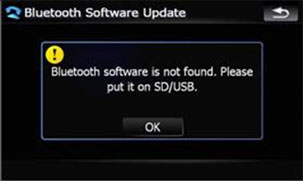
After updating the 2.0 error and folowing the instructions perfectly, I went to the next step and got this error "Bluetooth software is not found. Please put it on SD/USB. Any ideas? I reformatted the SD card and loaded the update on it again, but no joy.
OK I think Pioneer Deserve A small/light applause. I think Just maybe after this Update we can stop talking so crap about pioneer and the F series, and start some loving on our Navs!!
Much better response, Love the new screen brightness. load time still little slow, but definitely duable.
On a side note My satisfaction rating for this product went way up!
I am very happy with this update. Other then the image.res file problem I am having none so far...
OK, I am an idoit. I did not see the bluetooth update was a seperate update file!! I was so giddy to install the update to notice!
On a side note My satisfaction rating for this product went way up!
mine as well and i have the dnx5120. i might have to trade it in now... 
BTW this topic here guys
http://www.avic411.com/forum/viewtopic.php?t=18427
I went into test mode and sure enough it was back to the factory settings on my unit after the update. I did this mod again, I am not sure if it will even help now, but I figured I would try it anyway.
I loaded the update on my f700 and everything seems to be much better now. Haven't noticed any bugs yet but it's late and will see what happens tomorrow.
Hey guys i just found this forum and i purchased my 700 three weeks ago. I installed the new update last night everything downloaded fine but now i get the password screen come up. The problem is that the password screen i grey and i can't enter the password. Any help would be great.
Thanks Mitch
On a side note My satisfaction rating for this product went way up!
mine as well and i have the dnx5120. i might have to trade it in now...
WOW... welcome back to the AVIC world dj! 
Hey guys i just found this forum and i purchased my 700 three weeks ago. I installed the new update last night everything downloaded fine but now i get the password screen come up. The problem is that the password screen i grey and i can't enter the password. Any help would be great.
Thanks Mitch
Just to rule out the simple stuff, is your handbrake on? (assuming not bypassed)
Installed this on my 700bt last night. boot time is greatly increased, I would say the device is up and i can change the station in 15-20 seconds (I don't have an IPOD hooked up, I'm a Zune user). Bluetooth sound quality is greatly improved as well (using lg chocolate v2 on verizon wireless)
OK, I'm now on Pioneer's team - I, along with others, have talked trash about them for putting out the half-baked F series units, but at least they had the cojones to engineer up and do something about it! They obviously spent a lot of time researching and writing this 2.0 update and it shows - pretty much every complaint I had about the original version has been resolved. My contacts even sync over each time at boot up, just like a good Parrot-based Bluetooth system should! Kudos, Pioneer; you earned some major points with this latest update.
Do you happen to have an iPod connected? did it fail a connection?
I did the updates, firmware & bluetooth, last night on my F90. I didn't ride around or even mess with it after the updates.
Rolled out this morning and it dropped connectivity with my 5th gen 80gb twice and picked back up the connection then dropped it completely before I even got out my apartment complex. I unplugged it and plugged it back in....still no connection. I turned off the car and turned it back on and it worked. It did not drop the connection from that point until I arrived at school and found a parking spot so initially it sucked right now it is working.
I HATE this new style ipod cable; the last model was 100x more reliable and never dropped a connection. I still don't know if the cable is to blame or the unit, probably the unit though. I have another cable and already had my ipod replaced because I thought it was the ipod. The thing works sometimes and doesn't work other times.
can anyone confirm if software bypass still works with this update?
can anyone confirm if software bypass still works with this update?
Read the whole thread - specifically, p.4.