Search Archive

New Nav mod (Updated Mar 23, 2010) (Now 3.0 version)

By BorisM · May 24, 2009in Completed Mods/Themes💬 684 posts👁️ 133,910 views
Page 11 of 28
Posted Jul 21, 2009 · 20:26 UTC#251
Actually - add that line to the older skin - the one that has the switch for "automatic re-route"


Thanks -


Wouldn't it be easier to just add it to SYS.TXT -- no need to mess with archives then.


And something is definitely wrong with your archiving... Rezipping an unzipped DATA.ZIP should work, as long as the structure is still there...

Posted Jul 21, 2009 · 20:34 UTC#252
Actually - add that line to the older skin - the one that has the switch for "automatic re-route"


Thanks -


Wouldn't it be easier to just add it to SYS.TXT -- no need to mess with archives then.


And something is definitely wrong with your archiving... Rezipping an unzipped DATA.ZIP should work, as long as the structure is still there...


I originally added it to sys.txt and it didn't work. So i thought that the unit might be bypassing that file. And I don't have any idea why my zip files are not working - I didn't change any of the structure. I'm doing a virus scan now.

Posted Jul 21, 2009 · 21:00 UTC#253
I originally added it to sys.txt and it didn't work. So i thought that the unit might be bypassing that file. And I don't have any idea why my zip files are not working - I didn't change any of the structure. I'm doing a virus scan now.


It most definitely is using SYS.TXT -- I have quite a few settings there. I'd check that you have syntax correct, and that there's no overriding setting in pioneer.ini... Although I think SYS.TXT might actually take precedence over it...

Posted Jul 22, 2009 · 00:00 UTC#254

Can anyone tell me were it declares the vehicle icon and the route text? I can't seem to pin point it. Once I find that my skin will be ready for you guys to test. It is not in browsemap_800_480.ui or navigatemap_800_480.ui which is were the majority of my skin changes have been made.


post-22402-12872757980791_thumb.jpg

Posted Jul 22, 2009 · 00:03 UTC#255

Here is where the skin I am working on stands right now. couple more changes and I will be set.


post-22402-12872757981856_thumb.jpg

post-22402-12872757982203_thumb.jpg

post-22402-12872757982971_thumb.jpg

post-22402-12872757983809_thumb.jpg

post-22402-12872757985087_thumb.jpg

Posted Jul 22, 2009 · 00:10 UTC#256

This looks sick! very nice and neat!

Posted Jul 22, 2009 · 00:17 UTC#257
Here is where the skin I am working on stands right now. couple more changes and I will be set.


avic 001.jpg


avic 002.jpg


avic 003.jpg


avic 004.jpg


avic 005.jpg


is that on the 3.0?

Posted Jul 22, 2009 · 00:19 UTC#258
Here is where the skin I am working on stands right now. couple more changes and I will be set.


avic 001.jpg


avic 002.jpg


avic 003.jpg


avic 004.jpg


avic 005.jpg


is that on the 3.0?


No he's unfortunately still on Yuri's 2.0. After seeing that i want to revert back now. lol

Posted Jul 22, 2009 · 18:45 UTC#259

So is there a way to add a TTS mute button to this mod?

Posted Jul 22, 2009 · 20:33 UTC#260
So is there a way to add a TTS mute button to this mod?

I put one on the main navigation screen but I am sure you can put it just about anywhere you want, here is the code that I used. You will need to point to your image and use the X and Y to put it where you would like. You can also change the visiblemodel to make it show in different situations.


;Voice guidance mute


On a side note, does anyone now how to clear the cursor on the browse map screen. You can select a cursor point by just touching the screen but how do you clear that choice?

Posted Jul 22, 2009 · 20:55 UTC#261
So is there a way to add a TTS mute button to this mod?

I put one on the main navigation screen but I am sure you can put it just about anywhere you want, here is the code that I used. You will need to point to your image and use the X and Y to put it where you would like. You can also change the visiblemodel to make it show in different situations.


;Voice guidance mute


On a side note, does anyone now how to clear the cursor on the browse map screen. You can select a cursor point by just touching the screen but how do you clear that choice?


press the map button.

Posted Jul 22, 2009 · 21:46 UTC#262

That takes you back to the normal map view or will clear the cursor while in the normal map view. I would like to be able to clear the cursor and stay in the browsemap mode that Stanislavovich created.


Anyone know if that is possible?

Posted Jul 22, 2009 · 22:10 UTC#263
That takes you back to the normal map view or will clear the cursor while in the normal map view. I would like to be able to clear the cursor and stay in the browsemap mode that Stanislavovich created.


Anyone know if that is possible?


The only way I can think of is creating a button and putting in a code like this.


onrelease='map.MOVECURSORTOGPS' visiblemodel="!ui.vFullScreenCockpit" USE_SEPARATED_SAFETY_MODE=0>


I haven't tried it but I'm somewhat certain it's possible.

Posted Jul 24, 2009 · 03:55 UTC#264

F500 with 2008.4 maps and 2008.10 POI.


When viewing POI info, the CALL button is disabled. I can't call the POI by clicking the call button.


Is there a simple fix for this?

Posted Jul 24, 2009 · 14:43 UTC#265

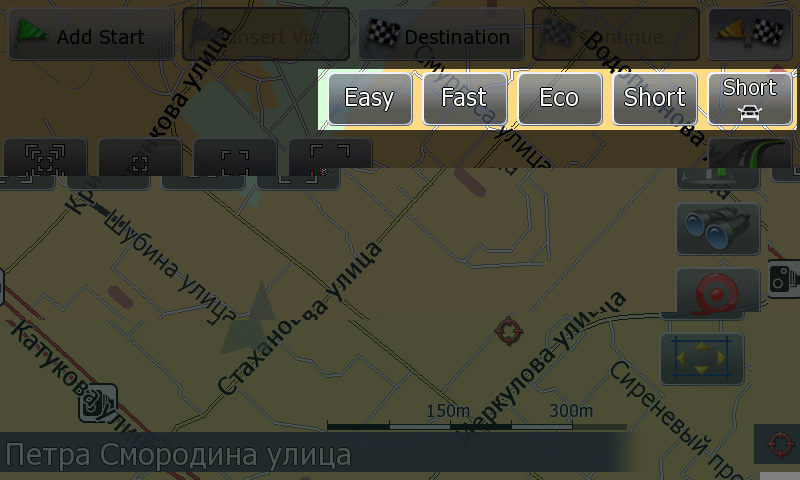
New version is released:

23.07.2009 v8.3

1. Mute button on the Avoid screen turns on/off voice guidance on route. Remembers last state. When not navigating, voice is always present (i.e. overspeed warnings).

2. Added indicators to the navigation screen -- top left, if a route is present. "Lips" -- voice off, "yellow flag" -- via point is shown, "road" -- next street is shown. "Lips" have priority.

3. Track control: shows track color in the track list. "Fit to screen" available only when track color is selected.


Fixes:

1. Possible crashes when using alternative poi.icons

2. "overview mode" settings did not work.


Please download from: http://depositfiles.com/files/ffmx99ygg


PS Jason, can we attach this to the forum?
Posted Jul 24, 2009 · 19:09 UTC#266

Boris

The version no. 8.3 is a little confusing as it still is a mod for iGo 8.0 and not iGo 8.3. Am I correct?


mbk

Posted Jul 24, 2009 · 19:44 UTC#267
Boris

The version no. 8.3 is a little confusing as it still is a mod for iGo 8.0 and not iGo 8.3. Am I correct?


mbk


Yeah, it's still for version 2.x firmware. It just happens to be revision 8.3 of the skin.

Posted Jul 24, 2009 · 19:50 UTC#268

Hoping someone here can help... Found some nice looking button images at


viewtopic.php?f=34&t=25947


but cannot find how to modify my 3.0 upgraded unit to use them. Can anyone help? THANKS!

Posted Jul 24, 2009 · 21:01 UTC#269
Hoping someone here can help... Found some nice looking button images at


http://avic411.com/forum/viewtopic.php?f=34&t=25947


but cannot find how to modify my 3.0 upgraded unit to use them. Can anyone help? THANKS!


Could you please stop being so annoying and posting unrelated BS in every thread you can find?

Posted Jul 24, 2009 · 22:10 UTC#270
Fixes:

1. Possible crashes when using alternative poi.icons


ohhhh.. that's why my unit crashed again nagain 2 days ago... thanks for the fix and the new version!

I think this mod is so great that i don't install iGO 8.3 :D

Posted Jul 24, 2009 · 22:44 UTC#271
Fixes:

1. Possible crashes when using alternative poi.icons


ohhhh.. that's why my unit crashed again nagain 2 days ago... thanks for the fix and the new version!

I think this mod is so great that i don't install iGO 8.3 :D


Most probably... You should've posted the issue, as Yuri did have a quick fix pretty much right away when I asked him about it.

Posted Jul 25, 2009 · 01:40 UTC#272

Some nice enhancements here! Thanks! Especially for adding a voice mute button.


Quick questions in navigate mode:

1. What are the 2 new dots in the top right corner?

2. What is the new icon to the left of the route mode icon? It changes to a red dot when clicked.


At one point, I was able to see a "menu" button in the bottom right of the map. Clicking it took me to the destination menu. I can't find the "menu" button again.


At one point, the destination menu had buttons on the bottom, one of them being "exit". Clicking this button crashed the igo app.

Posted Jul 25, 2009 · 03:17 UTC#273
Some nice enhancements here! Thanks! Especially for adding a voice mute button.


Quick questions in navigate mode:

1. What are the 2 new dots in the top right corner?

2. What is the new icon to the left of the route mode icon? It changes to a red dot when clicked.


At one point, I was able to see a "menu" button in the bottom right of the map. Clicking it took me to the destination menu. I can't find the "menu" button again.


At one point, the destination menu had buttons on the bottom, one of them being "exit". Clicking this button crashed the igo app.


The green dots are most probably the GPS signal indicator (added in the previous release).

Not sure about #2 -- I didn't load it yet.


The all those menu buttons are only visible when when in debug mode. Unless you are editing the skin, you probably don't need them...

Posted Jul 25, 2009 · 10:52 UTC#274
Most probably... You should've posted the issue, as Yuri did have a quick fix pretty much right away when I asked him about it.

Well, i had no idea that the problem could be Yuri's mod cause i installed Yuri's first and later add a huge load of POIs n buildings. I rather thought i messed up everything by myself...


About these greeen dots: i also thought it might be the GPS signal but it's always green here, i checked it in a tunnel after the voice said "gps signal lost" but it still was green. :?

Posted Jul 25, 2009 · 20:18 UTC#275
Most probably... You should've posted the issue, as Yuri did have a quick fix pretty much right away when I asked him about it.

Well, i had no idea that the problem could be Yuri's mod cause i installed Yuri's first and later add a huge load of POIs n buildings. I rather thought i messed up everything by myself...


About these greeen dots: i also thought it might be the GPS signal but it's always green here, i checked it in a tunnel after the voice said "gps signal lost" but it still was green. :?


Hmmm... I'll check.

Page 11 of 28