Search Archive

2012 US/CAN Maps - CNSD-310FM/UC upgrade (updated to supereasymethod - beta)

By pionara · Sep 20, 2012in Hacks/Mods💬 645 posts👁️ 199,662 views
Page 22 of 26
Posted Aug 15, 2013 · 03:06 UTC#526

sweet. thanks for the quick reply. waiting for my 8gb microsd hc card to come in and then ima be doing this. will report back! 


*EDIT: jumped the gun and just took an SD card from my camera. Everything worked flawlessly, as per directions. I didnt have much time to play with the new update but did anyone notice it having a bit of a lag? 

Edited Aug 15, 2013 by bheng
Posted Aug 20, 2013 · 18:04 UTC#527

OK, just checking. To answer your original question, no - I'm not noticing any difference in connection reliability. I often need to re-pair due to frequent Android OS updates (I am using a very hacked phone which was originally running WinCE (HTC HD2)).  Someimes it takes a couple tries before everything settles-down and works properly.

Hm, OK.  Basically, every time I get in the car, my bluetooth connects and then maybe 2 minutes later as I'm driving it disconnects.  If I got in and manually connect again, it'll say it's connected but Pandora and Aha won't work.  Had no connection issues like this with the previous version.  Is it possible to revert back?

Posted Aug 20, 2013 · 18:42 UTC#528

Hm, OK.  Basically, every time I get in the car, my bluetooth connects and then maybe 2 minutes later as I'm driving it disconnects.  If I got in and manually connect again, it'll say it's connected but Pandora and Aha won't work.  Had no connection issues like this with the previous version.  Is it possible to revert back?

It is possible to reinstall the previous version, but I've never done it so I can't walk you through. I think there is an option in TestMode to force load from SD (presumably the installation SD for the previous version?)   But first, it isn't clear here - are you re-pairing or just manually connecting after the connection is lost? I'm suggesting you re-pair - by deleting the pairing from the BTmenu on the phone, putting the AVIC in "visible" mode, and re-discovering the AVIC from the phone..

Edited Aug 20, 2013 by RonS
Posted Aug 21, 2013 · 16:04 UTC#529

It is possible to reinstall the previous version, but I've never done it so I can't walk you through. I think there is an option in TestMode to force load from SD (presumably the installation SD for the previous version?)   But first, it isn't clear here - are you re-pairing or just manually connecting after the connection is lost? I'm suggesting you re-pair - by deleting the pairing from the BTmenu on the phone, putting the AVIC in "visible" mode, and re-discovering the AVIC from the phone..

I've done that a couple times now, and yes, that'll get it to work if I re-pair it every time, but I shouldn't have to do that.  It should just recognize my phone and work whenever I get in the car like it did previously.

Posted Aug 29, 2013 · 00:13 UTC#530

***REMOVED***

Edited Aug 29, 2013 by tuscani66
Posted Sep 04, 2013 · 07:08 UTC#531

This worked on my X920.


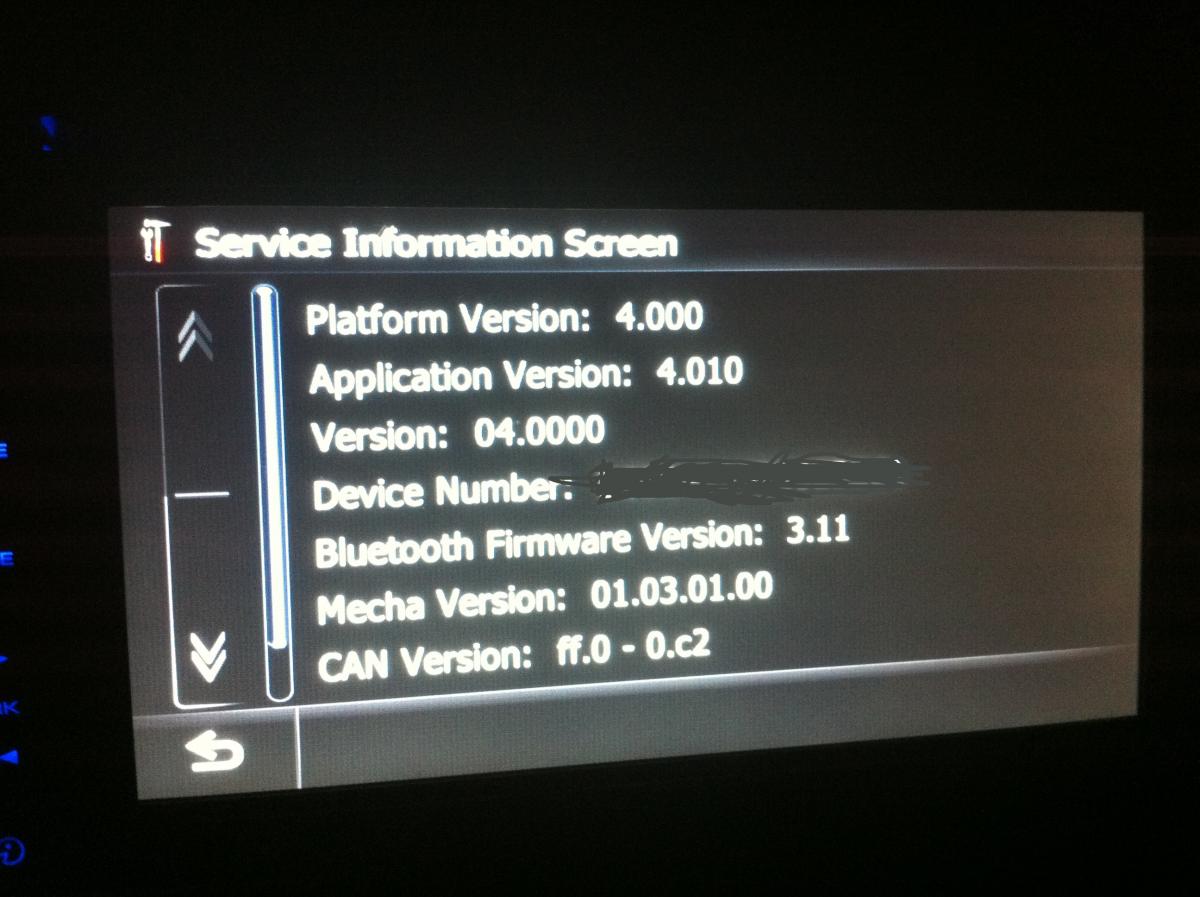
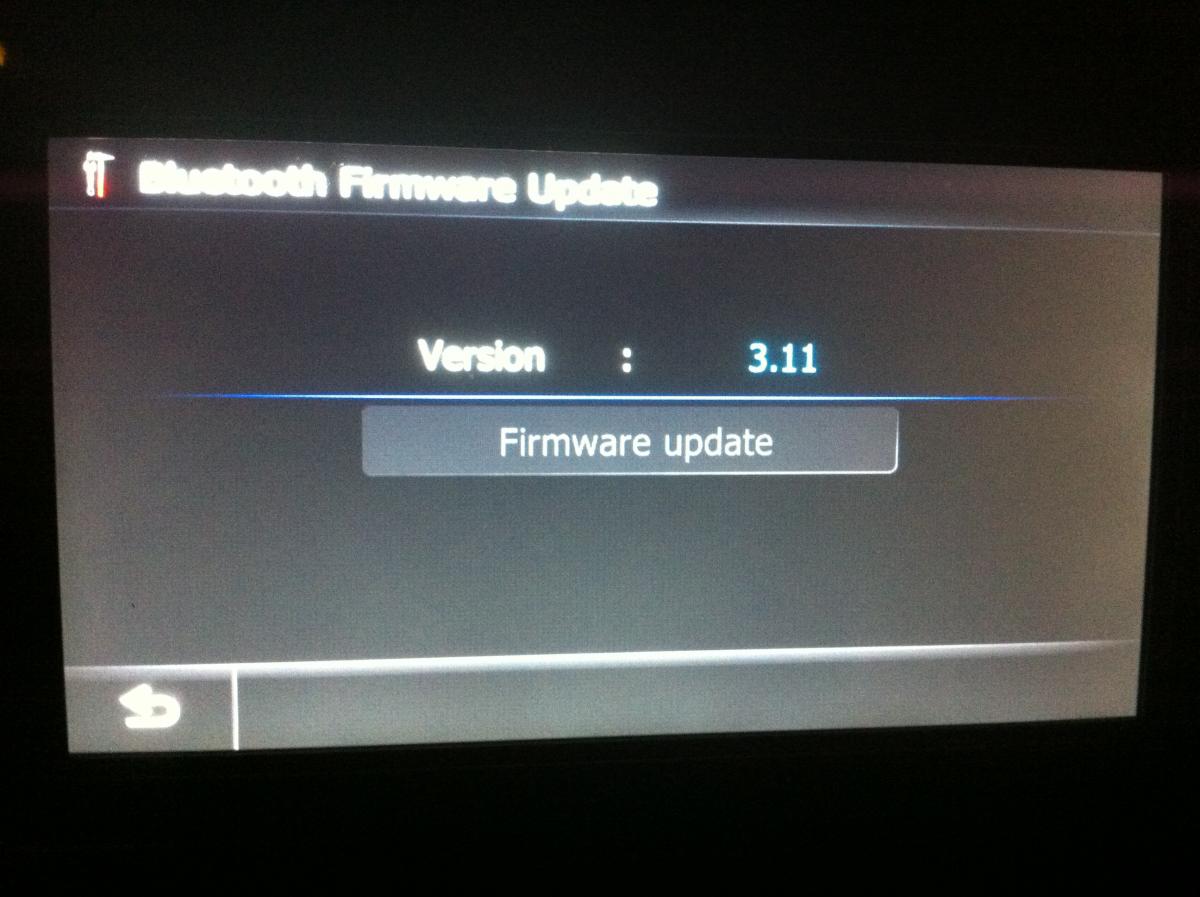
I did have a hiccup the first try.  It would get to 99% and then say something like "...Incorrect SD Card..."  I quick reformatted my 16 GB Kingston card with FAT32, used a different computer to copy the same files with 7-Zip, and the second try was flawless except I can't upgrade my bluetooth firmware.  My bluetooth firmware is at 3.11.  The option is greyed out.  Another difference was that after the update, I could not select different languages.  US English was already selected and the rest were greyed out.


This was my first update on my unit.


Any ideas?

post-94464-0-32027700-1378278499_thumb.jpg

post-94464-0-10603900-1378278521_thumb.jpg

Posted Sep 04, 2013 · 13:16 UTC#532

Did you have the SD (with \FIRMWARE) inserted when you observed the grayed update button? Not sure it matters but just wondered.


If you still can't update it try a hard reset (either disconnect the vehicle battery or pull fuses to both yellow and red power - if you are sure you know which ones).  I had other weird things on my HU after the last upgrade - and the reset fixed them.

Edited Sep 04, 2013 by RonS
Posted Sep 04, 2013 · 21:34 UTC#533

I am pretty sure I had removed the SD card.  I will try again tonight with the card in.  I hope I had a great DOH! and that is the problem.


Thanks!

Posted Sep 05, 2013 · 23:58 UTC#534

This worked on my X920.


I did have a hiccup the first try.  It would get to 99% and then say something like "...Incorrect SD Card..."  I quick reformatted my 16 GB Kingston card with FAT32, used a different computer to copy the same files with 7-Zip, and the second try was flawless except I can't upgrade my bluetooth firmware.  My bluetooth firmware is at 3.11.  The option is greyed out.  Another difference was that after the update, I could not select different languages.  US English was already selected and the rest were greyed out.


This was my first update on my unit.


Any ideas?

Make sure that your Bluetooth is turned on before the update.

Posted Sep 06, 2013 · 23:53 UTC#535

Thanks for the tips.  The issue with BT upgrade was that I had taken the SD card out after the update.

Posted Sep 11, 2013 · 17:59 UTC#536

Need some help! First off though, thanks so much for posting this! I followed the directions and the update process seemed to go very smooth, I updated from an original z120bt. Everything seems to be updated but I have a problem with the bluetooth controlling pandora and aha radio. It says that the bluetooth is disconnected but it's not, the phone and audio through bluetooth work fine. I have an iphone 5 with ios 6.1.4, does it not work with the iphone5? All the version numbers are what Pionara said they would be In the service information screen, however the CAN version just has dashes, no numbers. Is this a problem? what is CAN version btw? Also, I would like to use the appradio mode. Will it work with my head unit and the cdiv202navi unit? And finally, does anyone know how the new ios7 update that's coming out next week will effect all this? Any help is appreciated! Thanks!

Posted Sep 12, 2013 · 00:45 UTC#537

Need some help! First off though, thanks so much for posting this! I followed the directions and the update process seemed to go very smooth, I updated from an original z120bt. Everything seems to be updated but I have a problem with the bluetooth controlling pandora and aha radio. It says that the bluetooth is disconnected but it's not, the phone and audio through bluetooth work fine. I have an iphone 5 with ios 6.1.4, does it not work with the iphone5? All the version numbers are what Pionara said they would be In the service information screen, however the CAN version just has dashes, no numbers. Is this a problem? what is CAN version btw? Also, I would like to use the appradio mode. Will it work with my head unit and the cdiv202navi unit? And finally, does anyone know how the new ios7 update that's coming out next week will effect all this? Any help is appreciated! Thanks!


Is the pandora app on on your phone? Try bringing the pandora app up on the phone first and then connecting from the HU. Same would go for AHA. My guess is CAN means Canada which would probably be the same as the US version.

Edited Sep 12, 2013 by mds2004
Posted Sep 12, 2013 · 12:53 UTC#538

 All the version numbers are what Pionara said they would be In the service information screen, however the CAN version just has dashes, no numbers. Is this a problem? what is CAN version btw? 


My guess is CAN means Canada which would probably be the same as the US version.


I think CAN is for CanBus http://en.wikipedia.org/wiki/CAN_bus

Apparently the HU has some support for it, but it would require additional hardware to communicate with. Maybe to interface w steering-wheel controls and external amps.

Posted Sep 12, 2013 · 16:11 UTC#539

Is the pandora app on on your phone? Try bringing the pandora app up on the phone first and then connecting from the HU. Same would go for AHA. My guess is CAN means Canada which would probably be the same as the US version.

Yes, the pandora and aha radio app is on my phone. I tried bringing them up first but no luck. The audio will play through bluetooth but I have no control from the head unit. Maybe it's cause of the iphone 5?


I think CAN is for CanBus http://en.wikipedia.org/wiki/CAN_bus

Apparently the HU has some support for it, but it would require additional hardware to communicate with. Maybe to interface w steering-wheel controls and external amps.

Ah, ok I understand now. The only other hardware I have is XM radio and HD radio units and they are working good. So I guess it doesn't matter that is doesn't have version number?

Posted Sep 12, 2013 · 21:25 UTC#540

Yes, the pandora and aha radio app is on my phone. I tried bringing them up first but no luck. The audio will play through bluetooth but I have no control from the head unit. Maybe it's cause of the iphone 5?


Ah, ok I understand now. The only other hardware I have is XM radio and HD radio units and they are working good. So I guess it doesn't matter that is doesn't have version number?

Ya, I believe mine is empty too. Been that way for several updates.

AFA Pandora and other apps, make sure you are set up for wired. Check Settings/AV System Settings/App Connection. It must be set to "Wired" for iPhones/iTouch. Of course that means you need the adapter cable. See pg 133 in Z140 manual. Only Android/Blackberry can handle the Aha/Pandora apps over BT. Apple doesn't support the protocol required.

Edited Sep 12, 2013 by RonS
Posted Sep 12, 2013 · 21:39 UTC#541

Ya, I believe mine is empty too. Been that way for several updates.

AFA Pandora and other apps, make sure you are set up for wired. Check Settings/AV System Settings/App Connection. It must be set to "Wired" for iPhones/iTouch. Of course that means you need the adapter cable. See pg 133 in Z140 manual. Only Android/Blackberry can handle the Aha/Pandora apps over BT. Apple doesn't support the protocol required.

Ok thanks, that answers that question. I was considering getting the cdiv202navi unit to control the apps. Do you know if this will work for me?

Posted Sep 12, 2013 · 23:18 UTC#542

Ok thanks, that answers that question. I was considering getting the cdiv202navi unit to control the apps. Do you know if this will work for me?

I don't know - I use the old cable for iPods. But I have an older iTouch. I'm sure someone will know & respond.

Posted Sep 13, 2013 · 19:04 UTC#543

I don't know - I use the old cable for iPods. But I have an older iTouch. I'm sure someone will know & respond.


Yes I wonder if anyone has tried it. I looked at the manual for the cd-iv202navi and it has a 2 switch positions on it for different head units. One of them is for AVIC-140BH. I'm just wondering since my unit is a 120bt updated to the versions from this thread if it will work. I'm thinking about getting it but want to but would like to know if anyone else has made it work. Anyone? Thanks!

Posted Sep 18, 2013 · 00:26 UTC#544

I just used the updated method in the top post and it worked perfectly on my Z130-BT.  I used the torrent provided.

Posted Sep 21, 2013 · 04:07 UTC#545

Been a member since the avic-z1 days and even posted the first bypass instructions on pulsing the illumination wire (I didn't discover it, read it on the12volt, but just happened to be the first to relay the info here.) Been inactive for quite a while but checked in to see what tricks were available for my z110. Read in the instructions and followed them without issue other than the "radio error" so I disconnected the msn traffic receiver and all was good to go. I must say the appradio feature is far more valuable, to me anyway, than the map updates. It's like an entirely new head unit and far more responsive. Plus it forced me to clean up my wiring and finally install a switch for the power antenna so I can finally go through a car wash without mangling it!  :)


Anyhow, just wanted to post a sincere thank you for all involved in making this available and posting such an easy and descriptive guide. It is much appreciated!

Posted Sep 22, 2013 · 18:07 UTC#546

I have a Z120 that was updated to the Z130 software about a year ago.  Followed Pionara's instructions to the letter and this update was successful.  So far no issues.

Posted Sep 22, 2013 · 19:41 UTC#547

Been a member since the avic-z1 days and even posted the first bypass instructions on pulsing the illumination wire (I didn't discover it, read it on the12volt, but just happened to be the first to relay the info here.) Been inactive for quite a while but checked in to see what tricks were available for my z110. Read in the instructions and followed them without issue other than the "radio error" so I disconnected the msn traffic receiver and all was good to go. I must say the appradio feature is far more valuable, to me anyway, than the map updates. It's like an entirely new head unit and far more responsive. Plus it forced me to clean up my wiring and finally install a switch for the power antenna so I can finally go through a car wash without mangling it!   :)


Anyhow, just wanted to post a sincere thank you for all involved in making this available and posting such an easy and descriptive guide. It is much appreciated!

Hi, I updated my z120bt but the appradio feature is not working. I have an iphone5 and I tried the cd-iv202navi unit but it does not recognize my iphone. I put the app mode on wired and bluetooth in the settings but nothing. Could you tell me how you got it to work? Thanks!

Posted Sep 23, 2013 · 17:41 UTC#548

I successfully upgraded my X920 to version 4 using the guide from the first post and wanted to give some feedback based on my experience. Some of the installation details are somewhat murky because of how long this thread has become. If there isn't one already, a consolidated step by step should be posted in the forum's FAQ area.


- You will need at least a 4GB MicroSD card to do the firmware and map update at the same time. 8GB cards can be found on Amazon for $7.

- The torrent file has a folder inside of it that has a file you need to copy out in addition to the other two files on the original post. I cannot remember the name of the folder at the moment but it has a read me.txt file inside of it that tells you exactly what to do. I didn't do this the first time and I got the "insert correct SD card error". I'm not sure if this is related to not taking the aforementioned step or because I tried un-rar'ing the map update on my Mac. On my second try I did everything on my PC and did the file copy from the torrent folder and everything worked. In addition, the second time I attempted the install the actual unit went into some sort of DOS mode and displayed a message that it had copied some files. At that point I couldn't do anything so I recycled the ignition with the SD card still in the unit and when it booted back up, it went into the firmware update and finished 30 minutes later with no issues.


If anyone is reading this and would like to clarify the above, please feel free. Thanks to all those who contributed to this hack!
Edited Sep 23, 2013 by The Spectacle
Posted Sep 23, 2013 · 19:52 UTC#549

Hi, I updated my z120bt but the appradio feature is not working. I have an iphone5 and I tried the cd-iv202navi unit but it does not recognize my iphone. I put the app mode on wired and bluetooth in the settings but nothing. Could you tell me how you got it to work? Thanks!

I have an iphone4 so I can't speak to the 5. Did you install the appradio app from the appstore and launch it?

Posted Sep 24, 2013 · 00:23 UTC#550

helph  *****message   inser valid sd card ******* help  avic f930bt    upgrad cnsd310fm

Page 22 of 26