Search Archive

AVIC Z1/Z2/Z3 Upgrade to AVIC Z3 w/2009 Maps

By AFMagnum · Aug 20, 2007in Hacks/Mods💬 535 posts👁️ 186,645 views
Page 7 of 22
Posted Nov 10, 2007 · 18:05 UTC#151

Reading this thread from the beginning it would appear that the Toshiba MK8032GAX drive, available here in the GTA, is a good choice for this project.


I'm puzzled by a comment made earlier:

"I took the toshiba 60gb hdd, turned off security by putting it in my laptop...."

Could someone please explain what that means and how it's done with only a desktop?


:!: Thanks AFMagnum, awesome thread :!:

Posted Nov 11, 2007 · 03:38 UTC#152
My experience with Z1 to Z2 Upgrade;


11) I removed the pioneer disclaimer files (renamed the files .old but left them in place). So now only my Splash screen shows up.


which files are these?


In the partition (LDATA) there are 2 files in DIRECTORY :BG\COPYRIGHT. They are named CPYCUSTOM.BMP and CPYDEFAULT.BMP They are the bitmap files that show on any splash screen - default or custom :( . I renamed the files CPYCUSTOM.BMP.old and CPYDEFAULT.BMP.old, Leaving them in place incase the system accounts for them in some way. The disclaimers do not show up and my custom splash screen displays alone, and with no system side affects :lol: .

Posted Nov 12, 2007 · 00:56 UTC#153

thanks man but i thought it was the stupid warning thing you have to hit ok on the first time you go to the map screen :( anyway to remove those ones?

Posted Nov 12, 2007 · 01:05 UTC#154

No


thanks man but i thought it was the stupid warning thing you have to hit ok on the first time you go to the map screen :( anyway to remove those ones?
Posted Nov 12, 2007 · 23:42 UTC#155
I'm puzzled by a comment made earlier:

"I took the toshiba 60gb hdd, turned off security by putting it in my laptop...."

Could someone please explain what that means and how it's done with only a desktop?


I did mine like that. Basically just hooked it as the main HDD in a laptop and then booted with the floppy of the security removal tool made as per the awesome instructions from AFMagnum. That was easy! :lol:


More info HERE, look under "Q: How do I disable the lock on my HDD" and follow the instructions...

Posted Nov 14, 2007 · 03:32 UTC#156

Any updates on a key generator?

Posted Nov 14, 2007 · 19:14 UTC#157

I have a Z1 that was built in March, 2006.


If I get the CNDV-700HD disc and do the upgrade, will it kill my ability to just simply flick my lights during start-up so I can watch movies on the go?


Is this the same as a Z1 to Z2 upgrade?

Posted Nov 14, 2007 · 21:42 UTC#158

Good luck trying to buy the disc. I've been on the infamous waiting list for months now.


Plus non of the authorized dealers in my area have them either.


If you do the upgrade with the disc, then you have to do the 2 wire bypass cause the light flashing bypass will be disabled.

Posted Nov 16, 2007 · 00:18 UTC#159
I'm puzzled by a comment made earlier:

"I took the toshiba 60gb hdd, turned off security by putting it in my laptop...."

Could someone please explain what that means and how it's done with only a desktop?


I did mine like that. Basically just hooked it as the main HDD in a laptop and then booted with the floppy of the security removal tool made as per the awesome instructions from AFMagnum. That was easy! :lol:


More info HERE, look under "Q: How do I disable the lock on my HDD" and follow the instructions...


Thanks Semo, that clears things up. :)

I'll have a go at it this weekend.

Posted Nov 16, 2007 · 04:23 UTC#160

Does anyone know where I can get the update dvd?

Posted Nov 18, 2007 · 05:57 UTC#161

I know that the image is bypass but my question does the image have the latest MAPs that come out with the update CD??

thanks. I will be buying a hard drive for my upgrade. And thinking about buying another hard drive for my sisters Z2 because her is the older version.

Posted Nov 18, 2007 · 15:18 UTC#162

Thanks to everyone for all the information that was posted on the site for the Z2 upgrade. Hopefully, I can help some of you who were trying to save some of the settings from your old Z1. This was important to me as I had close to 100 entries in my address book.


After searching the site I could not find any information on how to save address book settings, history, recent calls list, route information, route history, etc. So, for anyone who is interested, here’s what I did when I upgraded my Z1.


To make this work you should first follow AFmagnums instructions on how to do the upgrade. Be sure to save an image of your existing HDD before starting the upgrade. Once that is complete you can follow the steps below to restore all of your information. In my case I used a new 60G Toshiba HDD instead of the existing Z1 drive but this will work with your existing drive as well. Also, I used Norton Ghost to do all this but Acronis should work as well. So, here’s the steps…


1) During the upgrade you should have made an image of your original Z1 drive. This image will be used to restore your settings. You should re-install the HDD and let it go through the update process. When this is done all your address book settings will be removed.


2) Power down and remove the HDD. Install it in your PC.


3) Using the old image from the Z1 restore the MSV (music) partition and the User partition to the newly upgraded HDD (if you have already moved your music then no need to restore the MSV partition). That’s the last two partitions on the HDD. If you left them at their original size that’s the 9.308GB and the 572.8 MB partitions. In my case I increased the MSV to30GB and expanded the User partition using the remaining space on the HDD.


4) That’s it! Now re-install the HDD to the Z2 and you will see all your information restored. Note that the Z2 will actually update the address book to Z2 format. The original address book was in the Z1 format.


From what I can tell this is what is restored:

All your music (this was explained in an earlier post, I moved music and all the user info at the same time).

Custom Backgrounds

Bluetooth info, telephone call history

Log Files

Guide info

Language

Location

Stock info

Search info

Volume settings

Route info, route studies, trace history

Address book, memory, favorites, history, images

Posted Nov 18, 2007 · 16:52 UTC#163

Thanks for all who contributed to these instructions. I was able to get it all working on the first try. It took about two hours, mostly to unlock and restore the image.


I also created a bootable CD-Image ISO out of the MHDD disk as the one PC I have that has IDE didn't have a floppy. Don't know if this was already done so sorry if this is a dupe but for those without floppy drives you can use the attached image to use a CD-ROM to disable security features on the drive instead.

Posted Nov 18, 2007 · 16:54 UTC#164

forgot attachment

MHDD-Bootable-CD.rar

Posted Nov 21, 2007 · 19:12 UTC#165

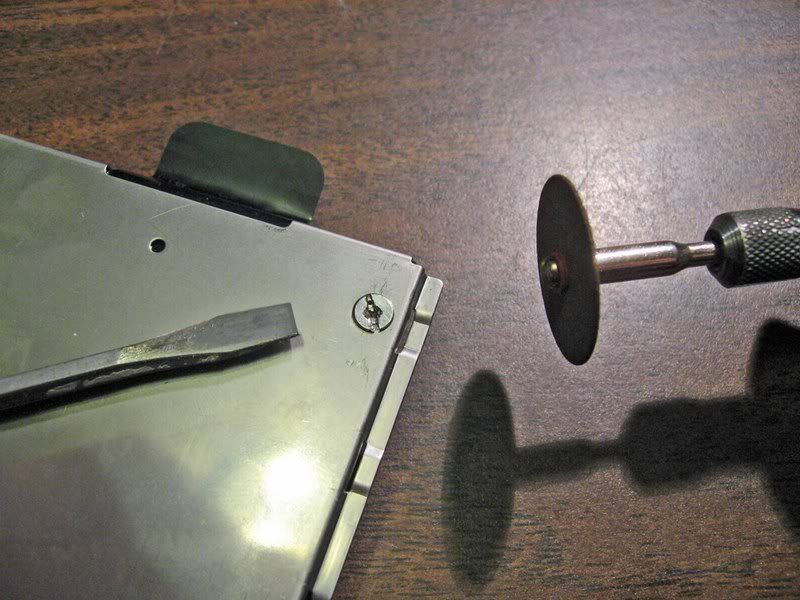
'Had the same problem removing the screws that hold the HDD to the mounting plate that others have reported.

Here is a quick way to overcome:

Grind a slot into the screw head with a dremel tool and immediately, while the screw is still hot, use a good fit flat screwdiver and the sucker will come out without effort. :):idea:


Z2hdd.jpg


Add to FAQ at the top of this thread. :?:

Posted Nov 21, 2007 · 20:40 UTC#166

Maybe I'm missing something or didn't read thouroughly but why are you guys removing the HD from the plate? I just left it attached to the plate and hooked the IDE cable directly to the back of the drive...

Posted Nov 22, 2007 · 15:59 UTC#167
Maybe I'm missing something or didn't read thouroughly but why are you guys removing the HD from the plate? I just left it attached to the plate and hooked the IDE cable directly to the back of the drive...


If you want to REPLACE the drive with a bigger one then you have to re-use the plate.

The prefered way of updating to the Z2 image appears now to be going with a new drive.

You get 50 gig (Toshiba 80 gig drive) of musik storage and you keep your existing drive untouched.

Very little difference in cost.

Posted Nov 22, 2007 · 16:24 UTC#168

ahh that makes sense.

Posted Nov 26, 2007 · 21:00 UTC#169

While I do see the advantage of doing the upgrade if you are installing a bigger hard drive but, for those reusing the Z1 hard drive wouldn't it be easier to buy the CNDV-700HD dvd and do the upgrade that way?

Posted Nov 26, 2007 · 21:56 UTC#170
While I do see the advantage of doing the upgrade if you are installing a bigger hard drive but, for those reusing the Z1 hard drive wouldn't it be easier to buy the CNDV-700HD dvd and do the upgrade that way?


If you are somewhat technical, this really isn't that hard. In addition, when this method came out, the upgrade DVD's were extremely hard to come by.

Posted Nov 27, 2007 · 20:43 UTC#171

went through the whole thread and and I might have missed it but does anyone know what the max partition size is for the music? dont want to order a bigger hard drive and waste the extra space for no reason. thanks.

Posted Nov 27, 2007 · 21:26 UTC#172

there isn't a maximum size for the music as I can tell.

Posted Nov 28, 2007 · 04:24 UTC#173

I also had a problem removing the original hard drive from the tray. I took the Lazy Man's way out and simply ordered the replacement parts from www.ued.net. Big thanks to the people that posted the service manual which allowed me to find the part numbers listed...but takes about 3 weeks to ship because these parts are not kept in stock. Total is about $20, but like I said, I'm lazy. Hope this helps someone...


Part # Part Price QTY

CBA1805 SCREW $0.92 4

CND3002 HOLDER $12.94 1

CNM8452 SPACER $3.81 1

Posted Dec 03, 2007 · 22:41 UTC#174

Okay maybe i missed something i have a couple of days off from worka nd i was going to attempt this. I ran into two problems if anyone can help. First I went out and purchased and ide adapter but when i went to put it in my computer it wouldn't plug in. Apparently the adapter i have is a 30 pin and the cable from the pc is 29 pin even on the motherboard is 29 pin. Secondly i don't see a diagram on the hard drivve that shows which place to put the jumper. I tried to take the metal plate off but the screws started to strip and i didn't wanna mess them up anymore. Thankx.

Posted Dec 04, 2007 · 01:27 UTC#175

Is there anyone out there who could help out a guy in Plano Texas to do all this?


Please email me at [email protected]

Page 7 of 22