Search Archive
📌 Pinned

The AVIC Development Mod

By bass_rock · Aug 10, 2015in NEX Series💬 720 posts👁️ 589,887 views
Page 24 of 29
Posted Oct 13, 2017 · 14:55 UTC#576


We have finally cracked pioneer navigation software (iGO NextGen)


attachicon.gifp2553_navimapicon.png


Now, you can put any content on the device for which you have a working license.

After installing the patch, your maps software will take any content with any valid license for that content.

Even if the license from another device (check of license hardware id (SWID) is disabled in our libraries).


You can copy manually content and licenses through File Manager, using copy_script or by inserting internal sd card into your PC.

Don't forget to set proper filesystem rights to newly copied files.


 -  x000(5000-8000NEX F960BT/DAB F60BT/DAB)  FW 1.07/1.08

attachicon.gifx000_1.07_9.18.13.411863.rar

 -  x000(5000-8000NEX F960BT/DAB F60BT/DAB) FW 1.11/1.13/1.14/1.15 - iGO ver: 9.18.28.610126

attachicon.gifx000_1.11_9.18.28.610126.rar

 -  x100(5100-8100NEX F970BT/DAB/TV F70/77DAB)  FW 1.05/1.07/1.10 - iGO ver: 9.18.28.610130

attachicon.gifx100_1.05_9.18.28.610130.rar

-  x200(AVIC-x200NEX/AVIC-Fx8x )  FW 1.00/1.02/1.07 - iGO ber: 9.18.28.624842

attachicon.gifx200_1.00_9.18.28.624842.rar


Use latest winrar5 http://www.rarlab.com/download.htm


For 5000nex-7000nex and 5100nex-7100nex users it is possible to add all features of 8000nex/8100nex:

  • 3D Landmarks,                                                          
  • 3D City Map,
  • Natural Voice Guidance,
  • Enhanced Junction View & Realistic Road Signs,
  • Free Lifetime Traffic by Total Traffic Network

attachicon.gifдоÑтупные Ð¾Ð±Ð½Ð¾Ð²Ð»ÐµÐ½Ð¸Ñ 5100-8100.jpg


Instruction to install patch 

  • Download file corresponding to your navigation version. You can check your version in About/Version information in maps application.
  • Unpack downloaded file into FAT32-formatted USB stick, insert stick into USB1 (USB2 isn't working).
  • Your device will reboot into testmode.
  • Select Write program forcedly => Copy Script, script will patch your system and reboot. 
  • Remove USB stick after script finishes.

Now you have have cracked version of maps software. This version will accept any valid licenses, even licenses not for your device.


You can find new content and licenses using gpspower.net or 4pda.ru:

http://www.gpspower.net/igo-maps.html

http://4pda.ru/forum/index.php?showtopic=141926


Adding RDS-TMC for the 5000/5100 NEX

attachicon.gifTMC UC.zip


pass: 4pda

  • Download file
  • Unpack downloaded file into FAT32-formatted USB stick, insert stick into USB1 (USB2 isn't working).
  • Your device will reboot into testmode.
  • Select Write program forcedly => Copy Script, script will patch your system and reboot. 
  • Remove USB stick after script finishes.


Adding TTS languages

Is available in 16 TTS languages

You can add any of the available languages

TTS download files you can on 4pda

http://4pda.ru/forum/index.php?showtopic=200728&view=findpost&p=46123907


dan.dnk.naja

deu.deu.hans

eng.gbr.amy

eng.usa.salli

fra.can.chantal

fra.fra.celine

ita.ita.carla

nld.nld.ruben

pol.pol.jan

por.bra.vitoria

por.prt.cristiano

rus.rus.tatyana

rus.rus.maxim

spa.esp.conchita

spa.usa.penelope

tur.tur.filiz


Gracias!!!


He seguido los pasos y he actualizado un AVIC F860BT, muchas gracias!! Eso si lo baje a la Version 1.11, y todo perfecto!!!


if you need the latest information

you can get it on 4pda.ru - rus lang

http://4pda.ru/forum/index.php?showtopic=698751


Posted Oct 25, 2017 · 20:15 UTC#577


We have finally cracked pioneer navigation software (iGO NextGen)


attachicon.gifp2553_navimapicon.png


Now, you can put any content on the device for which you have a working license.

After installing the patch, your maps software will take any content with any valid license for that content.

Even if the license from another device (check of license hardware id (SWID) is disabled in our libraries).


You can copy manually content and licenses through File Manager, using copy_script or by inserting internal sd card into your PC.

Don't forget to set proper filesystem rights to newly copied files.


 -  x000(5000-8000NEX F960BT/DAB F60BT/DAB) FW 1.11/1.13/1.14/1.15 - iGO ver: 9.18.28.610126

attachicon.gifx000_1.11_9.18.28.610126.rar


Use latest winrar5 http://www.rarlab.com/download.htm


Is above file correct and updated? Someone help me please!


I can't get my 6000NEX into TEST mode. I saw 1.15 (latest version) in the download link, so thought it's better get latest FW update first. Now I'm on 1.15, with exact Navigation version 9.18.28.610126. I followed the exact process mentioned. But couldn't get into Test Mode at all.


Did I miss anything? I'm a IT professional, so I'm sure simple technical instructions are followed.


============ Updates ============


Sorry, I sort it out by keeping reading other thread in the forum. It turns out I need the goldenapple key in the download.

"just use the correct patch/crack,and use the new testmode key (goldenapple)"

Edited Oct 25, 2017 by mythbai
Posted Oct 27, 2017 · 09:44 UTC#578
Hello,


Is it possible to use the patch on a F860BT-C (camper)?

I transfer new maps, license ... with the testmode_A but my avic does not recognize the maps!

Thank you

Posted Oct 28, 2017 · 18:59 UTC#579

Is above file correct and updated? Someone help me please!


I can't get my 6000NEX into TEST mode. I saw 1.15 (latest version) in the download link, so thought it's better get latest FW update first. Now I'm on 1.15, with exact Navigation version 9.18.28.610126. I followed the exact process mentioned. But couldn't get into Test Mode at all.


Did I miss anything? I'm a IT professional, so I'm sure simple technical instructions are followed.


============ Updates ============


Sorry, I sort it out by keeping reading other thread in the forum. It turns out I need the goldenapple key in the download.

"just use the correct patch/crack,and use the new testmode key (goldenapple)"

Hola, yo lo baje a la 1.11, con la 1.15 no funcionaba, ahora va perfecto, coloque mapas de teleatlas y unas licencias, meti los radares y la verdad va muy bien. Un saludo, y gracias por compartir el trabajo

Posted Oct 29, 2017 · 16:57 UTC#580

Hi,


Just got a Jenkins build on a 16GB USB, formatted  FAT32. The drive when plugged in USB1 (Apple usb port) is seen by the 8200Nex but it does not boot. The HU is trying to play the files from the USB


What am I doing wrong? The unit is 8200Nex on FW 1.07


Thank you 

Posted Nov 09, 2017 · 06:46 UTC#581

On the testmode_n keys, what do the Write Program, Write Bootloader, Write Boot, Write Recovery Platform, Write Opening Data options actually do?


From my reading, isn't the bootloader information in the NOR/BSP memory unique for each model number? I'm having issues with my unit immediately failing firmware updates so I believe some piece of my default system is corrupt and causes the firmware update to fail as soon as it starts...so I was hoping i could restore all of these things and not mess up my unit. But I didn't want to use the features on these testmode_n keys without understanding what they do?

Posted Nov 09, 2017 · 13:01 UTC#582

On the testmode_n keys, what do the Write Program, Write Bootloader, Write Boot, Write Recovery Platform, Write Opening Data options actually do?


From my reading, isn't the bootloader information in the NOR/BSP memory unique for each model number? I'm having issues with my unit immediately failing firmware updates so I believe some piece of my default system is corrupt and causes the firmware update to fail as soon as it starts...so I was hoping i could restore all of these things and not mess up my unit. But I didn't want to use the features on these testmode_n keys without understanding what they do?

From what I understand, on your USB key if you put the firmware AND the testmode key, from the menu you will be able to flash separate partition as you will. For instance if you fucked up your "platform" partition (/system), from this menu you can reflash it individually.

Posted Nov 09, 2017 · 17:21 UTC#583

From what I understand, on your USB key if you put the firmware AND the testmode key, from the menu you will be able to flash separate partition as you will. For instance if you fucked up your "platform" partition (/system), from this menu you can reflash it individually.


My biggest concern is the AVIC5000NEX folder that is extracted from the firmware downloads on Pioneer's site isn't the direct files that end up on disk when you update the firmware. For example, based on your description, if I have the AVIC5000NEX folder that contains the firmware updates, and I boot from the testmode_n3.key, select Write Bootloader, there isn't a folder in that firmware directory titled BOOTLOADER, so what does that function do? Your logic may apply to the functions Write Recovery Platform because in the firmware files there is a RECOVERY folder, but there's also a PLATFORM folder.


In essence, it sounds like the Write Recovery Platform option in the menu invokes a method or function like writeRecoveryPlat(Arg1, Arg2, ...) where the arguments this function would need would be a directory for source files, a mount destination to put the files, and any necessary unpacking parameters if the files are not just files on disk. but since I didn't create the key, or the list of menu options available, I was hoping someone could provide that information.


I'll have to admit I'm trying to ramp up on everything mentioned in this thread, I'm not a Linux or Android developer, but am familiar with scripts and general programming and software concepts. I'm just new to these specific concepts and file/folder/partition structures. The last thing I want to do is try something I think I understand only to fuck up my unit further. I was hoping to find a simple write-up that just explains what the functions do and their dependencies.

Posted Nov 09, 2017 · 18:27 UTC#584

I don't know for the 5000, but I have a 5200 and there is a BOOT folder in the firmware.

I have some background on unix and for me, the "write" will do a raw copy (using the dd command) of the file image directly into the partition.

Posted Nov 09, 2017 · 20:05 UTC#585

I don't know for the 5000, but I have a 5200 and there is a BOOT folder in the firmware.

I have some background on unix and for me, the "write" will do a raw copy (using the dd command) of the file image directly into the partition.


Just for confirmation, I'm working on an AVIC-7000NEX, but from what i can tell, the firmware update is applicable to 5000/6000/7000 series units.


Is there anyway I could peek into the testmode_a.key file that is found in the InternalSDCardBackup.zip, NORFlashBackup.zip, and the Jenkins online build utility that creates the archive.zip file to see how the method is defined?


Could you ELI5 what this process you're describing would be? e.g.

  1. Format USB drive (2GB or larger) to FAT32 and copy the contents of the CopyContentsToUSBDrive folder from the Jenkins build archive.zip file to the USB key.
  2. Copy the AVIC5000NEX folder from the firmware archive file downloaded from Pioneer to the USB key.
  3. Insert the USB drive into USB1 of your NEX unit and power on.
  4. The unit will reboot into Technical TestMode.
  5. Use Vol- button to navigate to Write Programs Forcibly and press Home button.
  6. Use Vol- button to select Write XXXXX and press Home button to execute that dd copy from the USB key to the internal SD card partition.
  7. etc...

Am I misunderstanding what this process would look like? This is why I'd feel more confident if I could see how these methods are defined or someone could explain their interpretation of them from some internal knowledge of the Tecnical TestMode interface.

Posted Nov 09, 2017 · 20:25 UTC#586

If you just want to upgrade your firmware you do not need the testmode key, what do you want to do exactly?

Posted Nov 09, 2017 · 21:36 UTC#587

If you just want to upgrade your firmware you do not need the testmode key, what do you want to do exactly?


I want to update the firmware. But when I do that, it fails immediately regardless of what firmware version I use. The OS reads the flash drive properly, detects the new version of the firmware, but then when I press Confirm to have it go through the update, it jumps immediately the "Update Failed!" screen. I've tried multiple USB drives and multiple versions of firmware. This is why I feel something is corrupt,because when I reset the device, and it reads the USB key to do a firmware update after the failure, it says Update Progress... "v 1.01 - > 1.01" which is clearly wrong. So basically something corrupt is preventing my unit from updating firmware so I wanted to restore/flash new recovery and boot partitions to potentially fix this issue with the testmode key.

Posted Nov 10, 2017 · 03:33 UTC#588

From what I understand, on your USB key if you put the firmware AND the testmode key, from the menu you will be able to flash separate partition as you will. For instance if you fucked up your "platform" partition (/system), from this menu you can reflash it individually.

So I tried what you mentioned...use the Write Programs Forcibly method on the testmode key with the USB drive containing the firmware items following these steps:
  1. Built the testmode key with the firmware I wanted on the same USB stick.
  2. Put it into USB1, powered on the unit.
  3. Selected Write Programs Forcibly, pressed HOME.
  4. Selected Write Bootloader, Pressed HOME.
  5. Selected the USB, saw the correct version information, Pressed HOME.
  6. Device reset, and when to Update Failed screen shown in pic.

    post-147073-0-57515700-1510284891_thumb.jpg

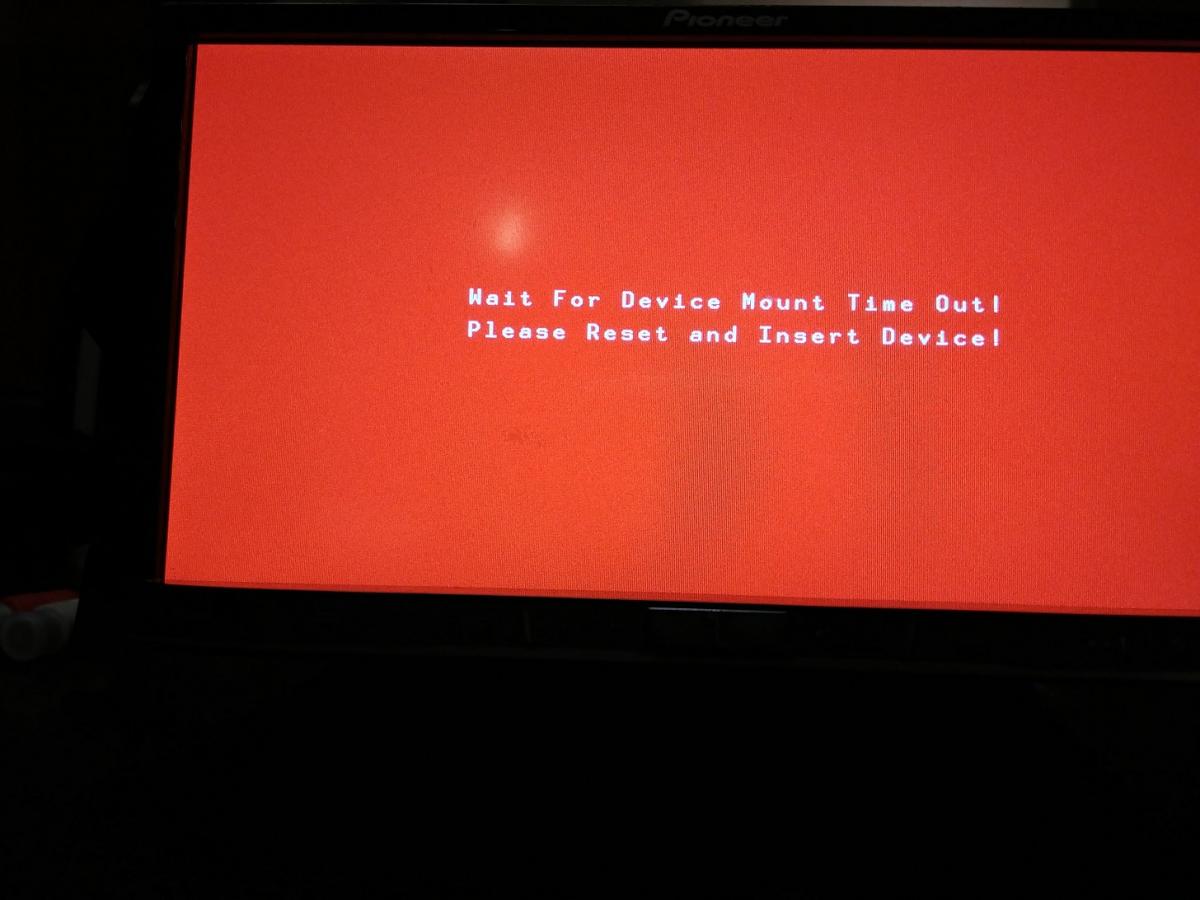
  7. and now it's just stuck on this screen...and pressing Home to reset just brings it back to this. Removing the USB key makes it remain on the Device Mount screen until a timeout occurs. See pics.

    post-147073-0-05518600-1510284914_thumb.jpgpost-147073-0-09935500-1510284920_thumb.jpg

Pretty much stuck there for now. Can't seem to get it to boot into any other functionality.
Edited Nov 10, 2017 by dpratt1008
Posted Nov 10, 2017 · 12:22 UTC#589

I think testmode_a lets you boot in android and testmode_n in the NOR bootloader or something, I don't know if you can have a script there on your usb key or something to reflash from here? Some people here knows more than me.

Or I guess you can open your unit to take the SD card out and copy a raw image of your firmware on it.

Posted Nov 10, 2017 · 21:02 UTC#590

I think testmode_a lets you boot in android and testmode_n in the NOR bootloader or something, I don't know if you can have a script there on your usb key or something to reflash from here? Some people here knows more than me.

Or I guess you can open your unit to take the SD card out and copy a raw image of your firmware on it.

To do that I'll have to unlock my SD card, which hasn't been done yet. I'm gonna see what the state of my SD card is this evening after work.

Posted Nov 17, 2017 · 22:45 UTC#591

So I can't successfully get the Transcend 8GB SD card inside my 7000NEX to be recognized by my windows PC. I'm not entirely surprised given this thing is what, formatted for a Linux/Android OS? So I'm still trying to figure out how to go about confirming the state of my SD card and it's configuration. Any guidance or input would be helpful if anyone has insight how to successfully read the contents of the SD card from windows if it hasn't been unlocked using the methods described in this original thread.

Posted Nov 25, 2017 · 00:00 UTC#592

Hi guys...


Every time I turn on my device, there is a long wait for the music to start playing.


I use an external 500gb hd with about 12.000 songs in FLAC.


I noticed that this is due to the creation of a database file of ID3 data.


I do not use the "TAG" interface in the search of files, but rather, "Files names".


So my doubt: is it possible to modify some files so that this indexing process does not occur ?


The database file can be found and copy to external device in DEVELOP DEBUG MENU -> DATABASE SAVE. In my case, the file is about 10mb.


Thanks.

Edited Nov 25, 2017 by sandreble
Posted Dec 07, 2017 · 00:03 UTC#593


We have finally cracked pioneer navigation software (iGO NextGen)


attachicon.gifp2553_navimapicon.png


Now, you can put any content on the device for which you have a working license.

After installing the patch, your maps software will take any content with any valid license for that content.

Even if the license from another device (check of license hardware id (SWID) is disabled in our libraries).


You can copy manually content and licenses through File Manager, using copy_script or by inserting internal sd card into your PC.

Don't forget to set proper filesystem rights to newly copied files.


 -  x000(5000-8000NEX F960BT/DAB F60BT/DAB)  FW 1.07/1.08

attachicon.gifx000_1.07_9.18.13.411863.rar

 -  x000(5000-8000NEX F960BT/DAB F60BT/DAB) FW 1.11/1.13/1.14/1.15 - iGO ver: 9.18.28.610126

attachicon.gifx000_1.11_9.18.28.610126.rar

 -  x100(5100-8100NEX F970BT/DAB/TV F70/77DAB)  FW 1.05/1.07/1.10 - iGO ver: 9.18.28.610130

attachicon.gifx100_1.05_9.18.28.610130.rar

-  x200(AVIC-x200NEX/AVIC-Fx8x )  FW 1.00/1.02/1.07 - iGO ber: 9.18.28.624842

attachicon.gifx200_1.00_9.18.28.624842.rar


Use latest winrar5 http://www.rarlab.com/download.htm


Hi everyone!


Does anybody have mirrors to download the maps??? I want to upgrade my 7000NEX but the gpspower page hasn't validated my account (I've been waiting for 4 days). Any help is appreciated 

Thank you

Posted Dec 14, 2017 · 19:54 UTC#594

AVH-4100NEX is ok. Work perfect.

Posted Dec 25, 2017 · 16:28 UTC#595

 Can someone post that links again,  all links are broken,  Thank you

Edited Dec 25, 2017 by resistol
Posted Jan 09, 2018 · 03:16 UTC#596


We have finally cracked pioneer navigation software (iGO NextGen)


attachicon.gifp2553_navimapicon.png


Now, you can put any content on the device for which you have a working license.

After installing the patch, your maps software will take any content with any valid license for that content.

Even if the license from another device (check of license hardware id (SWID) is disabled in our libraries).


You can copy manually content and licenses through File Manager, using copy_script or by inserting internal sd card into your PC.

Don't forget to set proper filesystem rights to newly copied files.


 -  x000(5000-8000NEX F960BT/DAB F60BT/DAB)  FW 1.07/1.08

attachicon.gifx000_1.07_9.18.13.411863.rar

 -  x000(5000-8000NEX F960BT/DAB F60BT/DAB) FW 1.11/1.13/1.14/1.15 - iGO ver: 9.18.28.610126

attachicon.gifx000_1.11_9.18.28.610126.rar

 -  x100(5100-8100NEX F970BT/DAB/TV F70/77DAB)  FW 1.05/1.07/1.10 - iGO ver: 9.18.28.610130

attachicon.gifx100_1.05_9.18.28.610130.rar

-  x200(AVIC-x200NEX/AVIC-Fx8x )  FW 1.00/1.02/1.07 - iGO ber: 9.18.28.624842

attachicon.gifx200_1.00_9.18.28.624842.rar


Use latest winrar5 http://www.rarlab.com/download.htm


Hi everyone!


Does anybody have mirrors to download the maps??? I want to upgrade my 7000NEX but the gpspower page hasn't validated my account (I've been waiting for 4 days). Any help is appreciated 

Thank you


 Can someone post that links again,  all links are broken,  Thank you


Can someone please post good links. 

Posted Jan 09, 2018 · 20:00 UTC#597

Can someone please post good links. 


I dont have the first x000 but here are the other 3


 -  x000(5000-8000NEX F960BT/DAB F60BT/DAB)  FW 1.07/1.08

   -N/A

 -  x000(5000-8000NEX F960BT/DAB F60BT/DAB) FW 1.11/1.13/1.14/1.15 - iGO ver: 9.18.28.610126

    -http://www37.zippyshare.com/v/umaUmJrz/file.html

 -  x100(5100-8100NEX F970BT/DAB/TV F70/77DAB)  FW 1.05/1.07/1.10 - iGO ver: 9.18.28.610130

   -http://www37.zippyshare.com/v/rNSxly7G/file.html


-  x200(AVIC-x200NEX/AVIC-Fx8x )  FW 1.00/1.02/1.07 - iGO ber: 9.18.28.624842

   -http://www37.zippyshare.com/v/QX47zzdn/file.html

Posted Jan 11, 2018 · 10:47 UTC#598

Hi everyone,

what is pass: for x200.... file unpack.

Posted Jan 11, 2018 · 13:11 UTC#599

Hi everyone,

what is pass: for x200.... file unpack.

it should be 4pda

Posted Jan 11, 2018 · 13:21 UTC#600

thanks, right.

Page 24 of 29