Hello, i need 5200NEX image for AVIC F980BT. Can anyone help or tell where to download it to upload it to the SD card? My email is:
[email protected]
Posted Jun 10, 2022 · 09:10 UTC#226
Hello, i need 5200NEX image for AVIC F980BT. Can anyone help or tell where to download it to upload it to the SD card? My email is:
[email protected]
Sorry very new to this! Any help getting an image file for an AVIC-F9880BT would be so appreciated!
I am new to this group and my Pioneer AVH-X8700BT is stuck on the loading screen during startup. I have managed to remove the internal SD Card and was hoping if someone could share with me the image file for my stereo?
I am in need of a AVH-4100NEX image. If someone has one, please post or pm me.
3 hours ago, kham said:icontact me if you need
Sent you an email reply!
On 6/5/2022 at 12:36 PM, Yohaan said:I got the image. I was able to clone one and it worked perfectly. I also dump the image sucessfully for anyone that needs it.
Steering wheels controls work fine for me as well. If any trouble with link dm. Use imageUSB to write the image to SD card (I used windows 10 btw).
I hope this helps someone as it was quite frusting. Thanks fof those that responded and tried to help.
https://mega.nz/file/P4xCES6a#HM_DyeRdGmWY1wuN1TqyPoR8TyZrJN823oilXAoS-Qw
https://drive.google.com/drive/folders/1d5sUiiyI_zP4dP-JwWL7e_tYXjA3H9eE?usp=sharing
Thanks for providing this image. I just bought a working 4500nex and decided to put in a new SD card from the start. I also own a 4400nex in another car and it had failed, so I was familiar with the process and wanted to be proactive with this new unit. I was surprised to see there was not a reliable image for the 4500nex model like there was for the 4400nex.
Seeing your post, I thought you actually had a copy of the 4500nex firmware, but after extracting your rar file and cloning it on a Windows machine using imageUSB to a new SD card, I installed it and noticed a few things that led me to believe it's just a modified 4400nex image. Mainly the absence of the parking guidelines give it away, but also the version number of this image you have posted is 1.02, which is the latest version from the 4400nex firmware page. So far though, this image seems to work great once installed on my 4500 unit, all functions seem to work as they should. I'll be installing the iDatalink Maestro rr this weekend, so hopefully that works as well. The serial number and device id both match, so that's good at least. If someone else wants to use this image, make sure to get at least a 32gb sd card, as once this thing is unzipped it is exactly that size and barely fit the 32gb sd card I used:
https://www.officedepot.com/a/products/9098072/SanDisk-Extreme-PLUS-Secure-Digital-Speed/
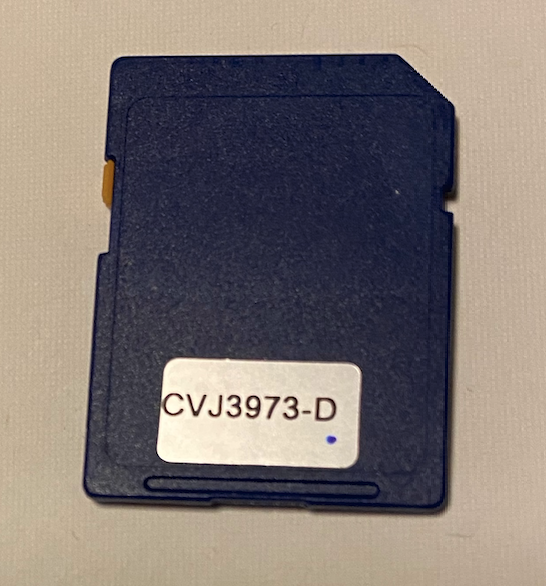
I checked the version number of my unit before I removed the stock SD card and it is version 1.05. I'm curious what has changed since the initial 1.00 release as I haven't seen anyone post about a version number this high for the 4500nex unit yet. Is it possibly they secretly fixed the bug causing the SD cards to fail? And why are they updating the firmware of this unit but not providing the firmware publicly for people to use? Also the ID on the card is "CVJ3973-D", this is different than the one you can buy in the link below, it has an id of "CVJ3973-B" which I assume may be an older firmware version:
https://www.pacparts.com/part.cfm?part_no=QXX3352&mfg=Pioneer
I'm hoping to copy the firmware from stock card to be able to use that instead of this 1.02 modified 4400nex image that was posted. If someone can point me in the right direction of the easiest way to go about doing that, it would be greatly appreciated! 

Hi all,
RE: AVH-4100NEX
I had recently received the Software Error issue as well, and am able to get to the Internal SD Card no problem.
However, when taking out the card, i had tried to see what files are on there, and it appears that the card is no longer readable.
So now I am at a loss. I tried contacting Pioneer through their Support line, and it just drops.
I've looked everywhere on the internet, and unable to find where I can download the image files for the AVH-4100NEX.
I've called/emailed many businesses across Canada, and no response still as to how i can obtain these files or pre-loaded SD Card.
Questions:
1.) Does anyone know where I can obtain the image files (and any additional files other than the downloadable firmware version on their website) for the AVH-4100NEX?
2.) If not, is there another model's image files that would work with it? if so, where can I find these files?
3.) Is there anywhere I can purchase a pre-loaded SD card with the image files?
I love Pioneer electronics as far as product/quality goes, and this is the first I've ever had an issue with anything Pioneer. My entire set up in my 4Runner, is Pioneer, and I would love to keep it that way. Also, I do not want to go through having to get a different brand head unit, and swapping out all my T-Harnesses, etc.
Any help is greatly appreciated!
Thank you!
I spent hours researching this over the last day, only to find that it's really hard to find what we should be doing TODAY. Had my radio act stupid yesterday morning, immediately ordered SD cards after research, and got it fixed today after work.
So, as of today, here it is for W4500NEX:
1. Buy SD card(s). I bought these: https://www.amazon.com/dp/B09CKFWP6N
2. Download the image:
Compressed (fastest download): https://drive.google.com/file/d/1-J9GN8cGtTwOvS_w0AEtBM9lReHBUrA8/view?usp=sharing
or
https://mega.nz/file/P4xCES6a#HM_DyeRdGmWY1wuN1TqyPoR8TyZrJN823oilXAoS-Qw
or
https://drive.google.com/drive/folders/1d5sUiiyI_zP4dP-JwWL7e_tYXjA3H9eE?usp=sharing
3. Flash SD card using rufus (or similar): https://rufus.ie
4. Watch this video: https://www.youtube.com/watch?v=0eCvEen1p0g
5. Do the work. When done, make sure the ribbon cable has enough slack on the outside of the plastic face before pushing the display back in, otherwise it'll get pulled out of the plug.
6. Be happy.
I also ordered the $35 card off ebay because it was going to take a week. PacParts wants $95! That's ridiculous. People have got to STOP recommending buying from them! I then spent $28 for 5 SD cards from Amazon because I could get them delivered overnight. If anyone is desperate for an already flashed SD card, message me and we'll work something out.
21 hours ago, Datsun said:Did you check PacParts?
I did but did not find the card on there. I've also sent them an inquiry
15 hours ago, rtheil said:I spent hours researching this over the last day, only to find that it's really hard to find what we should be doing TODAY. Had my radio act stupid yesterday morning, immediately ordered SD cards after research, and got it fixed today after work.
So, as of today, here it is for W4500NEX:
1. Buy SD card(s). I bought these: https://www.amazon.com/dp/B09CKFWP6N
2. Download the image:
Compressed (fastest download): https://drive.google.com/file/d/1-J9GN8cGtTwOvS_w0AEtBM9lReHBUrA8/view?usp=sharing
or
https://mega.nz/file/P4xCES6a#HM_DyeRdGmWY1wuN1TqyPoR8TyZrJN823oilXAoS-Qw
or
https://drive.google.com/drive/folders/1d5sUiiyI_zP4dP-JwWL7e_tYXjA3H9eE?usp=sharing3. Flash SD card using rufus (or similar): https://rufus.ie
4. Watch this video: https://www.youtube.com/watch?v=0eCvEen1p0g
5. Do the work. When done, make sure the ribbon cable has enough slack on the outside of the plastic face before pushing the display back in, otherwise it'll get pulled out of the plug.
6. Be happy.
I also ordered the $35 card off ebay because it was going to take a week. PacParts wants $95! That's ridiculous. People have got to STOP recommending buying from them! I then spent $28 for 5 SD cards from Amazon because I could get them delivered overnight. If anyone is desperate for an already flashed SD card, message me and we'll work something out.
Would you happen to know what features would be lost of I used the 4500nex images on a 4100nex head unit? At this point I'm okay with losing some features just to get this working again lol.
Or would you happen to know where I can find image files for the avh-4100nex?
In the configuration file of the software I got. It had multiple units in there. If I get the chance today I will look in there and see if the 4100 was in there.
19 hours ago, GSon82 said:Would you happen to know what features would be lost of I used the 4500nex images on a 4100nex head unit? At this point I'm okay with losing some features just to get this working again lol.
Or would you happen to know where I can find image files for the avh-4100nex?
Not sure, but here it is on ebay:https://www.ebay.com/itm/143900456109?hash=item218122b4ad:g:N7kAAOSw4z5f6UQN
I would suggest taking an image of the SD card before putting it in your radio so that you can have it for when your SD card dies again. You can do this with something like Rufus. Then, optionally, post it online for others to download.
On 8/20/2022 at 12:09 AM, rtheil said:I spent hours researching this over the last day, only to find that it's really hard to find what we should be doing TODAY. Had my radio act stupid yesterday morning, immediately ordered SD cards after research, and got it fixed today after work.
So, as of today, here it is for W4500NEX:
1. Buy SD card(s). I bought these: https://www.amazon.com/dp/B09CKFWP6N
2. Download the image:
Compressed (fastest download): https://drive.google.com/file/d/1-J9GN8cGtTwOvS_w0AEtBM9lReHBUrA8/view?usp=sharing
or
https://mega.nz/file/P4xCES6a#HM_DyeRdGmWY1wuN1TqyPoR8TyZrJN823oilXAoS-Qw
or
https://drive.google.com/drive/folders/1d5sUiiyI_zP4dP-JwWL7e_tYXjA3H9eE?usp=sharing3. Flash SD card using rufus (or similar): https://rufus.ie
4. Watch this video: https://www.youtube.com/watch?v=0eCvEen1p0g
5. Do the work. When done, make sure the ribbon cable has enough slack on the outside of the plastic face before pushing the display back in, otherwise it'll get pulled out of the plug.
6. Be happy.
I also ordered the $35 card off ebay because it was going to take a week. PacParts wants $95! That's ridiculous. People have got to STOP recommending buying from them! I then spent $28 for 5 SD cards from Amazon because I could get them delivered overnight. If anyone is desperate for an already flashed SD card, message me and we'll work something out.
Thanks for all this.
questions....
is this image the conversion from AVH to AVIC ? (AVH2AVIC)
why the image is so big (32GB) ?
you ordered 32GB sd cards ?
regards
On 8/17/2022 at 4:03 AM, PioneerBad said:Thanks for providing this image. I just bought a working 4500nex and decided to put in a new SD card from the start. I also own a 4400nex in another car and it had failed, so I was familiar with the process and wanted to be proactive with this new unit. I was surprised to see there was not a reliable image for the 4500nex model like there was for the 4400nex.
Seeing your post, I thought you actually had a copy of the 4500nex firmware, but after extracting your rar file and cloning it on a Windows machine using imageUSB to a new SD card, I installed it and noticed a few things that led me to believe it's just a modified 4400nex image. Mainly the absence of the parking guidelines give it away, but also the version number of this image you have posted is 1.02, which is the latest version from the 4400nex firmware page. So far though, this image seems to work great once installed on my 4500 unit, all functions seem to work as they should. I'll be installing the iDatalink Maestro rr this weekend, so hopefully that works as well. The serial number and device id both match, so that's good at least. If someone else wants to use this image, make sure to get at least a 32gb sd card, as once this thing is unzipped it is exactly that size and barely fit the 32gb sd card I used:
https://www.officedepot.com/a/products/9098072/SanDisk-Extreme-PLUS-Secure-Digital-Speed/
I checked the version number of my unit before I removed the stock SD card and it is version 1.05. I'm curious what has changed since the initial 1.00 release as I haven't seen anyone post about a version number this high for the 4500nex unit yet. Is it possibly they secretly fixed the bug causing the SD cards to fail? And why are they updating the firmware of this unit but not providing the firmware publicly for people to use? Also the ID on the card is "CVJ3973-D", this is different than the one you can buy in the link below, it has an id of "CVJ3973-B" which I assume may be an older firmware version:
https://www.pacparts.com/part.cfm?part_no=QXX3352&mfg=Pioneer
I'm hoping to copy the firmware from stock card to be able to use that instead of this 1.02 modified 4400nex image that was posted. If someone can point me in the right direction of the easiest way to go about doing that, it would be greatly appreciated!
Update: The 4500nex image that I used that's floating around here does NOT work with the Maestro RR steering wheel controls. I flashed the maestro rr with a configuration for the 4500nex radio and once plugged into the car it didn't seem to recognize the maestro and none of the steering wheel buttons worked. I took the radio out and popped back in my working blue stock sd card pictured above and everything worked as it should. I guess I'm just going to use the stock SD card until it fails in a year or two and hopefully a reliable/true 4500nex image will be around by then to use on an SD card.
On 6/5/2022 at 1:36 PM, Yohaan said:I got the image. I was able to clone one and it worked perfectly. I also dump the image sucessfully for anyone that needs it.
Steering wheels controls work fine for me as well. If any trouble with link dm. Use imageUSB to write the image to SD card (I used windows 10 btw).
I hope this helps someone as it was quite frusting. Thanks fof those that responded and tried to help.
https://mega.nz/file/P4xCES6a#HM_DyeRdGmWY1wuN1TqyPoR8TyZrJN823oilXAoS-Qw
https://drive.google.com/drive/folders/1d5sUiiyI_zP4dP-JwWL7e_tYXjA3H9eE?usp=sharing
looks like is for 32gb sd card.
is this image for avh-w4500 ?
original for AVH?
or custom AVH2AVIC ?
thanks
On 6/25/2022 at 11:53 AM, kham said:icontact me if you need
I contacted you
Hi,
I also posted this question on the AVH to AVIC "upgrade" thread, so please excuse my double post.
However, I do have an AVH-Z9200DAB unit. I do read that this is just another name for the 4400NEX (or 4500NEX?!) for different regions. Mine is from Europe - Germany to be precise. My issue is, the unit is stuck in the software-error mode. Panasonic is not responding to my repair request. Accordongly, I would like to exchange the SD-card with the firmware myself.
Can I just use the 4400NEX image floating around? I did have the parking control lines with my original Z9200DAB unit but I read that 4400NEX and 4500NEX differed exatly with these lines. Therefore, I am a bit confused as to which firmware-file would be the correct one for me.
Update: I did find the v1.02 firmware here: https://4pda.to/forum/index.php?showtopic=908197
Is for the Z9100DAB - so I guess the question is: can I use this for the Z9200DAB as well? Further, under the link you do not find an image file but the content of the SD-Card, I guess. How do I turn this into an image file which I can write to an SD-card to be inserted in the unit itself?
Anyway, can anybody here assist with the proper file to make my unit work again preferrably with the scope of functions I had before with the Z9200DAB? If possible, I would certainly consider the AVH2AVIC upgrade if this was still possible somehow despite the current situation with Russia.
Many thanks in advance!
Cheers, Andy
On 6/25/2022 at 2:47 PM, easy-e said:Sent you an email reply!
@khamFinally replaced the SD card with the image! Working great so far including Maestro on my steering wheel! THANK YOU!!!!!!
Any idea if this is a permanent solution or just kicking the can down the road to have to do again in a year or two?
Hello, can somebody help me with avic-x8600bt, please?
Thanks in advance,
Gradus
I celebrated too soon. Bluetooth is back to working but now if I touch the screen or a button it sometimes randomly reboots.
Thoughts?
On 9/24/2022 at 8:54 AM, easy-e said:I celebrated too soon. Bluetooth is back to working but now if I touch the screen or a button it sometimes randomly reboots.
Thoughts?
Anyone with a legit W4500NEX image? The one I have from kham restored wireless CarPlay but reboots are awful random and screen pixelization and distortion is driving me nuts. About to dump it for a different wireless CarPlay head unit. Any suggestions if I get desperate and just start with a replacement head unit?