Search Archive

GTIMatt's Mods

By GTIMatt · Mar 23, 2009in Hacks/Mods💬 346 posts👁️ 60,843 views
Page 11 of 14
Posted Apr 18, 2009 · 12:54 UTC#251

Hey GTIMatt, i'm new to the forum and i purchased the avic-f90bt the other day and i have all the wiring in, but i was wanting to know just exactly how to bypass the parking brake wire, i've been redoing my system so its all torn apart right now because i'm hiding all my xm and such but i was wondering how to do that bypass, if you could email me or show me a post on here and give good detailed instuctions because it will be annoying if i can't bypass it, thanks man.

Posted Apr 18, 2009 · 13:42 UTC#252
Hey GTIMatt, i'm new to the forum and i purchased the avic-f90bt the other day and i have all the wiring in, but i was wanting to know just exactly how to bypass the parking brake wire, i've been redoing my system so its all torn apart right now because i'm hiding all my xm and such but i was wondering how to do that bypass, if you could email me or show me a post on here and give good detailed instuctions because it will be annoying if i can't bypass it, thanks man.


if you look on the top of the screen, there is a link to "Wiki". It has it in there. There is also a forum talking about the bypass. Hope this helps.

Posted Apr 18, 2009 · 19:16 UTC#253

Man I followed the directions to rewire the mute wire, works EXCELLENT, no probs at all. that's where i've been was dirving around testing it out, had to remount the xm and such. Wanted to hide everything good and make it look right ya know, i took a few pics of the install completed on my iphone, just gotta figure out how to get them on here, LoL I'll admit that was the longest most complex install i've ever done, well worth it though, VERY well worth it, thanks for the help you all on here know your stuff, i just asked one question and one person replied, LoL and fixed my problem, thanks for the info and all the help!!!! as soon as i can figure out how to get the photo on here i will, i'm brand new to the board, plus don't have them downloaded on the comp yet so ya know.

Posted Apr 18, 2009 · 19:20 UTC#254

oh I forgot to add that this install is in an 06 Cobalt LS. Also got 4 JL 10w1v2's and a JL 500/1 in the trunk. Wanting to redo the install but might take a few pics of it and put it on here to show ya, before the install and then after the install. Thanks again for all your help everyone, thank you very much!!

Posted Apr 19, 2009 · 21:54 UTC#255

I wanted to share this excellent site to download poi available in the avic-f series format http://www.poifriend.com/?show=highest . Now that I have a ton of poi was wondering if someone could give me directions on how to install these poi to show on the map and where to install. Also I have new icons for restaurants and so on and I would like the avic to display but I dont know how to do that as well. Also wanted to know if I add poi should it appear as an icon on the map for example tim hortons show up on the map without searching for it?

Thanks for all your help and especially to Matt thanks for the mod.

Posted Apr 19, 2009 · 22:02 UTC#256
I wanted to share this excellent site to download poi available in the avic-f series format http://www.poifriend.com/?show=highest . Now that I have a ton of poi was wondering if someone could give me directions on how to install these poi to show on the map and where to install. Also I have new icons for restaurants and so on and I would like the avic to display but I dont know how to do that as well. Also wanted to know if I add poi should it appear as an icon on the map for example tim hortons show up on the map without searching for it?

Thanks for all your help and especially to Matt thanks for the mod.


there's an ongoing thread regarding poi's

Posted Apr 20, 2009 · 15:13 UTC#257
I wanted to share this excellent site to download poi available in the avic-f series format http://www.poifriend.com/?show=highest . Now that I have a ton of poi was wondering if someone could give me directions on how to install these poi to show on the map and where to install. Also I have new icons for restaurants and so on and I would like the avic to display but I dont know how to do that as well. Also wanted to know if I add poi should it appear as an icon on the map for example tim hortons show up on the map without searching for it?

Thanks for all your help and especially to Matt thanks for the mod.


From what i understand you have to run the POI from that site in the AVICfeeds program on your computer, Then put them on a SD card and use them from there, they are not standard poi files like are in the map folder in your unit, but they come up as ones that the avic reads off the sd card

Posted Apr 27, 2009 · 22:13 UTC#258

hey matt im running your mod its excellent. the only thing is when you use that gps logging thing where the clock turns red... i can't figure out how to clear the logs out. please help, i got random lines going through my gps unit cause i was trying to figure out how to use it. :(

Posted Apr 29, 2009 · 02:44 UTC#259

Could someone create a simple step by step guide to installing Matt's mod. Thank You

Posted Apr 29, 2009 · 04:57 UTC#260
Could someone create a simple step by step guide to installing Matt's mod. Thank You


it's in the first page

Posted Apr 29, 2009 · 05:09 UTC#261

I copyed both files to My Flash Disk\APL2\Igo and nothing happend, am I doing something wrong.

Posted Apr 29, 2009 · 05:16 UTC#262
I copyed both files to My Flash Disk\APL2\Igo and nothing happend, am I doing something wrong.

did you download the latest one, just try to reload it and see what happens,

Posted Apr 29, 2009 · 12:30 UTC#263

Hi Matt,


just wanted to say I really like your mod. I've tried the rest but IMO yours has the best balance of looks and functionality. I do like some of the options available in IDT's and CMH928's setup, like the enhanced simulation mode, the 'Nav Options' button and the 'day/night' button but not too keen on the buttons being along the top, much prefer your layout. I wouldn't even consider putting it back to standard now, especially with no bloody nav mute button!!! :x


Anyway, I was just looking to make some changes to the box colours as Blue doesn't really go with my Nissan's Orange dash (although the original silver metal effect did). I think I'm happy with changing the existing images to the colour I want and from what I've read previous posts and it seems the files I need to change in ui_pioneer\800_480\ are:


info_bg.bmp - Route Info Box

746_32K_OM-003_32.bmp - Next Instruction box

746_32K_OM-005_32.bmp - 2nd Instruction box

746_32K_OM-007_32.bmp - Next street box

746_32K_OM-001_32b.bmp - Street Box


Just have a couple of questions about this though:


1. I can't open the 'info_bg.bmp' file to edit, it doesn't seem to be like the other .bmp's.

2. What about the borders of the boxes, this doesn't seem to be included in the image, where can these be edited?

3. Do you know how I could put the boxes back to the standard silver metal effect but with your layout?


Hope that makes sense and thanks in advance for any help you can offer!!

Posted Apr 29, 2009 · 13:23 UTC#264
Hi Matt,


just wanted to say I really like your mod. I've tried the rest but IMO yours has the best balance of looks and functionality. I do like some of the options available in IDT's and CMH928's setup, like the enhanced simulation mode, the 'Nav Options' button and the 'day/night' button but not too keen on the buttons being along the top, much prefer your layout. I wouldn't even consider putting it back to standard now, especially with no bloody nav mute button!!! :x


Anyway, I was just looking to make some changes to the box colours as Blue doesn't really go with my Nissan's Orange dash (although the original silver metal effect did). I think I'm happy with changing the existing images to the colour I want and from what I've read previous posts and it seems the files I need to change in ui_pioneer\800_480\ are:


info_bg.bmp - Route Info Box

746_32K_OM-003_32.bmp - Next Instruction box

746_32K_OM-005_32.bmp - 2nd Instruction box

746_32K_OM-007_32.bmp - Next street box

746_32K_OM-001_32b.bmp - Street Box


Just have a couple of questions about this though:


1. I can't open the 'info_bg.bmp' file to edit, it doesn't seem to be like the other .bmp's.

2. What about the borders of the boxes, this doesn't seem to be included in the image, where can these be edited?

3. Do you know how I could put the boxes back to the standard silver metal effect but with your layout?


Hope that makes sense and thanks in advance for any help you can offer!!


1) download this software http://www.rc-dev.com/i3t/, most of the BMP's in the FLASHDISK are compressed so you'll need that software to view it and save it as an uncompressed BMP so you could work with it

2)the borders on the boxes are in the alpha layer of the BMP

3)you would have to search GTIMATTS 800_480 folder for a blank template of the box,


hope that helps

Posted Apr 29, 2009 · 15:26 UTC#265

Hi Matt


I'd just like to echo klanbo's commwents - your mod is the cleanest looking and offers the best functionality (no offence to the others but the buttons across the top don't work for me).


Many thanks


Chris

Posted Apr 29, 2009 · 16:04 UTC#266

Hi Matt


Thanks a lot for your mod.


I just installed the 2 files on my F900BT (Euro-Version).


No Problem at all. Everything works fine. The information are much better to read. :D


Just a small thing: I think the icons in the route information box for the destination arrival time and the

duration are exchanged. :wink:


Good work.


Hello from Switzerland


Swissguy01

Posted Apr 29, 2009 · 18:44 UTC#267
Hi Matt,


just wanted to say I really like your mod. I've tried the rest but IMO yours has the best balance of looks and functionality. I do like some of the options available in IDT's and CMH928's setup, like the enhanced simulation mode, the 'Nav Options' button and the 'day/night' button but not too keen on the buttons being along the top, much prefer your layout. I wouldn't even consider putting it back to standard now, especially with no bloody nav mute button!!! :x


Anyway, I was just looking to make some changes to the box colours as Blue doesn't really go with my Nissan's Orange dash (although the original silver metal effect did). I think I'm happy with changing the existing images to the colour I want and from what I've read previous posts and it seems the files I need to change in ui_pioneer\800_480\ are:


info_bg.bmp - Route Info Box

746_32K_OM-003_32.bmp - Next Instruction box

746_32K_OM-005_32.bmp - 2nd Instruction box

746_32K_OM-007_32.bmp - Next street box

746_32K_OM-001_32b.bmp - Street Box


Just have a couple of questions about this though:


1. I can't open the 'info_bg.bmp' file to edit, it doesn't seem to be like the other .bmp's.

2. What about the borders of the boxes, this doesn't seem to be included in the image, where can these be edited?

3. Do you know how I could put the boxes back to the standard silver metal effect but with your layout?


Hope that makes sense and thanks in advance for any help you can offer!!


1. See IDT's post. They are Igo formatted so you need special software to read them.

2. Not sure what you mean by borders, the rounded corners and white lines are all in my custom bmp images.

3. Can't remember if I kept copies of the originals in my data.zip, if I did they will have the same name with something like _orig tacked on the filename. If not then just get them from your data.zip backup (although I probably changed the position of the boxes slightly so the originals might not fit perfectly)

Posted Apr 29, 2009 · 18:47 UTC#268


Just a small thing: I think the icons in the route information box for the destination arrival time and the

duration are exchanged. :wink:


I thought that too but that is the icons that the standard system uses so I just left them (even though I thought they were wrong!).

Posted May 04, 2009 · 20:51 UTC#269

Hi Matt,


great mod - I love it on my F900, thank you.

Still, I have one request (and I did search the forum for it): is there any way to add a button for recalculating the route, that would open a menu with options like drop next via, add via to a gas station, parking place, avoid next 1, 2, etc km...

I have something like that in a portable GPS unit that is also using iGo 8.0 - unfortunately, resolution is different (480x272).

Posted May 04, 2009 · 21:02 UTC#270
Hi Matt,


just wanted to say I really like your mod. I've tried the rest but IMO yours has the best balance of looks and functionality. I do like some of the options available in IDT's and CMH928's setup, like the enhanced simulation mode, the 'Nav Options' button and the 'day/night' button but not too keen on the buttons being along the top, much prefer your layout. I wouldn't even consider putting it back to standard now, especially with no bloody nav mute button!!! :x


Anyway, I was just looking to make some changes to the box colours as Blue doesn't really go with my Nissan's Orange dash (although the original silver metal effect did). I think I'm happy with changing the existing images to the colour I want and from what I've read previous posts and it seems the files I need to change in ui_pioneer\800_480\ are:


info_bg.bmp - Route Info Box

746_32K_OM-003_32.bmp - Next Instruction box

746_32K_OM-005_32.bmp - 2nd Instruction box

746_32K_OM-007_32.bmp - Next street box

746_32K_OM-001_32b.bmp - Street Box


Just have a couple of questions about this though:


1. I can't open the 'info_bg.bmp' file to edit, it doesn't seem to be like the other .bmp's.

2. What about the borders of the boxes, this doesn't seem to be included in the image, where can these be edited?

3. Do you know how I could put the boxes back to the standard silver metal effect but with your layout?


Hope that makes sense and thanks in advance for any help you can offer!!
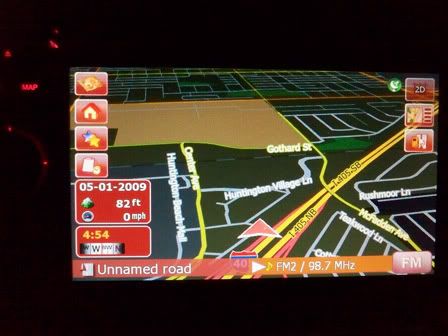
 

kdk_0057.jpg

kdk_0058.jpg

kdk_0059.jpg


All my dreams are coming true... I hope you see this MATT, I told you I would post pics.


*edit* I love you all

Posted May 04, 2009 · 21:37 UTC#271

I'm gonna need that, too. :mrgreen::lol:

Posted May 05, 2009 · 08:17 UTC#272
Hi Matt,


just wanted to say I really like your mod. I've tried the rest but IMO yours has the best balance of looks and functionality. I do like some of the options available in IDT's and CMH928's setup, like the enhanced simulation mode, the 'Nav Options' button and the 'day/night' button but not too keen on the buttons being along the top, much prefer your layout. I wouldn't even consider putting it back to standard now, especially with no bloody nav mute button!!! :x


Anyway, I was just looking to make some changes to the box colours as Blue doesn't really go with my Nissan's Orange dash (although the original silver metal effect did). I think I'm happy with changing the existing images to the colour I want and from what I've read previous posts and it seems the files I need to change in ui_pioneer\800_480\ are:


info_bg.bmp - Route Info Box

746_32K_OM-003_32.bmp - Next Instruction box

746_32K_OM-005_32.bmp - 2nd Instruction box

746_32K_OM-007_32.bmp - Next street box

746_32K_OM-001_32b.bmp - Street Box


Just have a couple of questions about this though:


1. I can't open the 'info_bg.bmp' file to edit, it doesn't seem to be like the other .bmp's.

2. What about the borders of the boxes, this doesn't seem to be included in the image, where can these be edited?

3. Do you know how I could put the boxes back to the standard silver metal effect but with your layout?


Hope that makes sense and thanks in advance for any help you can offer!!
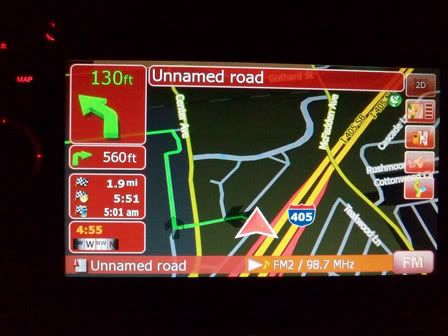
 

kdk_0057.jpg

kdk_0058.jpg

kdk_0059.jpg


All my dreams are coming true... I hope you see this MATT, I told you I would post pics.


*edit* I love you all


Looks great!

Posted May 05, 2009 · 22:34 UTC#273

Looks nice superman. How's the visiblity of the bmp's at night?

Posted May 06, 2009 · 01:31 UTC#274


1. See IDT's post. They are Igo formatted so you need special software to read them.

2. Not sure what you mean by borders, the rounded corners and white lines are all in my custom bmp images.

3. Can't remember if I kept copies of the originals in my data.zip, if I did they will have the same name with something like _orig tacked on the filename. If not then just get them from your data.zip backup (although I probably changed the position of the boxes slightly so the originals might not fit perfectly)


Thanks for your answers Matt/IDT. I've stopped being dense now and worked out what I needed to do. I've created my own custom boxes and icons too so it sort of matches my car. Went for a greyish silver look instead of the orange but I'm pleased with it now....almost! Added a nav settings and day/night button too when no route is active. I do have 3 more issues, would be great if you could help....will go for A B C style questions this time :D


A. The '2D/3D' icon and the 'info' icons always fade after several seconds to a more translucent state, where as all the other icons don't. At first I thought it was because they are those 3 icons in 1 .bmp's which have different alpha channels, so I made all 3 images the same but still didn't work. I can't work out what controls the translucent effect. I've noticed IDT's icons dim when inactive.....so guessing it's possible to stop icons dimming too.


B. Same 'info' icon (or 746_32K_OM-013_32b.bmp) doesn't seem to line up on the screen where I tell it to. I've tried renaming it (and updated the navigatemap_800_480.ui file accordingly) but no joy. Why is this one being awkward?


C. What file controls the poition of the route boxes? i.e. 'info_bg.bmp' in your data.zip.


Thanks alot, I'll post pics when it's all done so you can see what a mess I've made :roll:

Posted May 06, 2009 · 13:01 UTC#275
Looks nice superman. How's the visiblity of the bmp's at night?


Its very visible, and sinces its red... there is really no glare or nothing to your eyes. I kepted ALL the alpha channels, and i even made the speed camera warning alpha channeled (it wasnt before).


I do have to admit though... the red is a little too red (blood red) and i kind of want to tune the red down a little. but thats a lot of work


but lonestar seems to be a fan of my red theme LOL, Lone, i dunno if you done any changed to your DATA.zip but i can either give you the DATA.zip (if no changes are made) or i can give you the bmp pictures to inject into your DATA.ZIP

Page 11 of 14