Search Archive

Diaftia's Hybrid mods V2.3 - UPDATED: 01/14/10

By diaftia · Dec 01, 2009in Completed Mods/Themes💬 1,194 posts👁️ 195,795 views
Page 17 of 48
Posted Jan 14, 2010 · 08:39 UTC#401
Can someone tell me if there is a button, when in route to put in a next address???


So you can put in multiple addresses and make an optimal route?


Thx

Sounds like you want to add in a via point when in a route to a stop along the way.


This can be dine several ways:


1. If it's a POI you want to add a via for just search for it and click the button that says add via at the bottom of the POI details.

2. If you want to stop at a specific address while in route you can do this two ways:

A). Using plan mode; Go to the plan mode screen and do the search from there. Once you search the cursor will be on the address you entered on the plan mode screen. Expand the top most menu with the green arrow if not already done. Click add via to make it a stop along the way.

B). Using the quick menu; When not in route the quick menu buttons will automatically start a route when you start a search from those buttons. When in a route already and you perform a search from the quick menu the search results will bring you to the plan mode screen. Once you do that just expand the menu if not already done and click add via.


It's much easier to do than to read. Try it out and the nav should know where you are (in or out of route) and guide you to the correct screen.


Hope this helps.


Alex

Posted Jan 14, 2010 · 08:50 UTC#402


this is the image i get, what i mean by no sky is that there is no blue or clouds like in your pic, i just get grey, like an overcast day.

Change your scheme

Posted Jan 14, 2010 · 13:36 UTC#403
Hmmm that is odd. Did you delete the save files when installing my mods? Actually looking back at your screen shot I can gurantee that you didn't. The current street is missing at the top. That is a standard problem that happens when the save files are not deleted. Check the instructions for the location of the save files and delete them all


i delete all save files in the user data save folder except favorites, as per your instructions, i also delete the gps files every time so it starts out as having me in L.A. and all the maps rebuild when GPS finds me.

Posted Jan 14, 2010 · 13:39 UTC#404
Change your scheme


Could you elaborate please? thank you for your input as i have also read your posts and when it comes to understanding how this works i can see you are right there with Diaftia. I will fool around with the settings and try to change the scheme, just not sure what t to change it to. I know we put a file in the scheme folder but i have never changed a scheme setting. Any directions will be appreciated.

Posted Jan 14, 2010 · 13:44 UTC#405
The current street is missing at the top. That is a standard problem that happens when the save files are not deleted. Check the instructions for the location of the save files and delete them all


I paned all the way up to get the best image for the pic, i don't know if this affect the top of the street missing. I have reread all the instructions, i think i have followed them, but i will follow up on the tip from Abb1and keep working at it.


Thanks for the input guys. Donations will follow shortly.

Posted Jan 14, 2010 · 15:30 UTC#406

Installed the mod a minute ago....and its looking very cool and clean....


Pfewww and a lot of options to change also.... takes a while to figure some things out i think....


Only one thing....(allready spoken on the forum about it) i am missing a tmc button.....


Thanks for the hard work

Posted Jan 14, 2010 · 15:37 UTC#407
Installed the mod a minute ago....and its looking very cool and clean....


Pfewww and a lot of options to change also.... takes a while to figure some things out i think....


Only one thing....(allready spoken about it) i am missing a tmc button.....


Thanks for the hard work


Are you using the EU version? I will make a TMC button for Merten3000 to add to the EU version for the next release.

Posted Jan 14, 2010 · 15:50 UTC#408
The current street is missing at the top. That is a standard problem that happens when the save files are not deleted. Check the instructions for the location of the save files and delete them all


I paned all the way up to get the best image for the pic, i don't know if this affect the top of the street missing. I have reread all the instructions, i think i have followed them, but i will follow up on the tip from Abb1and keep working at it.


Thanks for the input guys. Donations will follow shortly.

Do me a favor and do the favorites too. I have had very few people complain of problems existing when keeping that file.


Scheme might do it but there is a default sky image that your system is ignoring. When he says change the scheme he says use the pioneer blue day/night in the color profiles. Give it a manual switch and see how it goes. I could see if you had one scheme loaded and changed that put when you loaded my mods, something could be wrong someplace. That would get overwritten when the scheme is changed.

Posted Jan 14, 2010 · 16:43 UTC#409
Installed the mod a minute ago....and its looking very cool and clean....


Pfewww and a lot of options to change also.... takes a while to figure some things out i think....


Only one thing....(allready spoken about it) i am missing a tmc button.....


Thanks for the hard work


Are you using the EU version? I will make a TMC button for Merten3000 to add to the EU version for the next release.


Yes EU version here


AHHH great, If then, we have the most complete and good looking mod ever.

Posted Jan 14, 2010 · 18:24 UTC#410

Not a huge problem Alex, but still can't change the view mode by touching the compass. It's a bypass issue...again. :lol: . Works fine if the E brake is engaged.

Posted Jan 14, 2010 · 18:51 UTC#411

Would like to know if I'm the only one having this problem with this mod, and the previous version. I thought this mod included the red diamond icon fix? Every time I load it though, I have to go in and modify the mulitipoi icon file and change it from 74 to 79. Another thing that's going on is the button beeps when selecting things. I have gone and turned the setting off but the sounds still continue. I suppose I could go in and delete the sound files but I don't see I would need to.

Posted Jan 14, 2010 · 18:54 UTC#412
Not a huge problem Alex, but still can't change the view mode by touching the compass. It's a bypass issue...again. :lol: . Works fine if the E brake is engaged.


Added a USE_SEPARATED_SAFETY_MODE=0 to the compass sprite. Should be good in the next release.

Posted Jan 14, 2010 · 19:03 UTC#413
Would like to know if I'm the only one having this problem with this mod, and the previous version. I thought this mod included the red diamond icon fix? Every time I load it though, I have to go in and modify the mulitipoi icon file and change it from 74 to 79. Another thing that's going on is the button beeps when selecting things. I have gone and turned the setting off but the sounds still continue. I suppose I could go in and delete the sound files but I don't see I would need to.


It will be in the next release. I think I left it out when i ported over to the new platform a while back.


The beeps are an odd one. Not sure why that would not work. I will look into it.

Posted Jan 14, 2010 · 19:05 UTC#414

AHHH great, If then, we have the most complete and good looking mod ever.


For anyone that wants the icon early to modify the code themselves.

AJG_menu_4_42.bmp.zip

Posted Jan 14, 2010 · 21:25 UTC#415

Love the mod and use it regulary. One question/request:


When navigating (using pioneer blue in case that matters), the highway road signs are set up so that the one you should be taking is 'highlighted' to be brighter, while the rest of the signs are normal. While the intent seems to be to 'highlight the choice', the effect is that the normal signs are MUCH more readable, while the highlighted sign feels 'greyed out' as in 'don't take this choice'.


Is there some sys.txt setting I can use to control that (either make the darker signs much more 'greyed out' or something?) If not, is that something that you can add/fix in the next release?

Posted Jan 14, 2010 · 21:28 UTC#416

AHHH great, If then, we have the most complete and good looking mod ever.


For anyone that wants the icon early to modify the code themselves.

📎 AJG_menu_4_42.bmp.zip


Guess i'll have to wait for the next update. I understand some lines in the data.zip ui file. But my knowledge doesnt goes that far to put in that button and let TMC work. Thanks anyway.

Posted Jan 14, 2010 · 22:50 UTC#417

Not hi-jack this thread, but did you try adding this to sys.txt:


[timezone]

sync_os_timezone=0

reset_os_timezone=0


This will be my last post in this thread regarding this. Sorry Alex

Not yet, but in Alex's defense: I just put the F90BT on my desk back to stock versions (data.zip, sys.txt, etc) and deleted all user save data. Rebooted, and the AV.exe clock went an hour ahead even with my timezone set manually in iGo's (didn't do this w/ 2.006). Looks like it's a bug w/ the way iGo 8.3 sets the date/timezone when it gets a GPS lock to me... Especially since I can go do this:


  • [*:2hniftuw]Start in Settings->Navi Settings->GPS & Time Settings
    [*:2hniftuw]Set to Auto timezone (and swear under breath that the damn thing thinks I'm in Idaho now)
    [*:2hniftuw]Back out one screen to Navi Settings
    [*:2hniftuw]Go back into GPS & Time Settings and reset to timezone to Manual
    [*:2hniftuw]Go back out to map, see right time
    [*:2hniftuw]Go to AV screen and now the time is correct!


/me points finger at NavNGo and Pioneer.


Is this a permanent fix to the Oregon problem or do you have to repeat these steps every time you power on? I still have not found a fix other than just staying in Washington. Oh well, at you can still buy sudafed there.

Posted Jan 14, 2010 · 23:40 UTC#418
Do me a favor and do the favorites too. I have had very few people complain of problems existing when keeping that file.


Scheme might do it but there is a default sky image that your system is ignoring. When he says change the scheme he says use the pioneer blue day/night in the color profiles. Give it a manual switch and see how it goes. I could see if you had one scheme loaded and changed that put when you loaded my mods, something could be wrong someplace. That would get overwritten when the scheme is changed.


tried that too, deleted all files in save folder still get the same image. the only thing i can think of that is different is that i added a couple mods posted on the forum. the project mayhem color scheme and i also added the skip nav warning mod but honestly i have never gotten a sky on any mod of yours that i have used. i had it once with some other mod and that is the only time i ever changed a scheme file other than when overwriting the files when using your mod. after that i found your mod and have used it since. i have completely restored my unit to 2.0 firmware since then and upgraded to the current 3.02 or whatever it is and i installed the 2009.6 maps.

would any of that have caused this or does any of that help you with understanding what i am doing wrong?i know it is me, i repair computers and one thing i have learned, it is always the user....


hope this isn't too much to ask, just can't figure it out. if you need any other info just let me know.

Posted Jan 15, 2010 · 00:20 UTC#419
Do me a favor and do the favorites too. I have had very few people complain of problems existing when keeping that file.


Scheme might do it but there is a default sky image that your system is ignoring. When he says change the scheme he says use the pioneer blue day/night in the color profiles. Give it a manual switch and see how it goes. I could see if you had one scheme loaded and changed that put when you loaded my mods, something could be wrong someplace. That would get overwritten when the scheme is changed.


tried that too, deleted all files in save folder still get the same image. the only thing i can think of that is different is that i added a couple mods posted on the forum. the project mayhem color scheme and i also added the skip nav warning mod but honestly i have never gotten a sky on any mod of yours that i have used. i had it once with some other mod and that is the only time i ever changed a scheme file other than when overwriting the files when using your mod. after that i found your mod and have used it since. i have completely restored my unit to 2.0 firmware since then and upgraded to the current 3.02 or whatever it is and i installed the 2009.6 maps.

would any of that have caused this or does any of that help you with understanding what i am doing wrong?i know it is me, i repair computers and one thing i have learned, it is always the user....


hope this isn't too much to ask, just can't figure it out. if you need any other info just let me know.


Bingo. Its the other schemes. I would have imagined that reverting to 2.0 and installing the 3.0 again would set it back. Its definitely in there (as you can see from the screens) but your scheme is not looking at sky.bmp which is the default bmp that is used to display the sky. Are you sure the backup you have is from before you installed any schemes? If you installed some schemes then decided to update to 3.0 and got a back up then it went with the backup.


One thing you can try is removing all the schemes in your schemes folder and just make sure mine are in there.


Skip nav warning is fine. As a matter of fact I just installed all of carvers latest stuff and my nav starts up in the last position I had it in like its supposed to. Seems to work good. Before that it always started at the pioneer main menu.

Posted Jan 15, 2010 · 00:34 UTC#420
Do me a favor and do the favorites too. I have had very few people complain of problems existing when keeping that file.


Scheme might do it but there is a default sky image that your system is ignoring. When he says change the scheme he says use the pioneer blue day/night in the color profiles. Give it a manual switch and see how it goes. I could see if you had one scheme loaded and changed that put when you loaded my mods, something could be wrong someplace. That would get overwritten when the scheme is changed.


tried that too, deleted all files in save folder still get the same image. the only thing i can think of that is different is that i added a couple mods posted on the forum. the project mayhem color scheme and i also added the skip nav warning mod but honestly i have never gotten a sky on any mod of yours that i have used. i had it once with some other mod and that is the only time i ever changed a scheme file other than when overwriting the files when using your mod. after that i found your mod and have used it since. i have completely restored my unit to 2.0 firmware since then and upgraded to the current 3.02 or whatever it is and i installed the 2009.6 maps.

would any of that have caused this or does any of that help you with understanding what i am doing wrong?i know it is me, i repair computers and one thing i have learned, it is always the user....


hope this isn't too much to ask, just can't figure it out. if you need any other info just let me know.


Thanks for the donation man! I always appreciate it. :)

Posted Jan 15, 2010 · 00:46 UTC#421
Thanks for the donation man! I always appreciate it.


No need for thanks, I wish it could be more, bro. things are tight, you know. but i will send more when i can. i would pay hundreds for the improvements you provide.


i will try your tip on the schemes because the original backup i have did already have some mods applied and i'm not sure which....

Will let you know.

Posted Jan 15, 2010 · 00:57 UTC#422
Thanks for the donation man! I always appreciate it.


No need for thanks, I wish it could be more, bro. things are tight, you know. but i will send more when i can. i would pay hundreds for the improvements you provide.


i will try your tip on the schemes because the original backup i have did already have some mods applied and i'm not sure which....

Will let you know.


Dude don't even worry about it. It was perfect.


Yeah I have 4 default schemes in mine that were modded only to support multiroute. Try just running those 4 and if that doesn't work find a fresh 3.0 backup to go to.

Posted Jan 15, 2010 · 06:37 UTC#423

Hi,


I am using the EU version of the mod and I am very pleased with it but... (there is always a "but", isn't it :wink: ). "Forbidden directions" are giving the wrong icons, "forbidden to turn right" instead of "forbidden to turn left" and the reverse, however I would rather like the signs for "allowed directions", white arrows on blue rectangular fields, instead of the "forbidding signs" with six situations: "turn left", "turn right", "turn left or right", "straight on or turn left", "straight on or turn right", "straight on".
 

And another more practical question: Is it possible to show POI's (with the exception of the speedcamera's, they do) on the map, like parking places, fuel stations etc.?


Thanks,


Hugo

Posted Jan 15, 2010 · 06:49 UTC#424
Love the mod and use it regulary. One question/request:


When navigating (using pioneer blue in case that matters), the highway road signs are set up so that the one you should be taking is 'highlighted' to be brighter, while the rest of the signs are normal. While the intent seems to be to 'highlight the choice', the effect is that the normal signs are MUCH more readable, while the highlighted sign feels 'greyed out' as in 'don't take this choice'.


Is there some sys.txt setting I can use to control that (either make the darker signs much more 'greyed out' or something?) If not, is that something that you can add/fix in the next release?


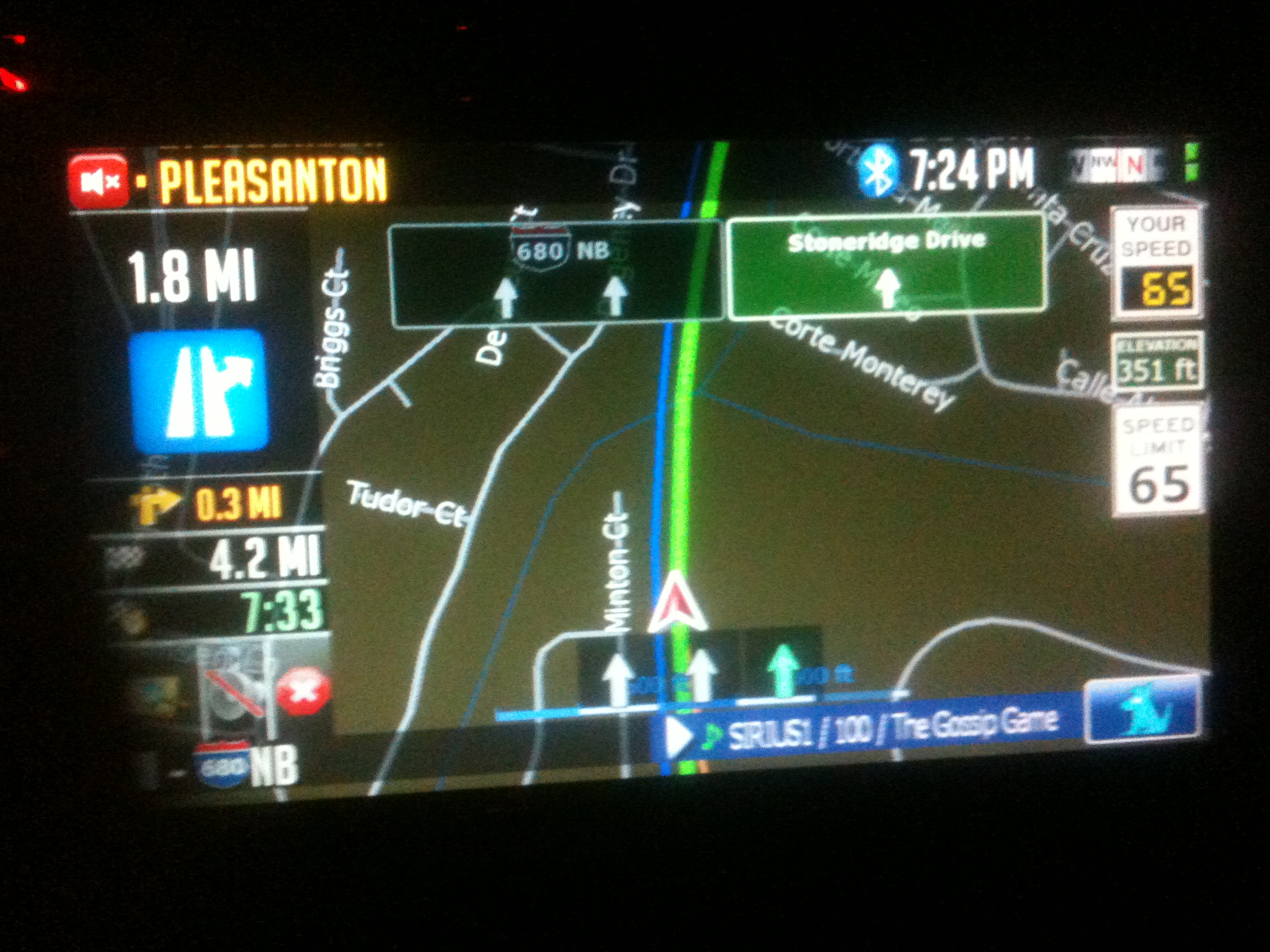
Its in one of the config files for the lane info I believe. I am not sure I get what you are saying though. Do you think that this pic reflects what you are saying? The right sign (Stoneridge) is the exit it wants me to take and I have to say its definitely "popping" more than the other one as the highlighted choice. You don't think so?

post-26802-12872760939628_thumb.jpg

Posted Jan 15, 2010 · 06:58 UTC#425
Hi,


I am using the EU version of the mod and I am very pleased with it but... (there is always a "but", isn't it :wink: ). "Forbidden directions" are giving the wrong icons, "forbidden to turn right" instead of "forbidden to turn left" and the reverse, however I would rather like the signs for "allowed directions", white arrows on blue rectangular fields, instead of the "forbidding signs" with six situations: "turn left", "turn right", "turn left or right", "straight on or turn left", "straight on or turn right", "straight on".


And another more practical question: Is it possible to show POI's (with the exception of the speedcamera's, they do) on the map, like parking places, fuel stations etc.?


Thanks,


Hugo


Hmmmm.... for the first part I have been working with Merten3000 on this stuff. I dont have an EU model so its hard for me to see this stuff. Let me see if he is aware of anything. Actually, can you answer me this? Do these only show when you go into the signs displayed on map and select Turn Restrictions to on?


As far as POI's go you can certainly turn on POI icons. They are all branded too and not generic. Go into settings then hit the manage button at the bottom. From there it will look the way you are accustomed to.

Page 17 of 48