Search Archive

Diaftia's Hybrid mods V2.3 - UPDATED: 01/14/10

By diaftia · Dec 01, 2009in Completed Mods/Themes💬 1,194 posts👁️ 195,795 views
Page 15 of 48
Posted Jan 11, 2010 · 18:25 UTC#351
I believe the streets and street names are done through the mapping software, in this case Teleatlas. We can't change that


That is correct. Your only option here is to use a hacked ezrider.exe and use navteq maps. Either that or contact Teleatlas and put in for a change.

Posted Jan 11, 2010 · 18:30 UTC#352

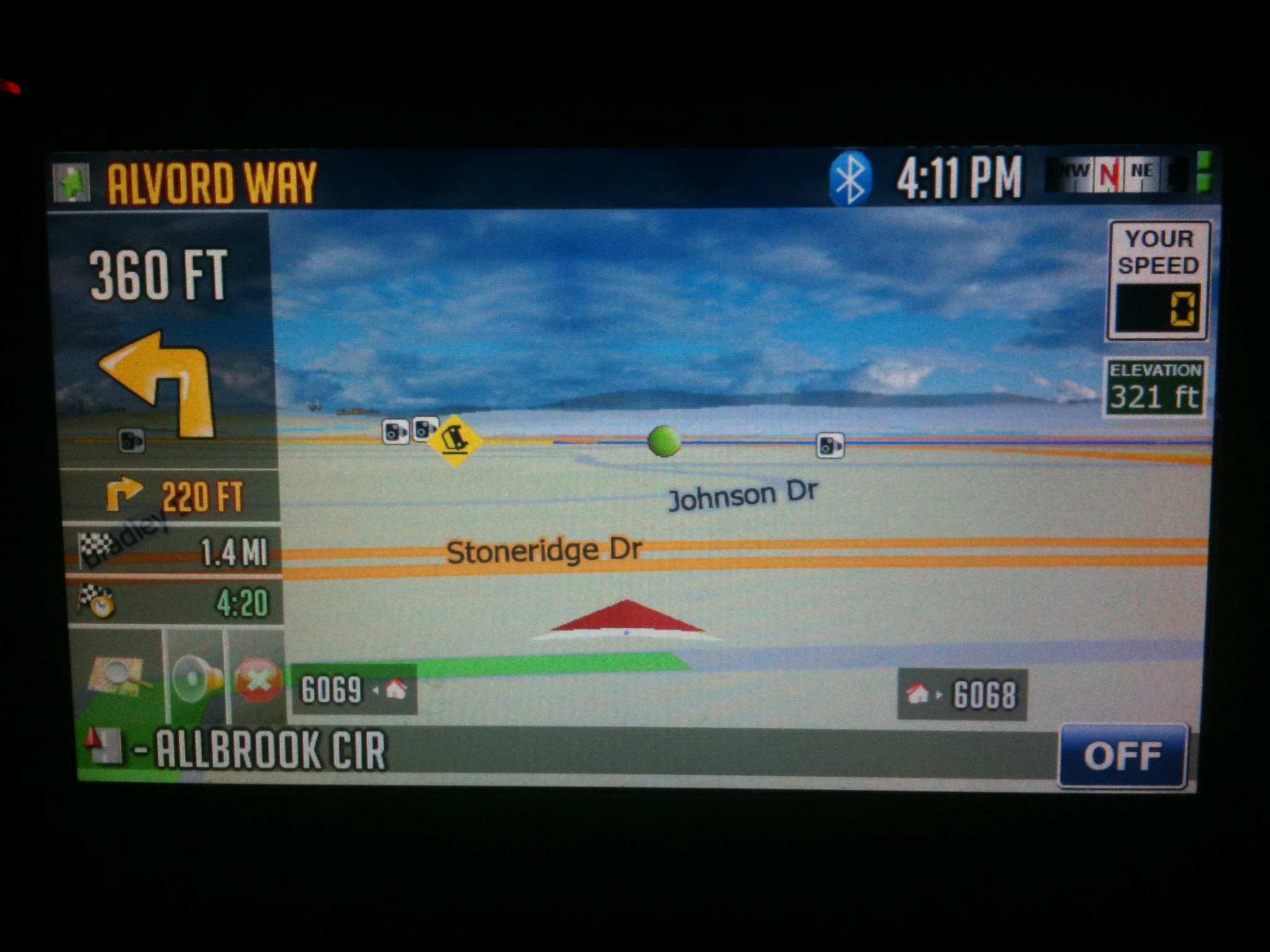
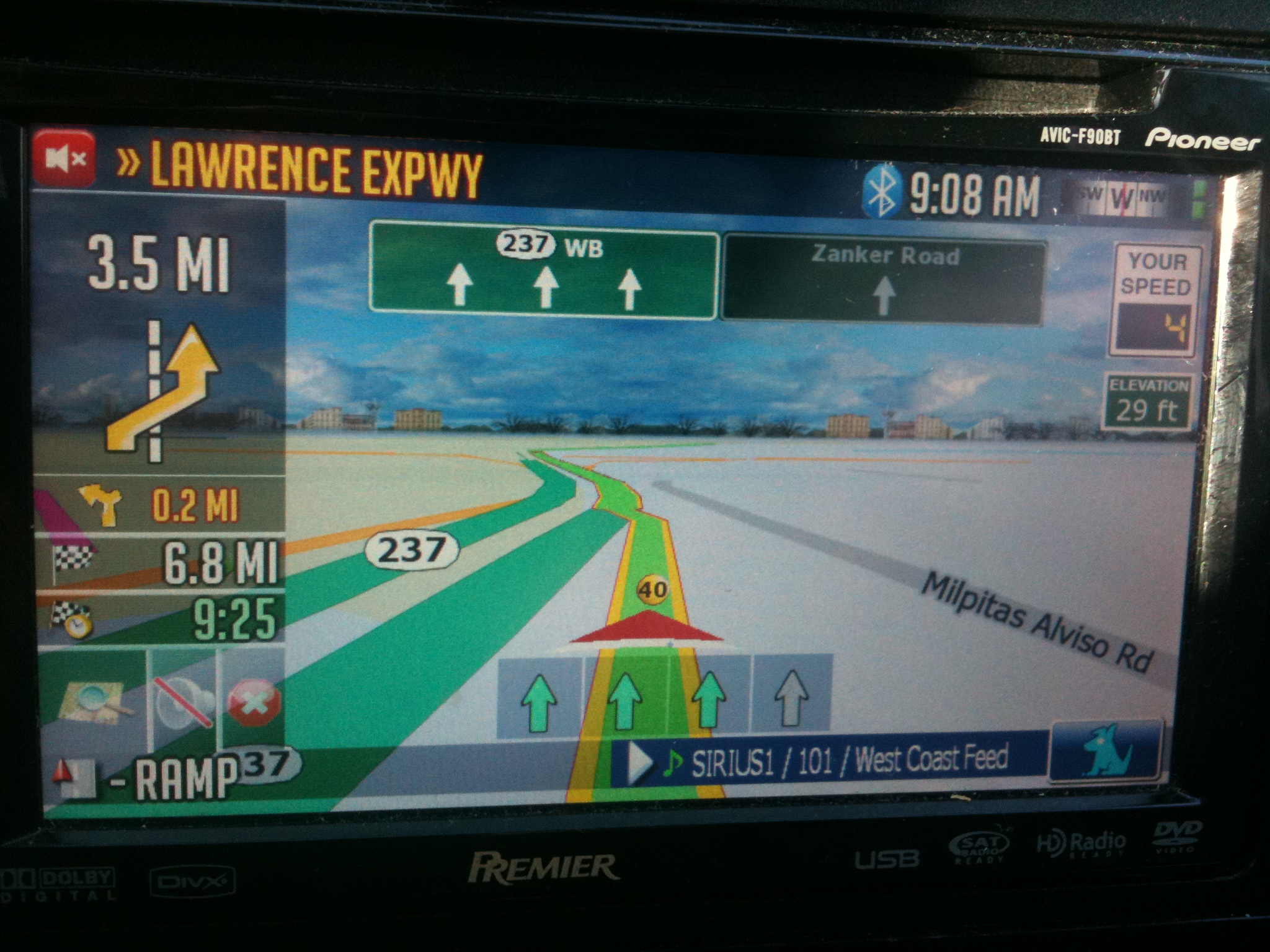
Larger nav text on left.


How do we enable the larger text on the left. I have a 700bt if that makes any difference. Also i am not getting the mute and cancel nav buttons on the navigation screen like shown.


Great mods by the way.


I think you need to delete your save files. Either that or you are in full screen cockpit mode.


Larger text is enabled by default. This is the old:


And this is the new:

post-26802-12872760909659_thumb.jpg

post-26802-1287276091547_thumb.jpg

Posted Jan 11, 2010 · 18:40 UTC#353

Larger nav text on left.


How do we enable the larger text on the left. I have a 700bt if that makes any difference. Also i am not getting the mute and cancel nav buttons on the navigation screen like shown.


Great mods by the way.


I think you need to delete your save files. Either that or you are in full screen cockpit mode.


Larger text is enabled by default. This is the old:

IMG_0343.JPG


And this is the new:


Ok .. i had full screen cockpit enabled haha. So i got that figured out. My next question is more of a functionality question than a question about your mod but how to do you lock it down to the low level view like show in the pictures. I found that clicking on the compass switches the view around but it never stays there. Also whenever i have it locked on the car it goes to a top down view. (ive only had this a few days so if this is a dumb question im sorry) Thanks

Posted Jan 11, 2010 · 18:47 UTC#354
Has anyone asked for the speed warning scale to be changed form percentages to actual mph over the speed limit? How about on city streets vs highways?


Where I live, drivers regularly drive 9 - 14 mph over the speed limit on the highway, but i'd like to be warned differently if I'm say 4 mph over the speed limit in the city.


Just a thought....


Thanks for the donation BigLou! Always appreciated. :)


To answer your question no I dont really have a document of hidden features. I can try to put something together now though. ;)


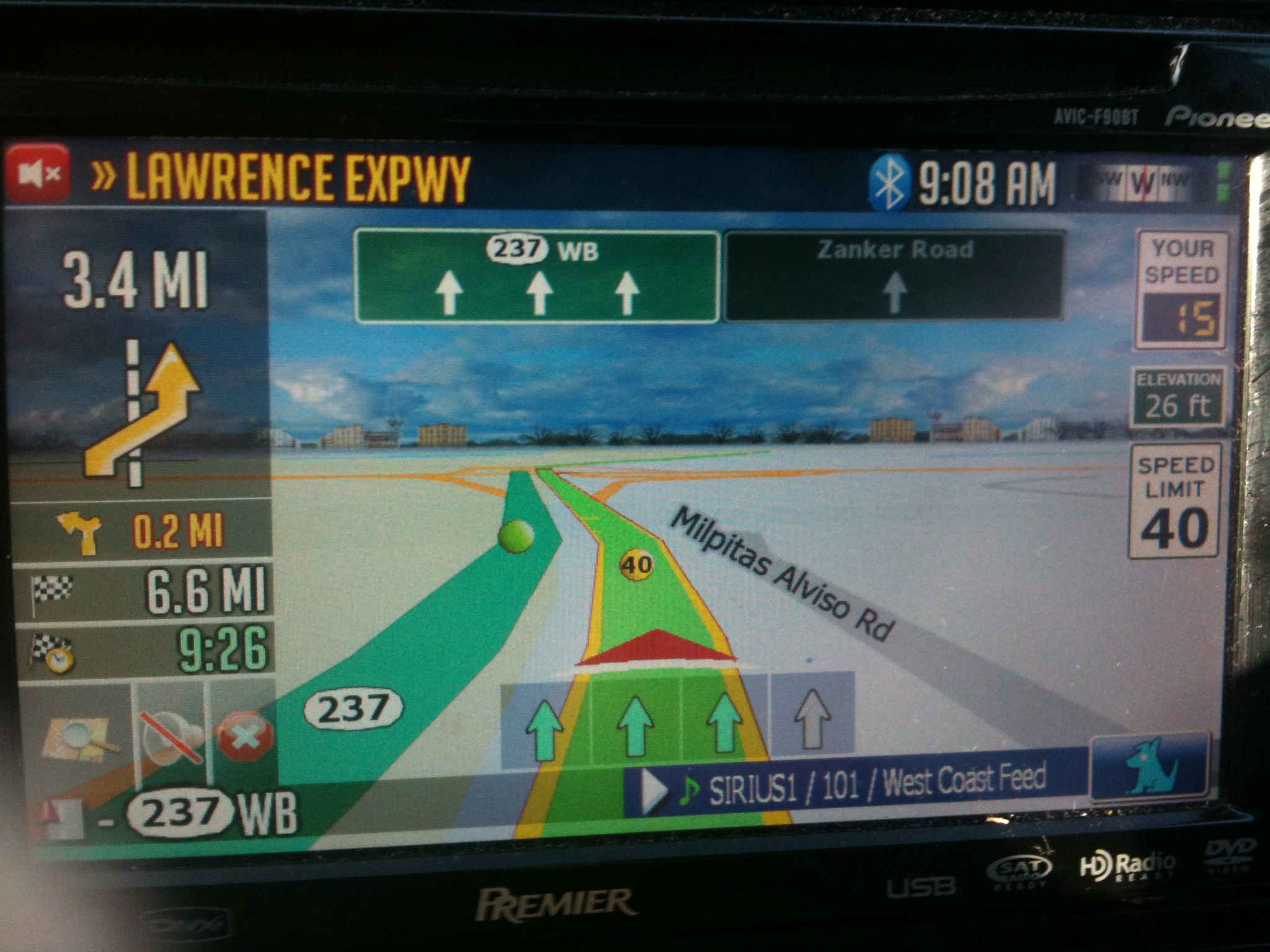
Lets use the picture below as a reference.


1. Touching the next street while navigating will repeat the last voice prompt in your route.

2. Touching the "Your Speed" sign will bring up the speedo

3. Long pressing the your speed sign will bring up the cruise dial.

4. Touching the Bluetooth icon will dial the number you have programmed in as a home #.

5. Touching the big direction icon will bring up the route avoid screen.

6. Touching the secondary direction icon will bring up the route details screen.

7. Touching the time to destination will switch it between time to destination and time at destination. This will pass on to the speedometer screen and be saved when rebooting.

8. Touching the speed limit sign when up will allow you to add a speedcam in the current GPS location.

9. Touching the time at the top of the screen brings up the trip computer.


Not too many hidden features in my mods. The quick menu makes it so that everything is pretty much out in the open. :)


Hope this helps.

post-26802-1287276092185_thumb.jpg

Posted Jan 11, 2010 · 18:48 UTC#355
Has anyone asked for the speed warning scale to be changed form percentages to actual mph over the speed limit? How about on city streets vs highways?


Where I live, drivers regularly drive 9 - 14 mph over the speed limit on the highway, but i'd like to be warned differently if I'm say 4 mph over the speed limit in the city.


Just a thought....


Hmmm... I will look into it. I see your point. 10% of 65MPH is 6.5 MPH but still. Sucks to have to do math.


NM - found it under alerts. Just had to keep playing.


Great MOD btw. Sent you a little something.

Posted Jan 11, 2010 · 18:56 UTC#356
Has anyone asked for the speed warning scale to be changed form percentages to actual mph over the speed limit? How about on city streets vs highways?


Where I live, drivers regularly drive 9 - 14 mph over the speed limit on the highway, but i'd like to be warned differently if I'm say 4 mph over the speed limit in the city.


Just a thought....


Hmmm... I will look into it. I see your point. 10% of 65MPH is 6.5 MPH but still. Sucks to have to do math.


NM - found it under alerts. Just had to keep playing.


Great MOD btw. Sent you a little something.


Sorry I misunderstood your question. Yes it will alert you based on speed over the speedlimit. ;)


Thanks again for the donation! Quick hint guide above.

Posted Jan 12, 2010 · 05:27 UTC#357

Diaftia, I would sincerely like to thank you for all your contributions.My 900bt is so much better than the unit i purchased, thanks to you. I have a queston and i hope it worthy but i have read all your posts and can not find the answer. I probably missed it but i have loaded every update of yours since December 01 and i never get clouds. i get the sky but no moon or clouds when i pan? Any simple answer? sorry if to noob but i just cant' get it. i had it with a different mod but i cant get it to work with yous. thanks for any help and i will test anything you need tested. i would really like to learn from you if you are willing to mentor. if not thanks for all your contributions. you absolutely are the man as far as i am concerned.

Posted Jan 12, 2010 · 07:00 UTC#358
Diaftia, I would sincerely like to thank you for all your contributions.My 900bt is so much better than the unit i purchased, thanks to you. I have a queston and i hope it worthy but i have read all your posts and can not find the answer. I probably missed it but i have loaded every update of yours since December 01 and i never get clouds. i get the sky but no moon or clouds when i pan? Any simple answer? sorry if to noob but i just cant' get it. i had it with a different mod but i cant get it to work with yous. thanks for any help and i will test anything you need tested. i would really like to learn from you if you are willing to mentor. if not thanks for all your contributions. you absolutely are the man as far as i am concerned.


Thanks for the kind words man. I appreciate it. I am always willing to help out whenever possible.


When you say you don't get clouds, do you mean as in the picture I posted a few posts above? I think I know what you are talking about. You can do 1 of 2 things. Either go into the smart zoom settings and adjust the tilt parameters to the far right, or turn off smart zoom and touch the screen to bring up the 3d controls. Tilt the setting to where you like it. With smartzoom off it will save it where you leave it. I personally like smartzoom so i would just adjust the sliders to the far right.

Posted Jan 12, 2010 · 12:07 UTC#359

Damn, I didn't even know that there was 'smart zoom settings'. I have usually just shut 'smart zoom' off. I will look for them and play around as I would like smart zoom, but also want the sky more

Posted Jan 12, 2010 · 14:56 UTC#360
Damn, I didn't even know that there was 'smart zoom settings'. I have usually just shut 'smart zoom' off. I will look for them and play around as I would like smart zoom, but also want the sky more

I will try to add this to the FAQ today. :)

Posted Jan 12, 2010 · 17:52 UTC#361

Hello,

Thank you ro uploading this update. I installed it to my radio. Everything is OK with it, only there are 2 problems. 2 functions,1 st the speed limit,2 nd the Voice isnt working. Can you tell me why is it? Or tell me what is the final solution.Please answer me here or to my e-mail: [email protected]

Thank you

Posted Jan 12, 2010 · 17:55 UTC#362
Hello,

Thank you ro uploading this update. I installed it to my radio. Everything is OK with it, only there are 2 problems. 2 functions,1 st the speed limit,2 nd the Voice isnt working. Can you tell me why is it? Or tell me what is the final solution.Please answer me here or to my e-mail: [email protected]

Thank you


1. If you have no voice you might need to delete your save files. Not sure what is causing the conflict but is one of the reasons I mention to delete the save files. I had it happen when testing and when I deleted the save files the voice prompts came back.


2. The speed limit only shows when the map data has a value for it. Otherwise it is not displayed. You will most likely see it on a freeway. Head out on a freeway/highway and it should appear.


Alex

Posted Jan 12, 2010 · 17:58 UTC#363

Help! I can't get my clock setting to save. I set it up for Central time and after I restart the car it goes to Eastern time for New York! Any suggestions?

Posted Jan 12, 2010 · 18:28 UTC#364
Help! I can't get my clock setting to save. I set it up for Central time and after I restart the car it goes to Eastern time for New York! Any suggestions?


I have never heard this before. Isn't your clock automatically setting with the GPS locating/locking?


I am really not sure this is related to my mods but just in case did you delete your save files?

Posted Jan 12, 2010 · 18:40 UTC#365

Thanks for the donation Ozzie! Don't remember seeing if you posted on here so thanks for the silent donation. ;)

Posted Jan 12, 2010 · 19:32 UTC#366
Help! I can't get my clock setting to save. I set it up for Central time and after I restart the car it goes to Eastern time for New York! Any suggestions?


I have never heard this before. Isn't your clock automatically setting with the GPS locating/locking?


I am really not sure this is related to my mods but just in case did you delete your save files?


I did delete the save files. I notice that when i go into the GPS time settings menu it has" EDT North America/New York" by default for some reason.

Posted Jan 12, 2010 · 19:42 UTC#367

Are you getting a GPS signal? I know if I'm in my garage or something, I can't get a signal, the time setting defaults to something else. Usually LA. 8)

Posted Jan 12, 2010 · 19:42 UTC#368
Help! I can't get my clock setting to save. I set it up for Central time and after I restart the car it goes to Eastern time for New York! Any suggestions?


I have never heard this before. Isn't your clock automatically setting with the GPS locating/locking?


I am really not sure this is related to my mods but just in case did you delete your save files?


I did delete the save files. I notice that when i go into the GPS time settings menu it has" EDT North America/New York" by default for some reason.


The reason why I don't think its related to my mods is because when you are in testmode, at the windows CE level, the unit will still sync time with the GPS satellites. Can you try hitting the reset and eject buttons on the AVIC itself for 5 seconds and see if the clears it up?


I agree with LonestarRob too. Do this outside with no roof over the car to make sure its getting good reception.

Posted Jan 12, 2010 · 20:36 UTC#369

I did delete the save files. I notice that when i go into the GPS time settings menu it has" EDT North America/New York" by default for some reason.


The reason why I don't think its related to my mods is because when you are in testmode, at the windows CE level, the unit will still sync time with the GPS satellites. Can you try hitting the reset and eject buttons on the AVIC itself for 5 seconds and see if the clears it up?


I agree with LonestarRob too. Do this outside with no roof over the car to make sure its getting good reception.


Thanks for the suggestions guys. I will try the reset suggestion tonight. BTW, I dont park in my garage so that takes that possibility out of the equation.

Posted Jan 13, 2010 · 05:20 UTC#370

Diaftia, Your mod is amazing. I have sent my thanks and wanted to let you know your instructions were perfect and I have enjoyed all of the new features.


Two questions...

1> I have changed my arrow to my car and since I have done that Mod that is posted in the forum I can't seem to get the map off north up. I also can't get the arrows to come up to change the angles of the map.


2 When updating (replacing the data file) do I need to clear the save file as I did when first installed?


Thanks again for the new driving experience.

Posted Jan 13, 2010 · 12:13 UTC#371

Great mod you got there!

Keep it up! :D

Posted Jan 13, 2010 · 15:20 UTC#372
Diaftia, Your mod is amazing. I have sent my thanks and wanted to let you know your instructions were perfect and I have enjoyed all of the new features.


Two questions...

1> I have changed my arrow to my car and since I have done that Mod that is posted in the forum I can't seem to get the map off north up. I also can't get the arrows to come up to change the angles of the map.


2 When updating (replacing the data file) do I need to clear the save file as I did when first installed?


Thanks again for the new driving experience.


Thanks for the donation Neil! Looks like it came in last night. Many thanks!


As far as changing the map orientation you do that by touching the compass. I do that since it's a little bigger than the traditional button.


As far as deletingthe save files goes; you should not need to delete them as long as you did it when you installed. Just changing and image should be fine since no code has changed.


Let me know how it goes and thanks for the feedback.


Alex

Posted Jan 13, 2010 · 15:37 UTC#373

Diaftia, great Job on the Mod. Question, When in route on the highway my screen changed from 3D back to 2D and I could not get it to convert back. i had to cancel the route and then it converted back. Hmm. Any ideas on that? also the icon (3d/2d) didn't even show on the screen. aka Ozzie

Posted Jan 13, 2010 · 16:11 UTC#374

diaftia,

I found a bug on digital dial screen. When the distance to next turn is less than km, the text overlaps or displays outside of the box. I will take a picture when I get home.

Posted Jan 13, 2010 · 17:40 UTC#375
Diaftia, great Job on the Mod. Question, When in route on the highway my screen changed from 3D back to 2D and I could not get it to convert back. i had to cancel the route and then it converted back. Hmm. Any ideas on that? also the icon (3d/2d) didn't even show on the screen. aka Ozzie


1. Can you provide more datails? Do you have overview mode on? When in overview mode, if you are in a route and the next turn is more than 2 miles away it will switch in to 2DN map mode. Going into another screen will make it go back to your previous map mode. If this is not what you are talking about can you give me the steps to reproduce the bug you are talking about?


2. What image name did you change for your icon? Which one do you want to change? The 3D image?

Page 15 of 48