Search Archive

2013 USA/CAN Maps Download

By misterwoofwoof · Mar 08, 2014in Hacks/Mods💬 317 posts👁️ 150,467 views
Page 8 of 13
Posted Jul 20, 2014 · 03:47 UTC#176


I did the hardware hack when I originally installed my unit. I did the software update and everything went well. I assume that the hardware mod is still working.


Random question.......

When I go to system information I don't see all those entry.....

All I have is two lines of information...

One say 5.000. I guess everything went well

Posted Jul 21, 2014 · 19:58 UTC#177

Thank you for doing this...I had no issues with the update on my z130BT.

Posted Jul 23, 2014 · 14:10 UTC#178

Just wanted to report No issues with updating x9310BT.  Thank you providing this!


...If only music would play through the lightning cable...album covers? yes, song "playing"? yes.  anything coming through the speakers? no!  I don't get it... but thats another thread...


so thanks again!

Posted Jul 26, 2014 · 14:05 UTC#179

Is anyone else having trouble download this update:  2013 USA-CANADA MAP UPDATE.zip  ?  I have google drive and it doesn't seem to matter..so slow it would take days to download..


Question about this download:  http://www.pioneerel...date_v5.100.zip   I'm using a Z110BT running 3.0, will this update bring me up to Z140BH ?  Does the update include 2013 maps?  Is it a good idea to update to 5.1?


Thanks

Posted Jul 26, 2014 · 14:26 UTC#180

Is anyone else having trouble download this update:  2013 USA-CANADA MAP UPDATE.zip  ?  I have google drive and it doesn't seem to matter..so slow it would take days to download..


Question about this download:  http://www.pioneerel...date_v5.100.zip   I'm using a Z110BT running 3.0, will this update bring me up to Z140BH ?  Does the update include 2013 maps?  Is it a good idea to update to 5.1?


Thanks

I just d/l in about 7 minutes - so the problem is on your end.

The 5.10 update is only a patch for 5.0 - which is the 2013 upgrade you haven't installed yet. Don't try installing it - it probably won't do anything anyway. 

Posted Jul 26, 2014 · 15:10 UTC#181

Thanks Ron, looks like what I need is the update: 2013 USA-CANADA MAP UPDATE.zip Which will take me from 3.0 to 5.0 and just to be clear, this firmware updates the units operating system as well as the maps, is that correct?


When I eventually figure out how to download the file, do I drag the folder to my SD card, or do I drag the contents of the folder to my SD card without the folder?

Posted Jul 26, 2014 · 16:33 UTC#182

Thanks Ron, looks like what I need is the update: 2013 USA-CANADA MAP UPDATE.zip Which will take me from 3.0 to 5.0 and just to be clear, this firmware updates the units operating system as well as the maps, is that correct?


When I eventually figure out how to download the file, do I drag the folder to my SD card, or do I drag the contents of the folder to my SD card without the folder?


When you view the larger compressed map file you will see that it contains 2 folders and the CardInfo file. Copy the two folders (Firmware and Update) onto the root of the SD card. This will create those two folders and contents on the SD card. You don't need to copy the CardInfo file as it would be replaced anyway. Open the CardInfo.zip file and you will find the CardInfo.cif file. Copy the CardInfo.cif file into the root folder of the SD card. Place the SD card in the radio and turn the vehicle on in order to start up the radio. If done correctly, you will see a message asking if you want to update. Select yes and the radio will confirm it's rebooting. Update takes about 30 minutes. This is the map update. Once that is done, go into the BT setting, scroll down and click on Firmware to update the BT firmware to 3.32.

Posted Jul 26, 2014 · 16:35 UTC#183

Worked perfectly. At first I tried the cardinfo file in post 39 but it did not work. I used the original file and it worked perfectly. 


Sent a donation as it's the right thing to do. 

Edited Jul 26, 2014 by tcope
Posted Jul 26, 2014 · 16:43 UTC#184

Thank you for the instructions tcope.  Did I read somewhere that if you update a Z110BT from 3.0 to 5.0 that will knock out the voice command features of the Z110BT?

Posted Jul 26, 2014 · 17:09 UTC#185

Thank you for the instructions tcope.  Did I read somewhere that if you update a Z110BT from 3.0 to 5.0 that will knock out the voice command features of the Z110BT?


Not sure...


http://avic411.com/index.php?/topic/38472-2013-usacan-maps-download/&do=findComment&comment=275737


http://avic411.com/index.php?/topic/38472-2013-usacan-maps-download/?p=276705


I've seen it mentioned but not seen too many complaints that it was lost.

Posted Jul 26, 2014 · 17:21 UTC#186

It knocks out the voice command NAVIGATION features only ... you cannot enter a destination by voice, only by typing in on the screen.   Supposedly if you have not implemented the parking brake bypass hack, you can only set a destination while the parking brake is on -- therefore no practical reason to try to set a destination by voice command and hassle with all of the misinterpretations of what you're saying, when you can just punch it in on the screen.


I have the bypass hack on my unit and I haven't missed the nav voice command.  I only use voice command for making phone calls.

Edited Jul 26, 2014 by JohnK
Posted Jul 26, 2014 · 19:18 UTC#187

It knocks out the voice command NAVIGATION features only ... you cannot enter a destination by voice, only by typing in on the screen.   Supposedly if you have not implemented the parking brake bypass hack, you can only set a destination while the parking brake is on -- therefore no practical reason to try to set a destination by voice command and hassle with all of the misinterpretations of what you're saying, when you can just punch it in on the screen.


I have the bypass hack on my unit and I haven't missed the nav voice command.  I only use voice command for making phone calls.


Thanks for clearing that up for me John.  I had my installer do the bypass hack and wasn't really aware that I was knocking out the Nav. Voice command feature.  If I can only use it while the parking brake is engaged and it doesn't work so well, the feature is not something I'm going to miss.  It will be nice to have the map update.  I had a location way out in the sticks to go to the other day and the navigation was completely lost, it wouldn't even accept the address, so I'm hoping 2013 maps are an improvement..

Posted Jul 26, 2014 · 23:38 UTC#189

Thanks everyone.

Edited Jul 27, 2014 by photousa
Posted Jul 27, 2014 · 16:11 UTC#190

Tried to upgrade to 5.1 using this link:  http://www.pioneerel...date_v5.100.zip , When unzipped you have a folder labeled: "AVIC-Z140BH_FW-Update_v5"  opened the folder and dragged the following items to the SC card:  AvicZ110 (folder),  Firmware, (folder) and Testmode.key (file)  Inserted the SC card into my AvicZ110BT,  The upgrade launched and went through the install process, the unit then restarted, then I got the screen in the photo below and couldn't go any further:


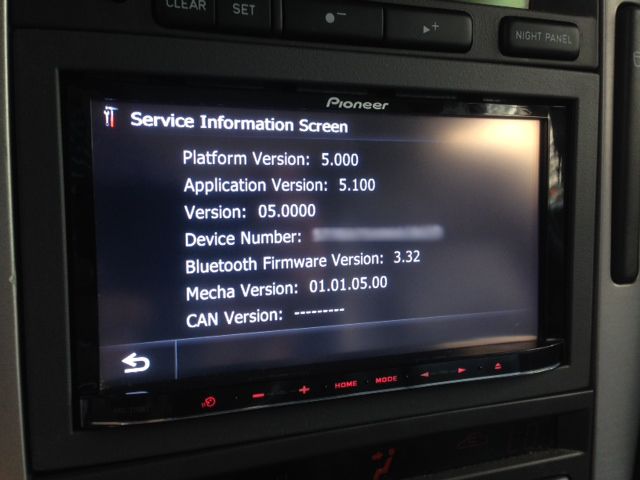
Went to system info to see what version I was on and I'm still at 5.0, I guess the upgrade didn't work.   When I try to reinsert the SC card, it doesn't go through the upgrade process, I just get the screen in the photo below.  My upgrade from 3.0 to 5.0 went well, I'm wondering what I did wrong?
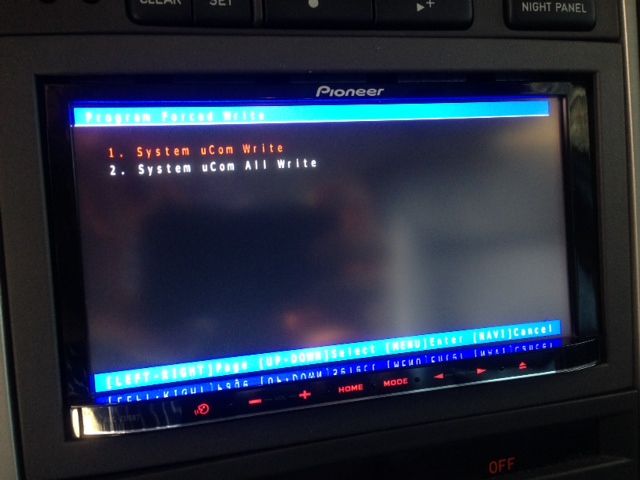
photo_zps2e224795.jpg

Posted Jul 27, 2014 · 16:32 UTC#191
photousa, on 27 Jul 2014 - 12:11 PM, said:photousa, on 27 Jul 2014 - 12:11 PM, said:

Tried to upgrade to 5.1 using this link:  http://www.pioneerel...date_v5.100.zip , When unzipped you have a folder labeled: "AVIC-Z140BH_FW-Update_v5"  opened the folder and dragged the following items to the SC card:  AvicZ110 (folder),  Firmware, (folder) and Testmode.key (file)  Inserted the SC card into my AvicZ110BT,  The upgrade launched and went through the install process, the unit then restarted, then I got the screen in the photo below and couldn't go any further:


Went to system info to see what version I was on and I'm still at 5.0, I guess the upgrade didn't work.   When I try to reinsert the SC card, it doesn't go through the upgrade process, I just get the screen in the photo below.  My upgrade from 3.0 to 5.0 went well, I'm wondering what I did wrong?
 

Did you read the instructions on the Pioneer web site on installing 5.100? http://www.pioneerelectronics.com/StaticFiles/PUSA/Files/Car-Firmware/AVIC-Z140BH_X940BT_FW-Update_v5.100_INSTRUCTIONS.pdf


 And the internal version is displayed via a hidden screen. Go to the System Information screen that shows Version  then press and hold the upper left corner of the screen.

Edited Jul 27, 2014 by RonS
Posted Jul 27, 2014 · 17:09 UTC#192

I did read the instructions. I'll try the search as you suggested, thanks.

Posted Jul 27, 2014 · 18:16 UTC#193

I did read the instructions. I'll try the search as you suggested, thanks.

Step #5 (on pg 5) shows exactly the screen you posted and what to do.

Posted Jul 27, 2014 · 21:30 UTC#194

Thanks Ron, After following your suggestion, I guess that worked after all.  Now on to figuring out how to get to the "App mode" screen...

photo2_zps8ac6f29b.jpg

Posted Jul 28, 2014 · 10:13 UTC#195

Was able to update my X920BT to the 2013 maps (5.0 firmware, and 3.32 BT firmware) but has anybody been able to update the X920BT to firmware 5.1?  I wrote the contents of the file AVIC-X940BT_FW-Update-v5.100.zip to the a FAT32 formatted Micro SD card and the unit reboots to the UCOM screen just fine.   When I select and chose "System uCom Write", i'm unable to continue because the next screen just shows [ --------- ] on the SD card instead of 8.05 (the uCom has 8.01).  


Seems as if the updater is checking to see if I have a X940 (and looking at a different folder).

Posted Jul 28, 2014 · 16:37 UTC#196

Has anyone been able to get the Appmode screen up and running, (visible) on an  Avic Z110BT, upgraded to 5.1?  I'm using the stock, CD-1U51v 30 pin cable with an iPhone 5.  Have the Appmode App installed on my iPhone, but have not been able to get the Appmode screen to show up, (I get the vertical icons on the right side of the screen, but I don't get the large horizontal icons in the center of the screen that are supposed to scroll, left and right).  Perhaps it's not possible with a Z110BT.  When I go into settings > AV settings, the system does not give me an iPhone option, I only have an iPod option.  Anyone else have a similar frustration?

Edited Jul 28, 2014 by photousa
Posted Jul 31, 2014 · 01:34 UTC#197

Has anyone been able to get the Appmode screen up and running, (visible) on an  Avic Z110BT, upgraded to 5.1?  I'm using the stock, CD-1U51v 30 pin cable with an iPhone 5.  Have the Appmode App installed on my iPhone, but have not been able to get the Appmode screen to show up, (I get the vertical icons on the right side of the screen, but I don't get the large horizontal icons in the center of the screen that are supposed to scroll, left and right).  Perhaps it's not possible with a Z110BT.  When I go into settings > AV settings, the system does not give me an iPhone option, I only have an iPod option.  Anyone else have a similar frustration?


Anyone out there?

Posted Jul 31, 2014 · 07:10 UTC#198


I updated my x930bt to x940bt firmware. now I am wondering which CARDINFO.zip I use for the map update in misterwoofwoof's post. Do I use the one for the 930bt or 940bt. Thanks in advance! 


Posted Jul 31, 2014 · 11:50 UTC#199

Anyone out there?

Sorry - I can't help - don't have an iPhone and never use Appmode.
Posted Jul 31, 2014 · 13:30 UTC#200

I updated my x930bt to x940bt firmware. now I am wondering which CARDINFO.zip I use for the map update in misterwoofwoof's post. Do I use the one for the 930bt or 940bt. Thanks in advance! 

It doesn't hurt or damage anything to try one and then the other if one doesn't work, but it may overwrite the x940bt update... not positive on that.

Edited Jul 31, 2014 by BlakeStone
Page 8 of 13