Search Archive

AVIC-MRZ99 Custom Firmware / Testmode

By crankz · Oct 09, 2014in Hacks/Mods💬 972 posts👁️ 566,761 views
Page 35 of 39
Posted Oct 28, 2020 · 14:23 UTC#851
On 2/26/2017 at 10:44 AM, dzo said:

OK, it must be a completely different platform, the only thing I can suggest is that you try to make a testmode key using this:


https://github.com/bassrock/AVIC-NEX/tree/master/TestKeys


This is the newer format for testmode keys.


You can also experiment to see if there is a key combination to get you into testmode.


I took a look as the user manual for mrz099 and the UI is completely different to the mrz99 so it's very unlikely that anything here will be of use to you.

Hey @dzo I am trying to get into my test mode with my AVIC RZ33 (2015, firmware at 2.0 something) but none of the keys that you posted in this thread works :( . I was searching this thread around and found out these perl files. How am I supposed to compile or use these files? Any help would be appriciated. 

Posted Nov 07, 2020 · 05:16 UTC#852
On 11.11.2019 at 4:15 PM, Shtirlitz said:

Hi,

OK, here is the step-by-step manual:

Step 1: Take out the FW, see here

Step 2: Get the file named "PS140PLT.PRG". For RZ09 it is in folder NAVIVUP\AVICRZ09\PLATFORM\

Cut out 0x200 bytes from the start of the file: its header. I used the SFK-tool:


sfk195x64.exe partcopy PS140PLT.PRG -allfrom 0x200 output.nb0 -yes

When you need to extract file output.nb0 by the dumpromx.exe tool (easy to find it on this forum):


mkdir DUMP
dumpromx.exe -d DUMP -v -5 output.nb0 >output.txt

As a result, you'll get a lot of FW files, and initDB.dat of course :)

Step 3: Patch initDB.dat file.

Use my sources, take translate.c and translation.txt, and see the code:


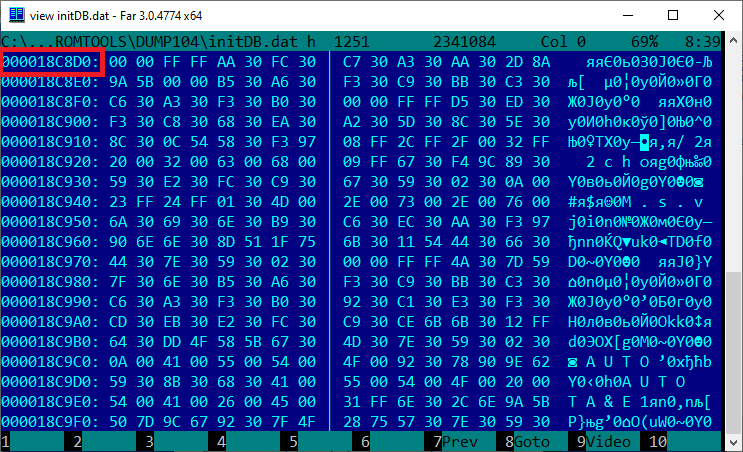
const long OFFSET = 0x18C8D0L;   // RZ09 1.04 0x18C8D0L; RZ77 2.07 = 0x1EA87CL
const long BLOCK_LEN = 0xAF00BL; // RZ09 1.04  0xAF00BL; RZ77 2.07 =  0xB5CDFL

These constants define the start and length-1 of the data block inside of the initDB.dat, correct it according to your header.

Address stores in the little-endian bytes sequence:
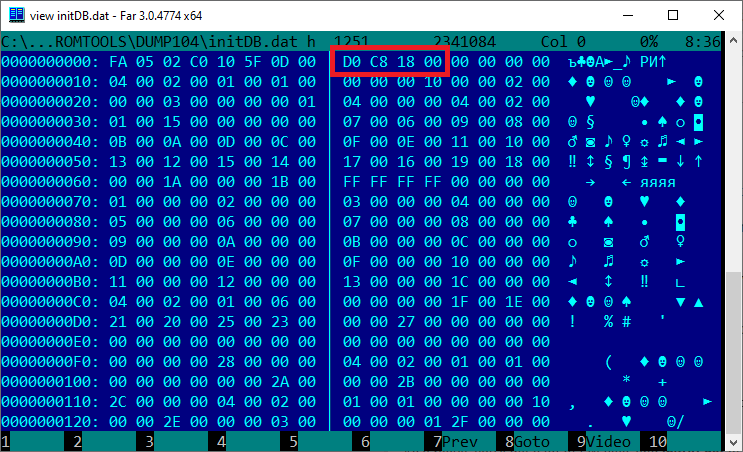
scr001.png?raw=true

Go to the start of this data block offset:
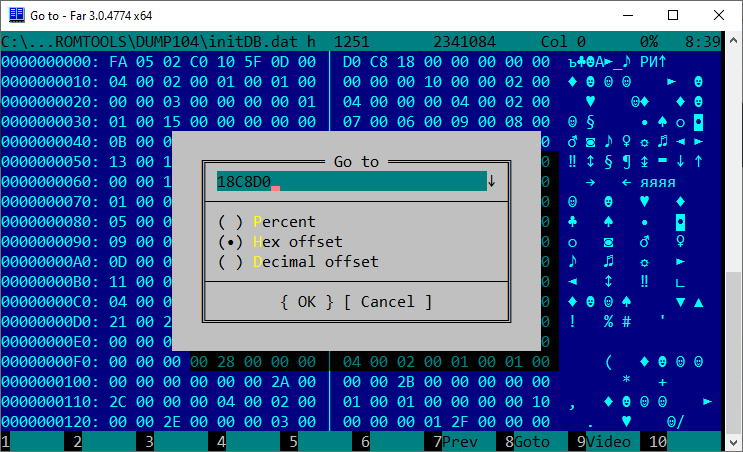
scr002.png?raw=true

scr003.png?raw=true

You can see the start of the Japanese strings data, its in UCS-2 LE codepage.

The end of the data block at the end of the initDB.dat file:
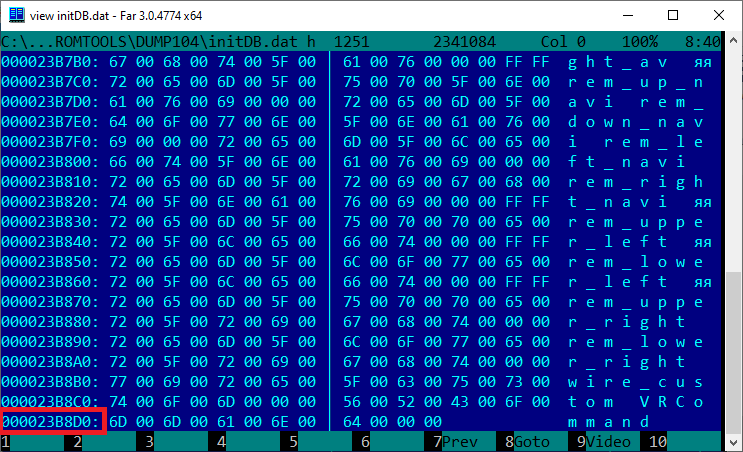
scr004.png?raw=true

The address of the last data byte is 0x23B8DB. Use the calc for calculating the length-1 and insert it to translate.c source, and compile it.

While running, the translate.exe search for initDB.dat and translation.txt in the current folder.

After finishing the output file initDB_out.dat will be created.

Step 4: Assemble the updated FW.

Get makever.c and compile it. You can change the version if you need it, the current FW version in the PS140PLT.VER file.
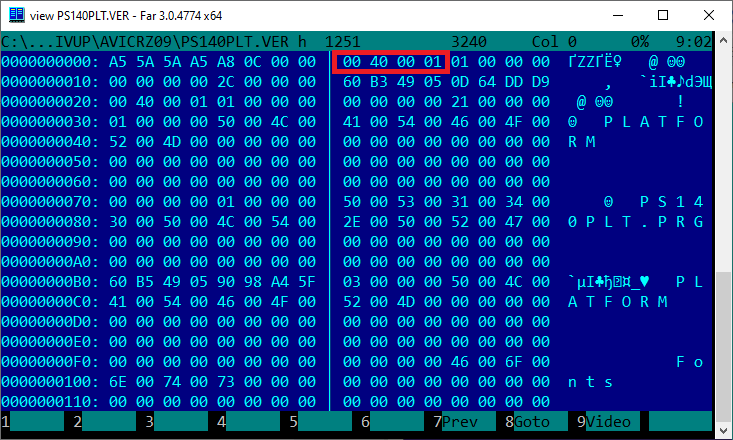
scr005.png?raw=true

Replace initDB.dat in the FW by commands:


copy /Y initDB_out.dat initDB.dat
dumpromx.exe -a initDB.dat fw_104_src.nb0

You need to get the correct output, like this:


img 00000000 : hdr=8d908c88 base=88471000  commandlineoffset=88471000
ERROR: could not find pointer for ofs 00000000
Successful file initDB.dat inserting
initDB.dat.nb saved successfully

If it OK, run the makever.exe by commands:


del /Q fw_104.nb0
ren initDB.dat.nb fw_104.nb0
makever.exe
mkdir NAVIVUP\AVICRZ09\PLATFORM
copy /Y PS140PLT.PRG NAVIVUP\AVICRZ09\PLATFORM\PS140PLT.PRG
copy /Y PS140PLT.VER NAVIVUP\AVICRZ09\PS140PLT.VER

It creates the folders (NAVIVUP) and files for the AVIC's FW update.

Step 5: Just place folder NAVIVUP on the SD and try to update your AVIC in a test mode.

Use "Program forced write" menu and "Platform write" command, SD as a source.

On Internal SD stayed the original Japanese FW if you want back to it.

And be careful, do not power off the AVIC during updating, it can be bricked (or boot looped)!!!

Good luck)

Приветствую, не как не могу найти программу dumpromx.exe  на форуме, если не сложно скажите где скачать.

Edited Nov 07, 2020 by serjeao
Posted Nov 30, 2020 · 17:12 UTC#853

Any luck with AVIC EVZ05? 


TIA

Posted Dec 10, 2020 · 01:37 UTC#854
On 4/11/2019 at 6:05 PM, mrmwash said:

Thank you DZO, will try it out and give feedback.

It works! Thank you so much DZO...

Hi mrmwash,

I also have a C9P6 and copying PF090JPJPN.LNG did not work for me. So I am gonna try copying NA090JPMZD.

which folder did you copy this file into, PRG0 or PRG1 ?

Thanks in advance. 

Posted Jan 21, 2021 · 06:26 UTC#855

help with the image when you turn it on

OPENING 5.bmp OPENING.bmp

Posted Jan 25, 2021 · 13:25 UTC#857

Good day! 

Is there any way that I can change to English language of my AVIC-MRZ06? Please help

Posted Feb 08, 2021 · 08:40 UTC#858

Can i get steps and code for language change on pioneer carrozzerria avic-mrz77 from japanese to English 


Posted Feb 08, 2021 · 08:42 UTC#859

Please can i get language change for mrz77

Posted Feb 14, 2021 · 10:15 UTC#860

Hello everyone Tell me, how can I open the font file "DFHSMaruGothic.pgf"? The same font is found in "PF090PLT.PRG" and, taking it out, I found those extra intervals for Russian letters. But after removing the intervals in the font, I do not know how to put everything back together correctly...

Всем привет! Подскажите, как можно вскрыть файл шрифта "DFHSMaruGothic.pgf"? Этот же шрифт лежит и в "PF090PLT.PRG" и, достав его оттуда, я обнаружил те самые лишние интервалы для русских букв.

DFHSMaruGothic.thumb.jpg.302ba7f2ef38d5ef1494e95bb0fc267e.jpgНо убрав интервалы в шрифте не знаю как собрать всё обратно правильно...

DFHSMaruGothicV1.jpg.31a8c47fbc7c4322eeafe94608220b56.jpg


Posted Apr 01, 2021 · 19:32 UTC#861
On 3/9/2019 at 6:16 PM, vadka610 said:

I have a Mrz06 and thank you for the help with changing the language, but I would like to know how to play music videos from a SD card, it says I must use navi studio to add files to the card but it wont even allow me to register.... can someone help me with this?

Can you please assist with how you changed the language on you MRz06 please.

Posted Apr 02, 2021 · 01:13 UTC#862

Hello friends!

Trying to mod AVIC evz05 troubled with

I cannot find "dumpromx.exe" tool neither this forum nor all the web.

Гугл с яндексом наперегонки несут бред и ссылки на этот форум и 4pda, где Штирлиц отсылает обратно на этот форум. need iq over 200 :(

Please if you got this tool take me direct or cloud link.

Thx to all helps

Posted May 26, 2021 · 08:43 UTC#863
On 9/6/2019 at 5:43 PM, Shtirlitz said:

Hi All!

FW backup instruction for AVIC-RZ09 (and similar devices - AVIC-RL09, AVIC-RW09, AVIC-RZ09, AVIC-RZ07, AVIC-RZ06, AVIC-RL05, AVIC-RZ05, AVIC-RW03, AVIC-RZ03):

1. Get SD card, FAT32-formatted. Probably the USB disk will work too, but I didn't check back up on USB.

2. Make the empty folder named "NAVIVUP" on SD card.

3. Power on the AVIC and place the SD card into AVIC device slot.

4. Go to in the Testmode (press and hold "NAVI" button, press each once right-left-right-left-right-left, release "NAVI" button - device restarted in test mode).

5. On the first screen - select menu "10. Program forced write", go to the next screen of this submenu (2 of 3) and select "3. Take out program".

6. Select destination "SD" or "USB" and press "MENU" for start downloading.

7. Wait for about minute while FW downloaded to SD/USD disk - with full-screen messages "!!NOW COPYING!!", while "HIT ANY KEY" message didn't appear.

Profit) You can see the full-FW files on your SD/USB disk in the NAVIVUP folder.

P.S.: Sorry guys but I cannot upload the screen-shots here, I see just "There was a problem uploading the file." message displayed.

Alex

Hi Shtirlitz,

Here didn't available submenu "3. Take the program out" on menu "Program force write" in my device Avic-ZH0077.
Here only...
1. HDD & Plat Write
2. Platform write
Please help on this regard, it will be highly appreciated.

Thanks

Posted Jun 04, 2021 · 11:50 UTC#864
ATTENTION plz, 

I can help with the RZ-05/09/99 translation of the Japanese language in encrypted and locked navi platform/OS

Ive been battling the encryption for some time and as of now can do it with no issues for sever

Please contact me here (remove spaces) east timour @ g mail . com

BR,
Tim
ATTENTION plz, 

I can help with the RZ-05/09/99 translation of the Japanese language in encrypted and locked navi platform/OS

Ive been battling the encryption for some time and as of now can do it with no issues for sever

Please contact me here (remove spaces) east timour @ g mail . com

BR,
Tim


Posted Jun 08, 2021 · 21:41 UTC#865

Hello!

mrz-09 black screen with code 6. how to fix? where did the files come from? Help.


Posted Jun 21, 2021 · 00:28 UTC#866

First off I want to go and say @dzo is an absolute legend! My MRZ-09 is (mostly) in English, so thank you so very much!

After reading through this lengthy thread, I guess I'm lucky that I have a working unit but there's still a couple of things that are annoying me and translating the original Japanese manuals for my model are proving not to be too helpful.


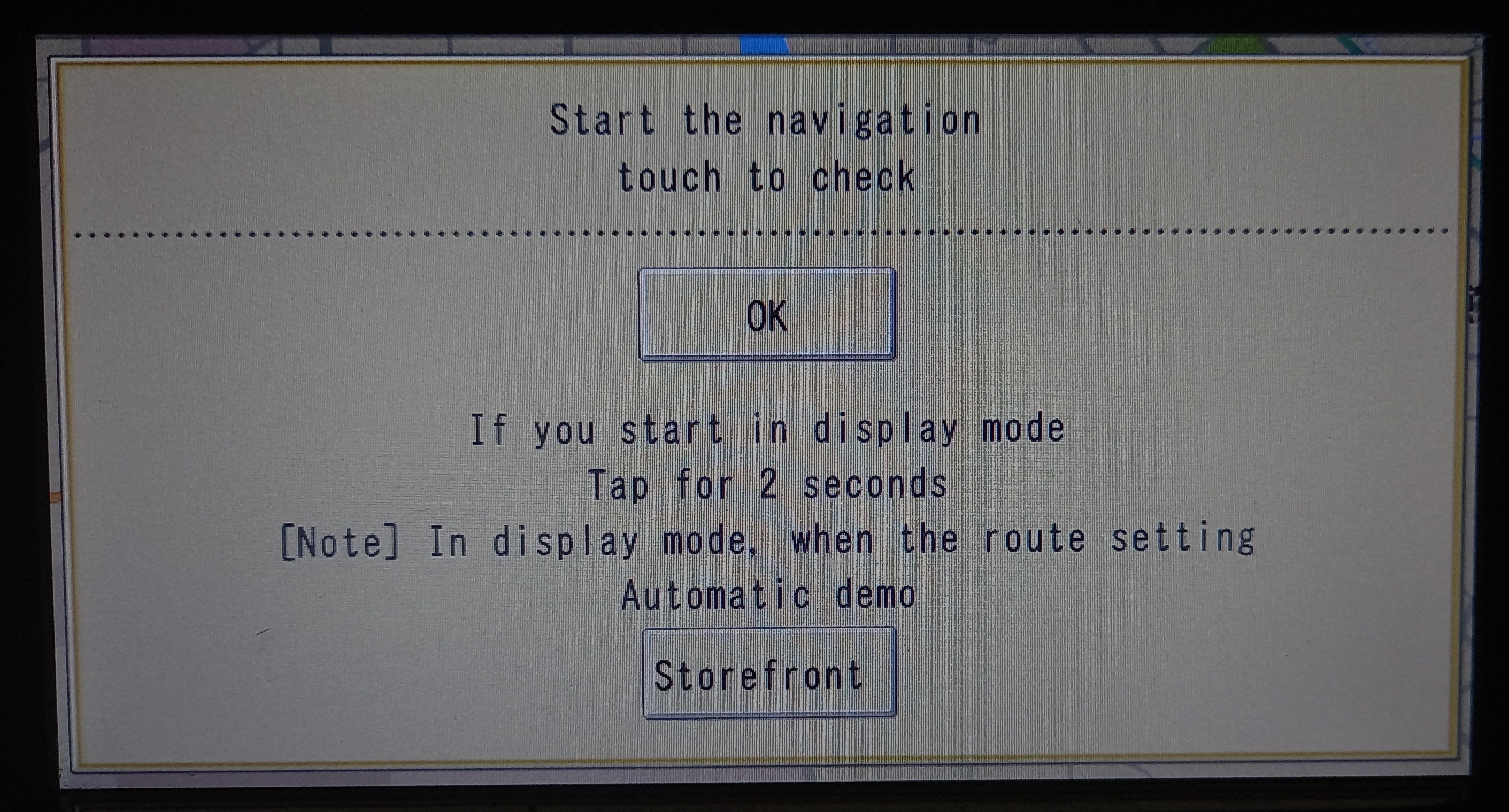
Firstly since resetting all the settings I've started getting this splash screen when powering on (and yes I can just "OK" it but it's annoying to keep having to do this every time).

Second issue of mine is the lack of being able to set the time, something many others have had issues with by the looks of it. It seems to be linked with the GPS from reading past posts. I see there's a video on a workaround for a different Carrozzeria unit, but is there anything for the MRZ-09? 

Thirdly is there away to change the splash screen on the MRZ-09? If so could anyone point me to the right discussion, tutorial or explain how it's done? I'm happy to make my own images, I'm well up enough on Photoshop to do it, I'd just need to know the image size and format. I'd like to make splash screens for others here too, upon request.

Forth and final thing that I'm fairly sure isn't possible reading the thread, but has anyone had any success in changing the maps what so ever on any JDM Carrozzeria device? If not, has anyone found a way to make it so the MRZ-09 defaults to the AV mode, or some way of disabling the Sat Nav altogether?

Please see my attached pictures. Any support would be greatly appreciated!

20210620_221725_1.jpg

20210620_221808.jpg

Edited Jun 21, 2021 by Solvalou
Posted Jun 22, 2021 · 22:05 UTC#867
El 14/5/2020 a las 1:48, shadrack dijo:

Hola, aquí está el enlace a los archivos de copia de seguridad de mrz 07

https://yadi.sk/d/hGnQktfNFBcchw  saludos cordiales

Hola, ¿podrías pasarme los archivos completos estos no me ayudaron por favor muchas gracias

Posted Jun 22, 2021 · 22:09 UTC#868

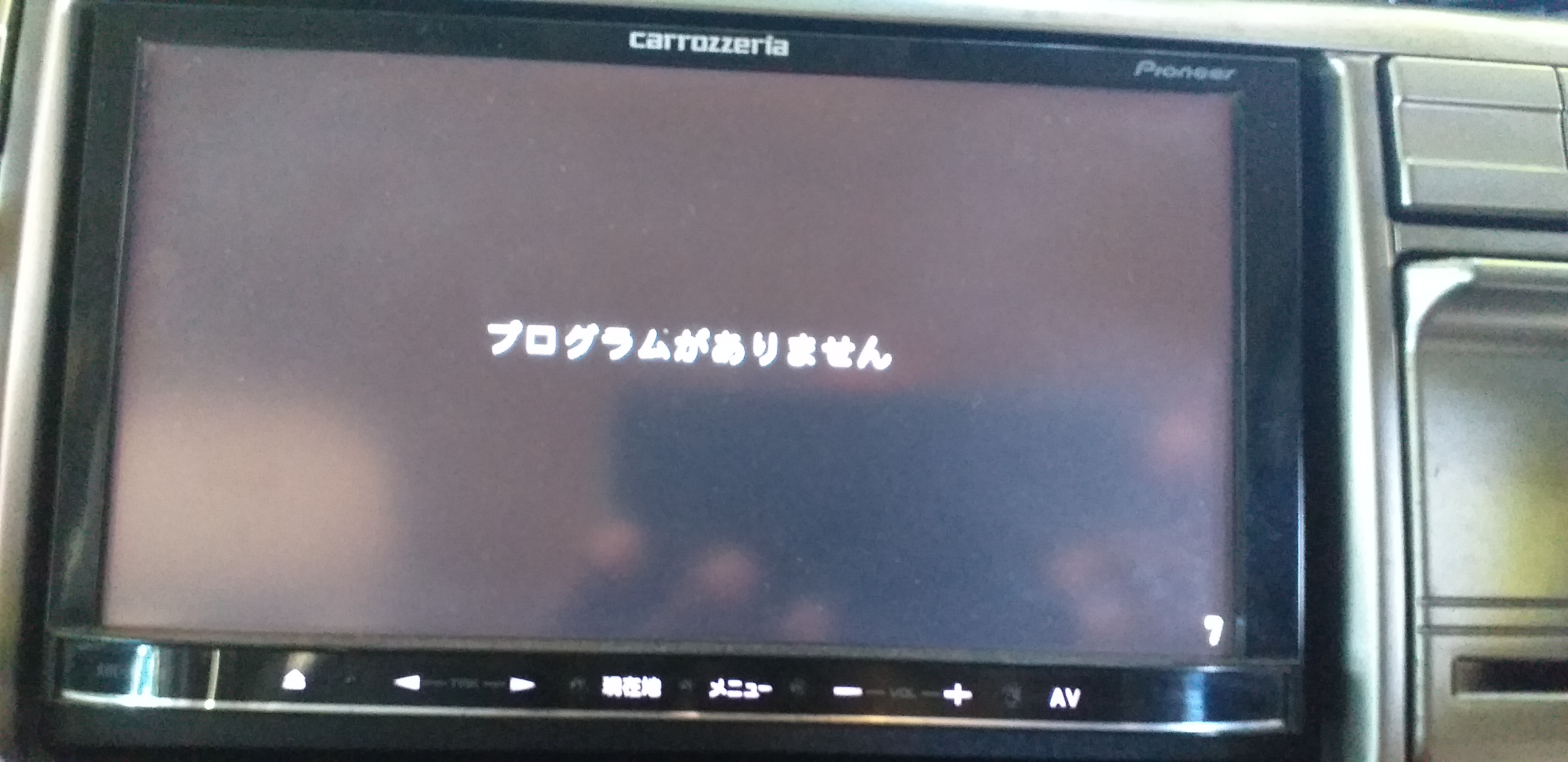
Hello I have the classic problem of "NO PROGRAMMING 7" in my AVIC-MRZ07. and there are no files in the USER folder I need them could you help me please thank you very much

20190418_145120.jpg.6eec7819fab6e6a318f0c01b0f30545c.jpg

Posted Jun 22, 2021 · 22:19 UTC#869
El 27/3/2019 a las 10:54, EnoKt dijo:

Cómo resolví finalmente mi problema con AVIC CARROZZERIA MRZ09 .

Recordé haber guardado dos copias de seguridad para la carpeta USUARIO en mi computadora portátil. 1) Versión antes de usar la configuración automática japonés-inglés de DZO que funcionó perfectamente en mi AVIC MRZ09. 2) Versión después de una conversión exitosa al inglés siguiendo el programa DZOs.

1) Entré en TestMode usando botones y navegué hasta USER DIR, luego seleccioné todos los archivos y presioné eliminar. Tomó tiempo, pero lo logré.

2) Copié la versión en inglés de la carpeta de respaldo en el disco flash y transfirió el contenido a la carpeta USER del AVIC MRZ09. Me tomé bastante tiempo pegarlo. Finalmente se hizo.

3) Se quitó el disco flash y se apagó el ACC. Esperó a que el ventilador interno de la unidad se detuviera por completo y volvió a cambiar a ACC.

4) La unidad volvió con vida sin pantalla negra y funciona bien. 

Espero que esta solución pueda ayudar a alguien con un problema similar al mío.

hola tengo el mismo problema pero en un avic mrz07 y no tengo los archivos de respaldo, alguien me podría ayudar por favor muchas gracias

Posted Jul 04, 2021 · 14:01 UTC#870


On 9/6/2019 at 5:43 PM, Shtirlitz said:

Hi All!

FW backup instruction for AVIC-RZ09 (and similar devices - AVIC-RL09, AVIC-RW09, AVIC-RZ09, AVIC-RZ07, AVIC-RZ06, AVIC-RL05, AVIC-RZ05, AVIC-RW03, AVIC-RZ03):

1. Get SD card, FAT32-formatted. Probably the USB disk will work too, but I didn't check back up on USB.

2. Make the empty folder named "NAVIVUP" on SD card.

3. Power on the AVIC and place the SD card into AVIC device slot.

4. Go to in the Testmode (press and hold "NAVI" button, press each once right-left-right-left-right-left, release "NAVI" button - device restarted in test mode).

5. On the first screen - select menu "10. Program forced write", go to the next screen of this submenu (2 of 3) and select "3. Take out program".

6. Select destination "SD" or "USB" and press "MENU" for start downloading.

7. Wait for about minute while FW downloaded to SD/USD disk - with full-screen messages "!!NOW COPYING!!", while "HIT ANY KEY" message didn't appear.

Profit) You can see the full-FW files on your SD/USB disk in the NAVIVUP folder.

P.S.: Sorry guys but I cannot upload the screen-shots here, I see just "There was a problem uploading the file." message displayed.

Alex

Hi Alex,

Its great to see the discussion. I have AVIC RZ06 installed with Japanese language. As per your instructions, I backed up the FW files which I am sharing here. Please have a look. It also named as AVICRZ09 in the NAVIUP folder after FW backup. NAVIVUP AVIC RZ06.7zI have no programming background. Just a thought, is it possible to replace the PS140PLT file with yours of AVIC RZ-09 for language change. Many thanks. 

AVIC RZ06 FW file link: NAVIVUP AVIC RZ06.7zNAVIVUP AVIC RZ06.7z

https://mega.nz/file/2YxHgYYQ#iFpa4j_r9aRvNojSfMRYCRp4aG65UG1ryHY2tuBr6Fk

Edited Jul 04, 2021 by tofazzalh
Posted Jul 08, 2021 · 09:47 UTC#871
On 10/15/2017 at 2:51 PM, manio112 said:

HI TO ALL AND THANKS DZO FOR HIS JOB I HAVE BACKUP OF MRZ09 MAYBE SOMEBODY NEED LINK FOR IT  https://mega.nz/#F!nUwjVLxZ!1soULiYcJRyf1W3ANrSFZg

I this for the English or Japanese Translation. Thanks Hein Zehrt Windhoek Namibia

Posted Jul 10, 2021 · 19:36 UTC#872

How to go into testmode in the first place? AVIC-RW09 here.
I don't have a NAVI button to restart it in test mode with the instructions given.
I have an SD card, FAT32-formatted with an empty NAVIVUP folder. What do I do now?

Posted Aug 04, 2021 · 08:10 UTC#873

Hi All,

I get an MRZ99. I can't open front panel. Electrically ok, it looks like demo mode, the aligment buttons inactive. At startup, show me, tap more than 2 minits, but where? 
I can access test mode. It is possible to set factory setting?
Regards,
Jaca

Attached Files (2)
4B5987D2-5A14-46D6-864B-54075D6C8916.jpeg
101D8827-FD53-490B-92F1-96D2F1B03309.jpeg
Posted Aug 25, 2021 · 06:19 UTC#874

Hey! First, I want to thank @dzo for the tremendous input as well as @javed akhtar continued support. You are legends. If you forgot someone, then I'm sorry.
Secondly, I have translated this post into google translate, so if there are any mistakes, then get it right.
Thank you all, I have translated MRZ09 / MRZ99 / MRZ77 / MRZ90 into Russian, MRZ02 into English. I also wanted to contribute my treasure to this case and created a backup for all the above models and attached the link below. More MRZ models are coming soon and will be added as well. A friend ordered several pieces. MRZ and asked me to translate them since I work in photoshop (he thinks I'm a programmer). But thanks to the detailed instructions, DZO, as well as the advice of Javedakhtar, I translated them.

Backups:

1) MRZ 02

2) MRZ 09

3) MRZ 77

4) MRZ 90

5) MRZ 99

6) NR-MZ03 MITSUBISHI

https://mega.nz/folder/O3pHwIoK#PViNfdIVca0qBcVeMo0nfg

Edited Aug 27, 2021 by hydyrov — Reason: New backups
Posted Aug 27, 2021 · 19:37 UTC#875

Hello, just in case you won't have the backup copy of the mrz07, I've been looking for it for months and I can't find it, please, I would appreciate it if you have it and give me the link

On 25/8/2021 at 2:19, hydyrov said:

¡Oye! Primero, quiero agradecer@dzo por la tremenda aportación, así como @javed akhtar apoyo continuo. Sois leyendas. Si olvidaste a alguien, lo siento.
En segundo lugar, he traducido esta publicación al traductor de Google, así que si hay algún error, hágalo bien.
Gracias a todos, he traducido MRZ09 / MRZ99 / MRZ77 / MRZ90 al ruso, MRZ02 al inglés. También quería contribuir con mi tesoro a este caso y creé una copia de seguridad para todos los modelos anteriores y adjunté el enlace a continuación. Próximamente vendrán más modelos MRZ y también se agregarán. Un amigo pidió varias piezas. MRZ y me pidió que los tradujera ya que trabajo en Photoshop (él cree que soy programador). Pero gracias a las instrucciones detalladas, DZO, así como a los consejos de Javedakhtar, las traduje.

Copias de seguridad:

1) MRZ 02

2) MRZ 09

3) MRZ 77

4) MRZ 90

5) MRZ 99

6) NR-MZ03 MITSUBISHI

https://mega.nz/folder/O3pHwIoK#PViNfdIVca0qBcVeMo0nfg


Page 35 of 39