Search Archive

2015 European Map Update for Pioneer AVIC-F30BT, F930BT, F9310BT, F40BT, F940BT, F840BT, F8430BT

By Flomsen · Aug 16, 2015in Hacks/Mods💬 789 posts👁️ 337,085 views
Page 19 of 32
Posted Sep 23, 2015 · 14:21 UTC#451
 

Everybody who is aking for the password should be banned for one week or so...

If you are not able to read, you should not update your unit!


just my 2ct


This! I went through the thread thoroughly before doing anything. Even if you don't want to go through the whole thing, is it that hard to read the first post?!


Questions no answer! Or then, to make you putting has in the daytime at random without understanding

I'm afraid I have no idea what you were trying to say with that second sentence. 


As for answers, I answered Kansloos because he/she has the same version I do.

I'm not going to say yes it will work on your version and then be blamed if it doesn't!


I will tell you what I did with my version - f930bt and you can decide from that.

1. I would say false, as I used testmodkey to backup the user folder and was able to update afterwards with no problem. The only thing I couldn't figure out was how to get out of testmod so just turned the unit off and on again after removing the sd card.


2. I have no idea.


3. I didn't edit a thing. I downloaded the file from the first post, put it all on an sd card and into the unit. I went through this whole thread before doing anything, and it looks to me that anything that needed to be edited has now been done by someone else so that we don't have to do it.


4. See answer to 3.


5. If you follow the instructions linked to (the main bit being do not turn off the engine) I don't see why you would have a problem as long as your model is listed as working on the first post.

Edited Sep 23, 2015 by Nutty
Posted Sep 23, 2015 · 16:43 UTC#452

hello Nutty


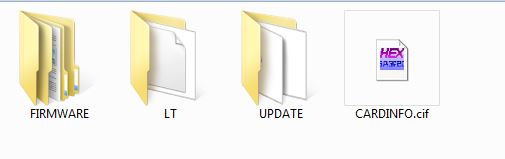
you mean it takes just put the files (firmware / update /card info.cif )
(first post)  and start update ?

why talk of Renewallflib.dll?
The RenewallFLib.dll is device-specific,  no ? why it is written in this forum need to edit

Edited Sep 23, 2015 by seti75
Posted Sep 23, 2015 · 18:55 UTC#453

hello Nutty


you mean it takes just put the files (firmware / update /card info.cif )

(first post)  and start update ?


why talk of Renewallflib.dll?

The RenewallFLib.dll is device-specific,  no ? why it is written in this forum need to edit

Hi :)

Yes, put those three things onto the root of a blank sd card, put the card into your unit, start the engine and keep it on, the unit should say it's reading the card and then ask if you want to start the update.

It took about 20 minutes for me. It restarted after reaching 100% and installed some things and asked about the language settings. It then restarted a second time and asked about the update again, so I just clicked no and ejected the sd card.


I think people were talking about editing the files because a crack (or whatever the proper term is) hadn't yet been created to make it universal for all users, I assume it now has and that's why several of us haven't had to edit anything to be able to update. But, I'm still new to all this so could be wrong.


If you use testmode to backup first it's not hard to do once you've worked out which button does what, there is a link here https://www.youtube.com/watch?v=ipoK6dfCp_Q that helps explain it a bit, it's a different model unit but it helped me work it out.

Edited Sep 23, 2015 by Nutty
Posted Sep 23, 2015 · 18:59 UTC#454

thanks to Flomsen and monsterF9
AVIC F9310BT got a new life with a map in 2015.

I edited the user \ PRG0 \ APL \ RenewallFlib.dll

After converting a file RenewallFlib.dll
Uploading maps held without a problem.
There was no need password.

http://zapodaj.net/3e15ab4bdab07.jpg.html

http://zapodaj.net/e4c5569a613e6.jpg.html

http://zapodaj.net/1a668d17528ce.jpg.html

http://zapodaj.net/cafa52a669941.jpg.html

http://zapodaj.net/8fe38ece20c03.jpg.html

Posted Sep 23, 2015 · 19:12 UTC#455

I have read the entire topic. But i wasnt sure if i got it all right. Thats why i asked for extra info regarding the version of my f930bt.

Edited Sep 24, 2015 by Kansloos
Posted Sep 23, 2015 · 19:19 UTC#456

I have reader the entrire topic. But i wasnt shure if i got it all right. Thats why i asked for extra info regarding the version of my f930bt.

The reading post was to those that keep asking for the password, not people like you (and I, and others) that are confused with the install bit :)

I answered you best I could as I have the same version but am new to this, hope it helped.

Posted Sep 24, 2015 · 08:33 UTC#457

So, i think i found a problem:

I can´t set any mute level in the setting. The button recognizes touching, but no function.
If i get a telephone call (BT FW is 3.32) the music plays a current level and is not muted.


Thats not good for me.
Anybody has the same problem or an idea what to do?


Greets

Posted Sep 24, 2015 · 09:16 UTC#458

hello you send me the modified file
I also have a 9310bt
thank you

Posted Sep 24, 2015 · 09:17 UTC#459

thanks to Flomsen and monsterF9

AVIC F9310BT got a new life with a map in 2015.

I edited the user \ PRG0 \ APL \ RenewallFlib.dll

After converting a file RenewallFlib.dll

Uploading maps held without a problem.

There was no need password.

http://zapodaj.net/3e15ab4bdab07.jpg.html

http://zapodaj.net/e4c5569a613e6.jpg.html

http://zapodaj.net/1a668d17528ce.jpg.html

http://zapodaj.net/cafa52a669941.jpg.html

http://zapodaj.net/8fe38ece20c03.jpg.html

hello you send me the modified file

I also have a 9310bt

thank you

Posted Sep 24, 2015 · 12:13 UTC#460

Hallo zusammen,

gibt es schon jemand der das Update auf dem F40BT installieren konnte??

Posted Sep 24, 2015 · 12:19 UTC#461

all this wasted time!!! 109.gif
update succeeded for the f940bt without editing , not password!! 2.gif
 version 5.0 -->  I am in version 6.0
it is simply necessary to take the 3 files of the post.1
in SDcard and to make the update!!

question: how to make the update of the bluthoot ?


thank you has flomsen/Nutty

Edited Sep 24, 2015 by seti75
Posted Sep 24, 2015 · 12:49 UTC#462

3 Files


there is :

1. Update File

2. Voice Data File

3. ???

Posted Sep 24, 2015 · 13:20 UTC#463

all this wasted time!!! 109.gif

update succeeded for the f940bt without editing , not password!! 2.gif

 version 5.0 -->  I am in version 6.0

it is simply necessary to take the 3 files of the post.1

in SDcard and to make the update!!


question: how to make the update of the bluthoot ?


thank you has flomsen/Nutty

So glad it worked for you! :)


Does your bluetooth actually need updating? Mine was already the latest version. 

I can't see a BT update for your model on the Pioneer site, so I'm not sure how you would do it, sorry!

Posted Sep 24, 2015 · 13:24 UTC#464

3 Files


there is :

1. Update File

2. Voice Data File

3. ???

I didn't bother with the voice files so I'm not sure how you use those.

When you download and extract the main update file, there should be a folder, then another folder inside that one that says SD drive.

It's the 2 folders and 1 file in that SD drive folder, that you need to put onto your sd card. So - Firmware and Update folders, and the cardinfo file.

Edited Sep 24, 2015 by Nutty
Posted Sep 24, 2015 · 13:55 UTC#465

hello you send me the modified file

I also have a 9310bt

thank you

RenewallFlib.dll is unique to that navigation.

You should modify your.

http://srv2.sendfile.pl/pobierz/505706---m1gh.html 


howto:

1. Run the AVIC "supertestmode" with a freshly formatted (FAT32) your SD card. (go to 11th place in the program there is a file manager)

2. Copy the driver using "supertestmode" RenewallFlib.dll file path USER \ PRG0 \ APL \ RenewallFlib.dll
3. Paste the RenewallFlib.dll file on the SD card.
4. Remove the SD card with AVIC and on their PC, edit the file RenewallFlib.dll as described below (the original file keep for a rainy day):
a) File RenewallFlib.dll open with the help of the program HxD HexEditor ( http://hxd-hex-editor.soft32.com ) and load the file.
B) edit the entries:
in the column "Offset (h)" we are looking for the line 000019F0 and at the height of the row in the column "00" change the value to 00 so that a string of 00 50A0E3
in the column "Offset (h)" we are looking for the line 00001A10 and at the height of the row in the column "00" change the value to 00 so that a string of 00 50A0E3
in the column "Offset (h)" we are looking for the line 00001AD0 and at the height of the row in the column "08" change the value to 00 so that a string of 00 50A0E3
in the column "Offset (h)" we are looking for the line 00001C10 and at the height of the row in the column "04" change the value to 00 so that a string of 00 50A0E3
in the column "Offset (h)" we are looking for the line 00001C20 and at the height of the row in the column "04" change the value to 00 so that a string of 00 50A0E3
in the column "Offset (h)" we are looking 00001A30 line and at the height of the row in the column "0C" change the value to 00 so that a string of 00 50A0E3
c) save the file
5. Insert the SD card with the "supertestmode" and RenewallFlib.dll file back to AVIC.
6. Delete the original file RenewallFlib.dll with AVIC path USER \ PRG0 \ APL \ RenewallFlib.dll
7. Paste RenewallFlib.dll edited file from the SD card to the path USER \ PRG0 \ APL
8. Prepare freshly formatted (FAT32), SD card with map files (so that the SD card was  folders FIRMWARE, UPDATE and file CARINFO.cif )
9. Insert the SD card into the AVIC. (if you have a weak battery, start the car engine, the update takes about 25 minutes)
10. AVIC will ask you for  whether to update the map, confirm.
11. Sit and wait 25 minutes.
12. After 2 reboots AVIC will be updated.
13. From the machine starts up again and again botloader asks us whether we want to update the map, of course, then we press NO and pull the SD card.


Sorry for the English with a translator

Edited Sep 24, 2015 by AndrzejSz
Posted Sep 24, 2015 · 14:41 UTC#466

STOP!


Don't mess with patching the RenewallFlib.dll, this is the old way for update.


Now the verinfo.dat is patched by Pionara, and its included in the new download zip.


All you have to do is unzip and copy files to sd FIRMWARE(folder), Update(folder), CARDINFO.cif.

Put sd in unit and the update starts auto. No password or nothing. Thats it.


Some few models (f20b++?) need a patched cardinfo.gif. Use search function in this thread.


For tts update: copy files to folder voice on sd. Start unit and go into costumize settings and update voice data.

Posted Sep 24, 2015 · 14:51 UTC#467

HI, my friends.


I have unfortunately  :x  Pioneer Avic F20bt.


Two years ago I updated my avic with map 2013. Everything go alright.


I did this update: http://avic411.com/index.php?/topic/37407-2013-eu-update-f30-f930-f9310-f40-f940-f840-f8430/page-6 (it was for avic f30bt, but was good to my avic f20bt


Now I downloaded the new update (2015) in this topic.


Can I update with my avic f20bt?


My avic f20bt version is: 5.00000  (have a look at the attacched picture).


Should I change any of the files like cardinfo, flg, and so on??


thanks you so much


Lukas


Posted Sep 24, 2015 · 15:01 UTC#468

Just to clear things up.


The current start post of Flomsen contains the patched VERINFO.DAT file from Pionara.

I just downloaded the files Map update again and the VERINFO.DAT has the same size, same content as the one Pionara supplied. 


So in theory I can copy the content of the SD folder to the SD card. 

Put the SD card in my F9310BT unit

Turn on the ignition

Update the unit

Reboot

Install the TTS language packs. 


Am I right?

Posted Sep 24, 2015 · 15:02 UTC#469

HI, my friends.


I have unfortunately  :x  Pioneer Avic F20bt.


Two years ago I updated my avic with map 2013. Everything go alright.


I did this update: http://avic411.com/index.php?/topic/37407-2013-eu-update-f30-f930-f9310-f40-f940-f840-f8430/page-6 (it was for avic f30bt, but was good to my avic f20bt


Now I downloaded the new update (2015) in this topic.


Can I update with my avic f20bt?


My avic f20bt version is: 5.00000  (have a look at the attacched picture).


Should I change any of the files like cardinfo, flg, and so on??


thanks you so much


Lukas


Lukas,

I think this answers your question:

http://avic411.com/index.php?/topic/81488-2015-european-map-update-for-pioneer-avic-f30bt-f930bt-f9310bt-f40bt-f940bt-f840bt-f8430bt/page-28&do=findComment&comment=335519

Posted Sep 24, 2015 · 16:23 UTC#470

..

Edited Sep 24, 2015 by seti75
Posted Sep 24, 2015 · 16:27 UTC#471

3 Files


there is :

1. Update File

2. Voice Data File

3. ???


in the SD  (ok for fb940bt...idem f40bt ....+...)


http://www.zupimages.net/up/15/39/igtu.jpg

Edited Sep 24, 2015 by seti75
Posted Sep 24, 2015 · 16:50 UTC#472

Nutty, signal radars your avic ? (Speedcam) my fb940, for a long time (3 or 4 months) indicate more speed cam

Edited Sep 24, 2015 by seti75
Posted Sep 24, 2015 · 17:11 UTC#473

it works!!!

without Problem on Avic F40BT

thx

Posted Sep 24, 2015 · 17:22 UTC#474

explains ? ( f940bt = f40bt )

I do not find the setting radar (speedcam) on/off

Edited Sep 24, 2015 by seti75
Posted Sep 24, 2015 · 17:58 UTC#475

Nutty, signal radars your avic ? (Speedcam) my fb940, for a long time (3 or 4 months) indicate more speed cam

I don't know if we had any speedcams on it before, we've not long had the unit so haven't looked into everything. I'm trying to work out the speedcam thing at the moment but can't make much sense out of it.

I certainly haven't found an obvious setting for it though, so I'm trying to add them myself as POIs.

Edited Sep 24, 2015 by Nutty
Page 19 of 32