Search Archive

AVIC-MRZ99 Custom Firmware / Testmode

By crankz · Oct 09, 2014in Hacks/Mods💬 972 posts👁️ 566,761 views
Page 20 of 39
Posted Mar 08, 2018 · 06:22 UTC#476
23 hours ago, philf said:

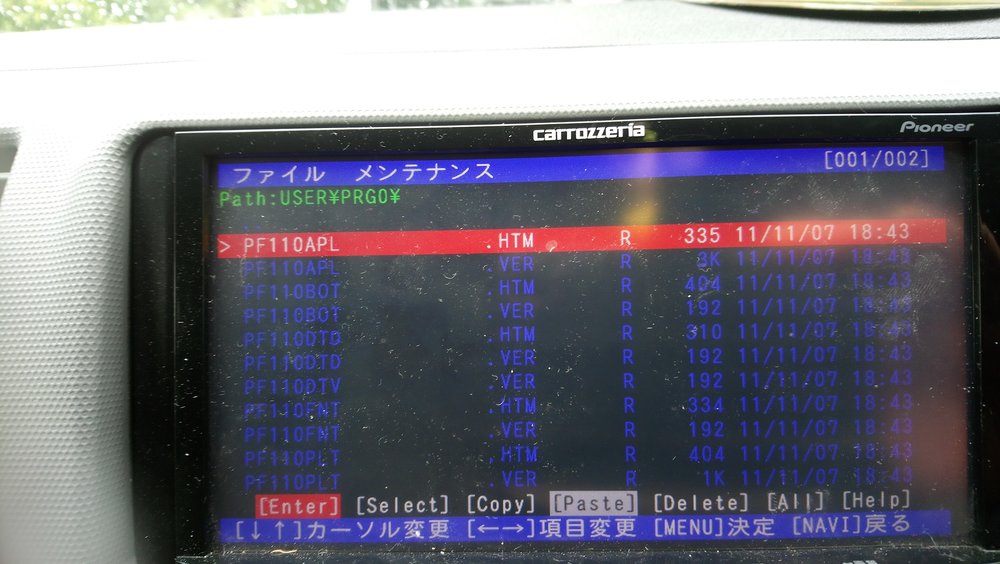
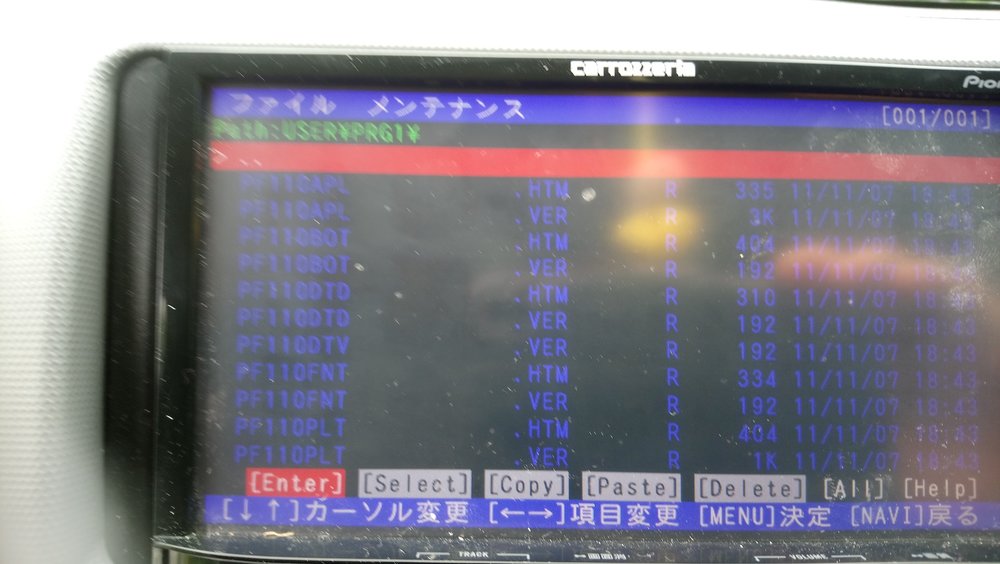
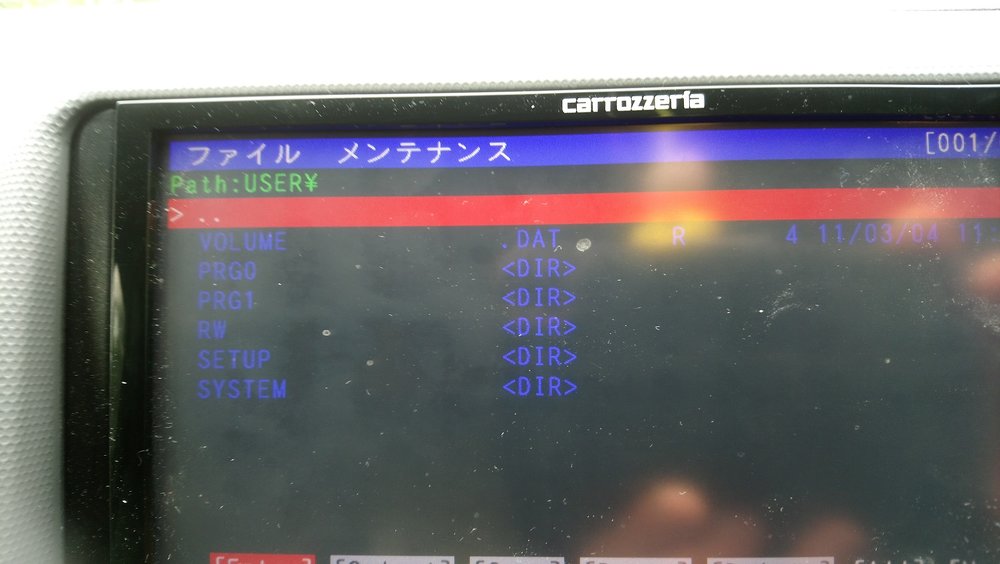
Hi..I have a AVIC-MRZ05 trying to see firstly if the language change you described above for MRZ99 will work for mine. I have got to testmode but am not sure how to back up USER file..could not find reference on here how to do this. next question is I looked in USER and seem to have both PRG0 and PRG1..(I attach some photo's. I also see from other posts that pasting new file may be an issue....If you could help with step by step process on what I need to do that would be great. I have copied the zip file you have link to on SD card already..(though did not seem to show on screen when I put it is SD slot...my be when I am in testmode it will be seen..but not sure how to retrieve it from SD card and paste it on system....If anyone has done this on AVIC-MRZO5 it would be great to know it can be done and step by step process. many thanks 
stereo0.jpg

stereo1.jpg

stereo2.jpg

Many people including me, have already changed MRZ05 to english. You only need to read, understand and apply the procedure carefully.

Posted Mar 10, 2018 · 09:51 UTC#477
On 3/8/2018 at 12:12 PM, javed akhtar said:

After first reboot, remove the sd card and every thing will be normal.

Thanks a lot for your reply @javed akhtar, but I tried it then but still its stuck, as of now I only need the User Data back up files of MRZ-99,so that I can restore it back to normal and then attempt to change it to English. I was wondering if you have it ?

Also can you please tell me which post should I follow and from which post should I try to download the Zip file along with the installer (The plug and play installer ) ? Also I have to update the player through SD card and Dzo said to edit the script, I tried it the first time and changed it to SD instead of Usb but still it didn't work.

Can you please help me regarding this ?


Posted Mar 12, 2018 · 05:24 UTC#478
On 3/10/2018 at 2:51 PM, Shakawat said:

Thanks a lot for your reply @javed akhtar, but I tried it then but still its stuck, as of now I only need the User Data back up files of MRZ-99,so that I can restore it back to normal and then attempt to change it to English. I was wondering if you have it ?

Also can you please tell me which post should I follow and from which post should I try to download the Zip file along with the installer (The plug and play installer ) ? Also I have to update the player through SD card and Dzo said to edit the script, I tried it the first time and changed it to SD instead of Usb but still it didn't work.

Can you please help me regarding this ?


See th pos by http://avic411.com/index.php?/profile/147520-bonanza/  on page 27. You can get the backup from here http://avic411.com/index.php?/profile/140074-konstant22/. the backup is also available here http://avic411.com/index.php?/profile/140397-dzo/.  I advise you to read and understand the whole thread carefully, so that you have enough knowledge of what you are doing. Do you know the meaning of shakawat? Good luck.

Posted Mar 12, 2018 · 05:32 UTC#479
3 minutes ago, javed akhtar said:

See th pos by http://avic411.com/index.php?/profile/147520-bonanza/  on page 27. You can get the backup from here http://avic411.com/index.php?/profile/140074-konstant22/. the backup is also available here http://avic411.com/index.php?/profile/140397-dzo/.  I advise you to read and understand the whole thread carefully, so that you have enough knowledge of what you are doing. Do you know the meaning of shakawat? Good luck.

Thanks a lot @javed akhtar, but I have already solved the problem. My MRZ99 is now English now and I couldn't be any happier all thanks to you guys! 

P.S I used the installer from post number 52 and succeeded, I was wondering whether I can use the same Zip file for MRZ77 ? Or do I need to do anything extra ?  

Posted Mar 13, 2018 · 04:36 UTC#480
22 hours ago, Shakawat said:

Thanks a lot @javed akhtar, but I have already solved the problem. My MRZ99 is now English now and I couldn't be any happier all thanks to you guys! 

P.S I used the installer from post number 52 and succeeded, I was wondering whether I can use the same Zip file for MRZ77 ? Or do I need to do anything extra ?  

You can translate mrz77 easily. In the upper right corner search for mrz77 and you will get the answer. many have already done it. See this 


Posted Mar 15, 2018 · 11:03 UTC#481

I have Avic- MRZ009  can i change language to english  ?


Thanks

Posted Mar 18, 2018 · 14:40 UTC#482

Hi All,

I've messed up! I used DZO's mrz99 usb file to try and change from Japanese to English, on my mrz90 and didn't back up as everyone seems to have updated without a problem.

Now my screen is messed up.20180318_143417.thumb.jpg.f5dbc624ebea0204a4883f97b7aa2b77.jpg20180318_143406.thumb.jpg.4d024c203dd8fba4b3acf78b4d7a03fd.jpg


Can any body help please!!!!

Posted Mar 20, 2018 · 06:48 UTC#483

Anyone with the language change for Mrz05 the firmware reads 1.000000 tried the 1 here but all menus still in japanese

Posted Mar 20, 2018 · 09:30 UTC#484
On 3/18/2018 at 7:40 PM, sanglasmick said:

Hi All,

I've messed up! I used DZO's mrz99 usb file to try and change from Japanese to English, on my mrz90 and didn't back up as everyone seems to have updated without a problem.

Now my screen is messed up.20180318_143417.thumb.jpg.f5dbc624ebea0204a4883f97b7aa2b77.jpg20180318_143406.thumb.jpg.4d024c203dd8fba4b3acf78b4d7a03fd.jpg


Can any body help please!!!!

Put These files to the original location and every thing will be fine.

PF110JPMTB.LNG

PF090JPENG.LNG

PF090JPJPN.LNG

PF110JPENG.LNG

PF110JPJPN.LNG

PF110JPMEN.LNG

Attached Files (6)
Posted Mar 20, 2018 · 09:32 UTC#485
2 hours ago, Farez said:

Anyone with the language change for Mrz05 the firmware reads 1.000000 tried the 1 here but all menus still in japanese

Many people including me, have already changed MRZ05 to english. You only need to read, understand and apply the procedure carefully.

Posted Mar 24, 2018 · 04:36 UTC#486

thanks It works 


Posted Mar 27, 2018 · 20:01 UTC#487

Any one can change MRZ009 language from japan ?

Posted Mar 30, 2018 · 13:33 UTC#488
On 20/03/2018 at 9:30 AM, javed akhtar said:

Put These files to the original location and every thing will be fine.

PF110JPMTB.LNG

PF090JPENG.LNG

PF090JPJPN.LNG

PF110JPENG.LNG

PF110JPJPN.LNG

PF110JPMEN.LNG

Thanks for your reply. Sorry it has taken so long to try this solution.

I downloaded the files and have them on an SD card, but I do not have the copy or paste functions on my unit? See attached picture.


20180330_142405.jpg

Edited Mar 30, 2018 by sanglasmick
Posted Apr 05, 2018 · 05:01 UTC#489

The SD card is stuck inside on an installation loop...

Fixed the problem, I deleted all the files from the sd card

Edited Apr 05, 2018 by Natreve — Reason: Solved issue
Posted Apr 09, 2018 · 14:23 UTC#490

Has anybody had any luck with replacing the map of Japan with any other map? MRZ whatever?

Posted Apr 12, 2018 · 09:00 UTC#491

Hi

In an attempt to change the language using the 2011 version given above this has happened to my screen(refer to the attached screen shots). The language has disappeared completely and blank buttons are left. Need your help in fixing this. I have also attached the contents of the langdata folder.

20180412_134255.jpg

20180412_134148.jpg

20180412_134243.jpg

Posted Apr 12, 2018 · 10:49 UTC#492
1 hour ago, charsicheeta said:

Hi

In an attempt to change the language using the 2011 version given above this has happened to my screen(refer to the attached screen shots). The language has disappeared completely and blank buttons are left. Need your help in fixing this. I have also attached the contents of the langdata folder.

20180412_134255.jpg

20180412_134148.jpg

20180412_134243.jpg

Perhaps you have disturbed the files in the prg0 folder. If you had made the backup then you should restore the original files. if not then try to copy the files from prg1 folder or otherwise. please inform did you delete / copy / paste manually or you used the testmode key? First try to find which folder has been disturbed (PRG0 or PRG1)? Then try to restore from the other folder. The files for MRZ05 can be downloaded from earlier posts, if required.

Posted Apr 12, 2018 · 15:34 UTC#493

Hi Javed

Thank you for your prompt response brother. I did these changes in the prog0 folder and manually deleted the file first and then pasted the new file. I made a mistake i did not take the backup before doing all this. Should i simply just go to prog1 folder and copy any missing files into prog0 ? And that would solve the problem ? Can you share amy links ? 

Posted Apr 13, 2018 · 04:22 UTC#494
12 hours ago, charsicheeta said:

Hi Javed

Thank you for your prompt response brother. I did these changes in the prog0 folder and manually deleted the file first and then pasted the new file. I made a mistake i did not take the backup before doing all this. Should i simply just go to prog1 folder and copy any missing files into prog0 ? And that would solve the problem ? Can you share amy links ? 

Yes, you only need to put the missing files from prg1. That will solve the problem.

Posted Apr 13, 2018 · 08:07 UTC#495

Hi

I just copied the missing files and the japanese language has returned. Still no english.....

Posted Apr 13, 2018 · 10:50 UTC#496

Do any of you managed to play video on mrz05 or mrz02? I tried some youtube explanations but could not manage. 

Experiences kindly needed.

Posted Apr 13, 2018 · 12:44 UTC#497
4 hours ago, charsicheeta said:

Hi

I just copied the missing files and the japanese language has returned. Still no english.....

See my post no page 33

Posted Apr 13, 2018 · 12:45 UTC#498
1 hour ago, Carrozzeria mrz02 & mrz05 said:

Do any of you managed to play video on mrz05 or mrz02? I tried some youtube explanations but could not manage. 

Experiences kindly needed.

copy the mp4 files on sd card, goto av, select video and play only when you are not driving.

Posted Apr 16, 2018 · 17:54 UTC#499
On 30/12/2016 at 6:59 AM, dzo said:

Here's a zip file that should automatically update mrz99, mrz77, mrz09 and mrz07 (and perhaps others).


https://github.com/dzo/mrz99/blob/master/updatemrz99.zip?raw=true


Extract the zip to a usb drive and switch on the AVIC with it plugged in to install.


If you want to use a SD card, edit the script and replace USB\ with SD\ in the copy commands


It also replaces the images so there is almost no Japanese text left. 


My mrz99 has a photo of my family as the background but I'm sure you don't want that in your car so I've replaced it with this:


https://github.com/dzo/mrz99/blob/master/updated/b1853.bmp


Make sure you do a backup before running the script just in case.


could you please upload a new version (with the automatic installer) but for an SDcard? i don't know how to edit the script. please without your familly photo ;) 
my model is mrz05.
thanks in advance 

Edited Apr 17, 2018 by shadowman14 — Reason: edit
Posted Apr 17, 2018 · 13:15 UTC#500

Hello, dear friends.

First of all, I want to sincerely thank DZO for the excellent work. The materials were very useful in practice.
Now i have a big problem with my Carrozeria AVIC-MRZ99, which I can not solve on my own.
I put the English language on the instructions from DZO, read the entire forum branch, but did not find a solution anywhere.
I do not have a bluetooth operation, it does not configure and does not connect to devices.
In the settings menu, the system requires a password change, but all windows are inactive, and I do not know how to change it and make it work (photo in attachments).

As far as I understand, it can be done through the firmware, diagnostic menu or something like that.
It can be a replacement for the file responsible for the bluetooth password.
Nowhere in the settings did I manage to change the password and make BT work.
I'll be glad if you can help me at least somehow.

I hope for your responsiveness and sociability.

Приветствую, друзья.
У меня есть проблема с Carrozeria AVIC-MRZ99, которую я никак не могу решить самостоятельно.
Сначала хочу от всей души поблагодарить DZO за прекрасную работу. Материалы оказались очень полезными на практике.
Я поставил английский язык по инструкции от DZO, прочитал всю ветку, но нигде не нашёл решения своей проблемы.
У меня не работает Блютуз, не настраивается и не подключается к сторонним устройствам.
В меню настроек Bluetooth система требует "смены пароля", но все окна - неактивны, и я не знаю, как его поменять и заставить BT работать (фото во вложениях).
Насколько я понимаю, это можно сделать через программное обеспечение, прошивку, диагностическое меню или что-то подобное.
Может быть заменой файла, отвечающего за текущий пароль блютуза?
Нигде в настройках мне не удалось поменять пароль или сделать что-то другое, что бы заставить Bluetooth работать.
Буду рад, если Вы сможете мне хоть как-нибудь помочь.
Надеюсь на вашу отзывчивость и коммуникабельность.

5ad5ef92a6ca6_BTProblem.thumb.jpg.db361cd8183bce549184c3d2dbcfb659.jpg

Page 20 of 39